You can control Metronome.fm by voice without putting your instrument down. Choose the VOICE button in the display settings, and it appears at the bottom of the screen. Press it (or Shift+Space on a computer) and say "tempo 120" or "start", and it does what you said.

- Press it to start listening, and press it again to stop
Turning speech into text is left to the browser's speech recognition (the Web Speech API). This post is about the next step: turning that text into a metronome command. I started with rules that looked for keywords, but they also reacted to things I said to myself, and they couldn't read two commands given at once. So I switched to asking Jev, a cheap model that only makes judgments, with a separate question for each kind of command, such as tempo and playback.
Keyword rules reacted to talking to myself
At first, I looked for words in the text. If it contained "stop" (ストップ, 止め), stop; if it contained "faster" or "up" (速く, 上げ), raise the BPM; if it contained "tempo" and a number, set that BPM; and a sentence with a single number was also treated as a tempo.
While testing, "店舗を 120" (store 120) also set the BPM to 120. The speech recognizer had misheard テンポ (tempo) as 店舗 (store), and it only worked by chance: the sentence had a single number, so it was treated as a tempo.
Unfortunately, these rules also apply to things you say to yourself while practicing. "あと 5 分だけやろう" (just five more minutes) became tempo 5 (rounded up to the minimum BPM of 40), and "3 回目だ" (that's the third time) became tempo 3. And when you ask for two things at once, like "set the BPM to 130 and play", only one of them gets through.
Splitting the command into axes and asking Jev all at once
Jev returns a probability for each option, given a text and a question. I also use it to route AI requests (Sorting AI requests with Jev to pick the right model).
If "which command is this?" is a single question, Jev can only pick one option, so it can't express two commands given at once. Instead, I ask a separate question for each of tempo, playback and track (this post calls each one an axis), add one more axis for "is this a request to the app, or talking to oneself?", and ask them all in one call.
export const VOICE_CLASSIFIER_QUESTIONS = {
  tempo: {
    type: "choice",
    instructions: "What does it ask to do with the tempo (BPM)?",
    criteria: {
      set: "Set the tempo to a specific number.",
      faster: "Make the tempo faster or higher, by some amount or a little.",
      slower: "Make the tempo slower or lower, by some amount or a little.",
      none: "Does not ask to change the tempo.",
    },
  },
  playback: { /* start, stop, none */ },
  track: { /* next, previous, none */ },
  addressed: {
    type: "choice",
    instructions: "Is this a request to the metronome app?",
    criteria: {
      command: "A request or command to control the metronome (tempo, playback or tracks).",
      chatter: "Not a request to the app: talking to oneself, talking to someone else, counting, filler sounds, noise, or comments about the practice.",
    },
  },
} as const;For "set the BPM to 130 and play", it returns set for tempo, start for playback, none for track and command for whether it's a request.
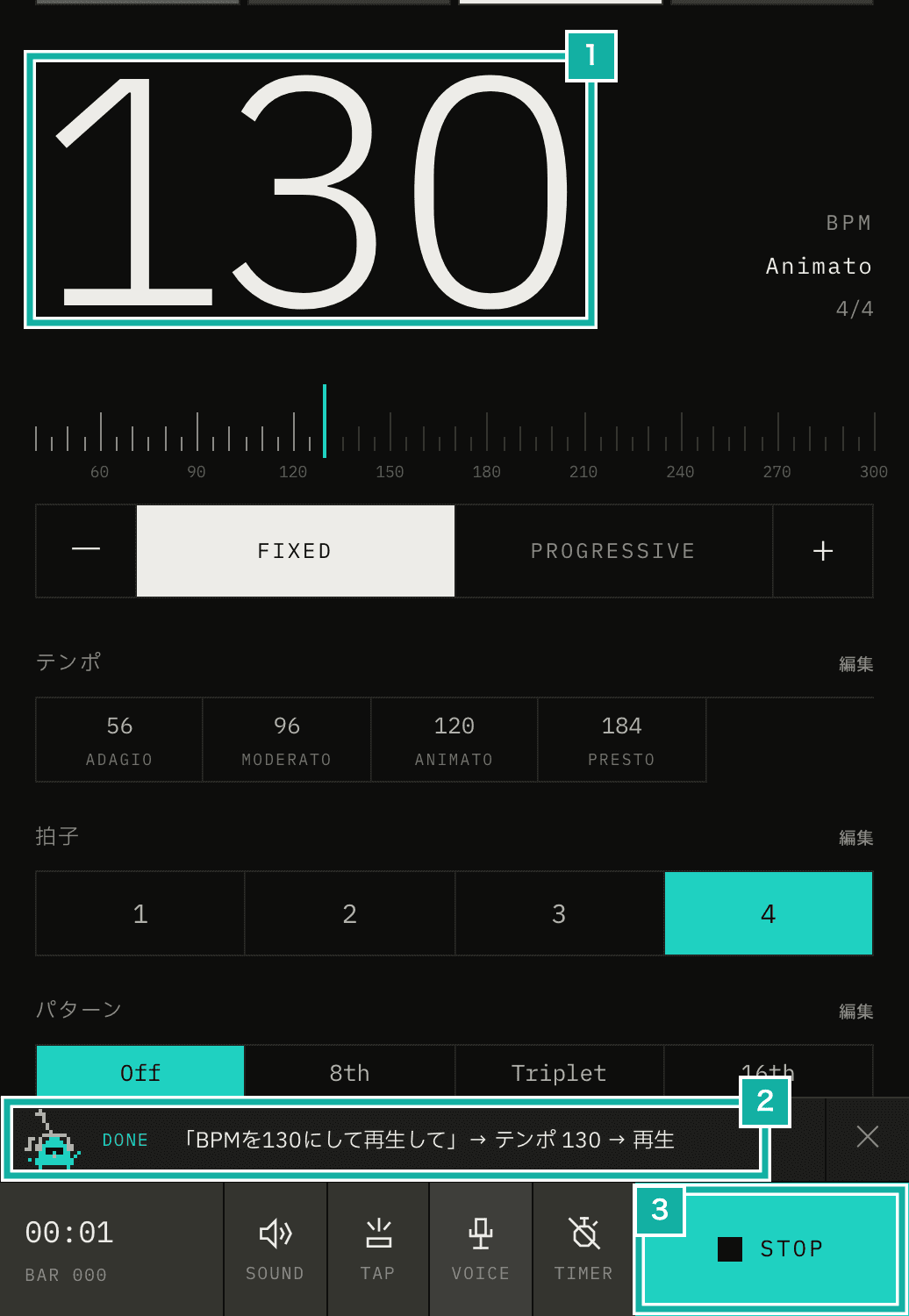
- The BPM changed to 130
- The recognized text, followed by the commands that ran, in order (it closes after a moment)
- Playback started
Jev only returns probabilities for the options, so the numbers themselves are taken from the text by rules. They read Arabic numerals, full-width digits and kanji numerals (百二十, 120). Only when a sentence has two or more numbers (「3 番目の曲をテンポ 90 で」, the third song at tempo 90) do I add one more question that lists the numbers found as its options, and let Jev pick which one is the tempo.
bpm: {
  type: "choice",
  instructions: "Which number is the tempo (BPM) to set?",
  criteria: {
    ...Object.fromEntries(numbers.map((n) => [String(n), `The tempo is ${n}.`])),
    none: "None of the numbers is a tempo to set.",
  },
},Testing with 64 phrasings
Before putting it into the app, I prepared 64 requests someone might actually say and compared Jev's answers with the expected answer for each axis.
Kind | Count | Result |
|---|---|---|
A single command (Japanese and English) | 27 | All correct |
Misrecognitions (「店舗を 120」, 「天保 120 にして」, and so on) | 5 | The 3 mild ones were correct. 「スタッフ」 (for "stop") and 「再生死体」 (for "play") were judged as talking to oneself |
Two commands at once | 6 | All correct |
Two numbers in one sentence | 4 | The tempo number was right in all 4 |
Talking to oneself, conversation, click sounds picked up by speech recognition | 22 | All judged as not a request |
Over three runs, 58, 59 and 60 cases respectively had every axis correct. Nothing said to oneself was judged as a request in any run.
Most of the wrong answers came from sentences said to oneself, and only a command axis was wrong. 「このテンポきついな」 (this tempo is tough) came back with slower (0.91) for tempo, but the request axis judged it as talking to oneself, so nothing happens. A command only runs when the request axis says command, and even then only answers with a probability of 0.7 or higher on each axis are used. That way undecided answers don't run, like the playback axis for 「BPM 120 で 2 小節後に」 (BPM 120, two bars later), where start was 0.38.
One judgment took about 0.3 seconds (median). Only the first few calls took about a second.
Stop words and short requests don't wait for Jev
Waiting 0.3 seconds after saying "stop" is too long. Speech recognition also returns interim results before you finish speaking. If a stop word (ストップ, 止め and so on) shows up in one of them, the metronome stops right away before the text goes to Jev, and only the rest of the request runs on Jev's answer.
Short requests like "start", "next song" or "set the tempo to 120" don't wait for Jev either. Jev is there to handle two commands given at once and to tell talking-to-myself apart, and a short request in a fixed form can't be read any other way. Rules check whether the whole utterance is just one of these fixed phrases, and if it is, it runs right away.
Multiple commands run in the order stop, tempo, track, play. That way "set it to 130 and play" plays at 130 from the very first beat.
Falling back to the rules when Jev isn't available
Jev is called from the server. When offline, over the limit on Jev calls (see the next paragraph), or when the request fails, the browser falls back to the rules alone. Voice control itself keeps working.
One judgment costs about $0.00002, so it doesn't count toward plan limits. As a guard against abuse, each listening session counts once, with a limit of 200 per user per hour and 20,000 per day for the whole app (about $0.4). The limit check happens when listening starts and finishes while you're still speaking. That way it doesn't add to the wait for Jev's answer after you finish.
Chrome delivers the same result more than once
Right after I started testing, saying 「再生して」 (play) once showed the "Play" notice about five times. Even when set to stop after one result (continuous set to false), Chrome sometimes delivers the same final result again and again (onresult is called more than once). Now the code remembers the index of each result it receives and skips ones it has already seen.
Listening ends after one request
I also changed how listening works. At first, it listened only while the button was held down. If you're used to voice input on a phone, holding the button down is a chore, so now one tap starts listening, and listening ends once you've finished one request. If what you said can't be read as a command, it doesn't keep listening; it stops and shows at the bottom of the screen that nothing matched. If you say nothing, it stops after 4 seconds.
I'm also building a wake word, "Hey Friko" (Friko is the Metronome.fm mascot), so you can start without pressing the button (for now it's only in browsers on a computer, and you turn it on from the app menu). Training the model that recognizes it on the device is covered in Training my own model to recognize "Hey Friko", and running it in the browser in Running the "Hey Friko" wake word model in the browser without freezing the page.