Metronome.fm has a feature called "Ask AI to edit settings". You describe a change in words, such as "raise the tempo by 10", and the AI rewrites the current metronome settings.
When we replaced Gemini with OpenAI's gpt-5-mini, we noticed that the requests we receive are of different kinds. Some ask for a small change to the current settings. Others ask the AI to build something from scratch, such as "a funk groove with a busy, moving bass line" (besides clicks, Metronome.fm can also play a bass note on each beat). Some have nothing to do with the metronome.
If one model handles everything, a cheap model gives weak results for requests to build something from scratch, and an expensive model charges a high price even for simple edits. So we first sort the requests with a cheap model that only makes judgments, and then use a different model for each kind of request. This post covers how we sort requests, what we found when comparing models, and how we keep costs down.
Four kinds of requests
We sort incoming requests into four kinds.
- Edit: a change to the current settings. "Raise the tempo by 10", "click only on beats 2 and 4", "transpose up one key"
- Create: a request by mood or genre. "A cool rock ballad with bass", "a funky 16-beat"
- Song: a request that names an existing song, like "something like ..."
- Unrelated: text that has nothing to do with the metronome settings. "What's the weather today?", "Hello"
For edits, it is enough to rewrite the current values correctly. For create and song requests, the quality depends on how well the model writes rhythms and bass lines.
Classifying requests with Jev
We use Jev from TypeSafe AI to classify requests. It does not generate text. Given some text and a question, it returns a probability for each option. It costs $0.042 per million input tokens, and output is free.
All our AI calls go through Cloudflare AI Gateway, and we pay for them from our Cloudflare credits. Jev can be called there too. We ask a single question whose answer is one of four options (choice), and describe each kind in English.
export const createClassifierInput = (request: string) => ({
  state: `A user typed this request into the "edit settings with AI" box of a metronome app:\n${request}`,
  questions: {
    kind: {
      type: "choice",
      instructions: "What kind of input is this?",
      criteria: {
        edit: "Asks to change the metronome's settings: tempo (BPM), time signature, ...",
        create: "Describes a mood, genre or style of rhythm to build from scratch ...",
        song: "Asks for something like a specific existing song or artist's song ...",
        unrelated: "Not a request about metronome settings or rhythm at all: nonsense, ...",
      },
    },
  },
});It returns probabilities such as { edit: 0.97, create: 0.03, song: 0, unrelated: 0 }. One classification used 517 tokens on average, cost about $0.00002 and returned in about 0.35 seconds.
Jev is designed for English, so we first checked whether it can sort requests written in Japanese. We sent 32 requests (12 edit, 6 create, 5 song and 9 unrelated). For 30 of them, the most likely option matched the answer we had assigned. The two misses were a create request, "something intense for practicing fast playing", and a song request that named a song with "at the tempo of ...". Both were classified as edits. Changing the order of the options did not change the results.
Unrelated requests get a prompt to rephrase, without using a request
This feature has a monthly limit on requests for each plan. Using up one request on unrelated text is a loss for the user.
So if Jev's probability for "unrelated" is 0.9 or higher, we do not call the model or use a request. Instead, we return a message asking the user to rephrase. Among the 32 requests, all 9 unrelated ones scored 0.99 or higher. The highest "unrelated" score among related requests was 0.23, for "a gentle practice menu for beginners".
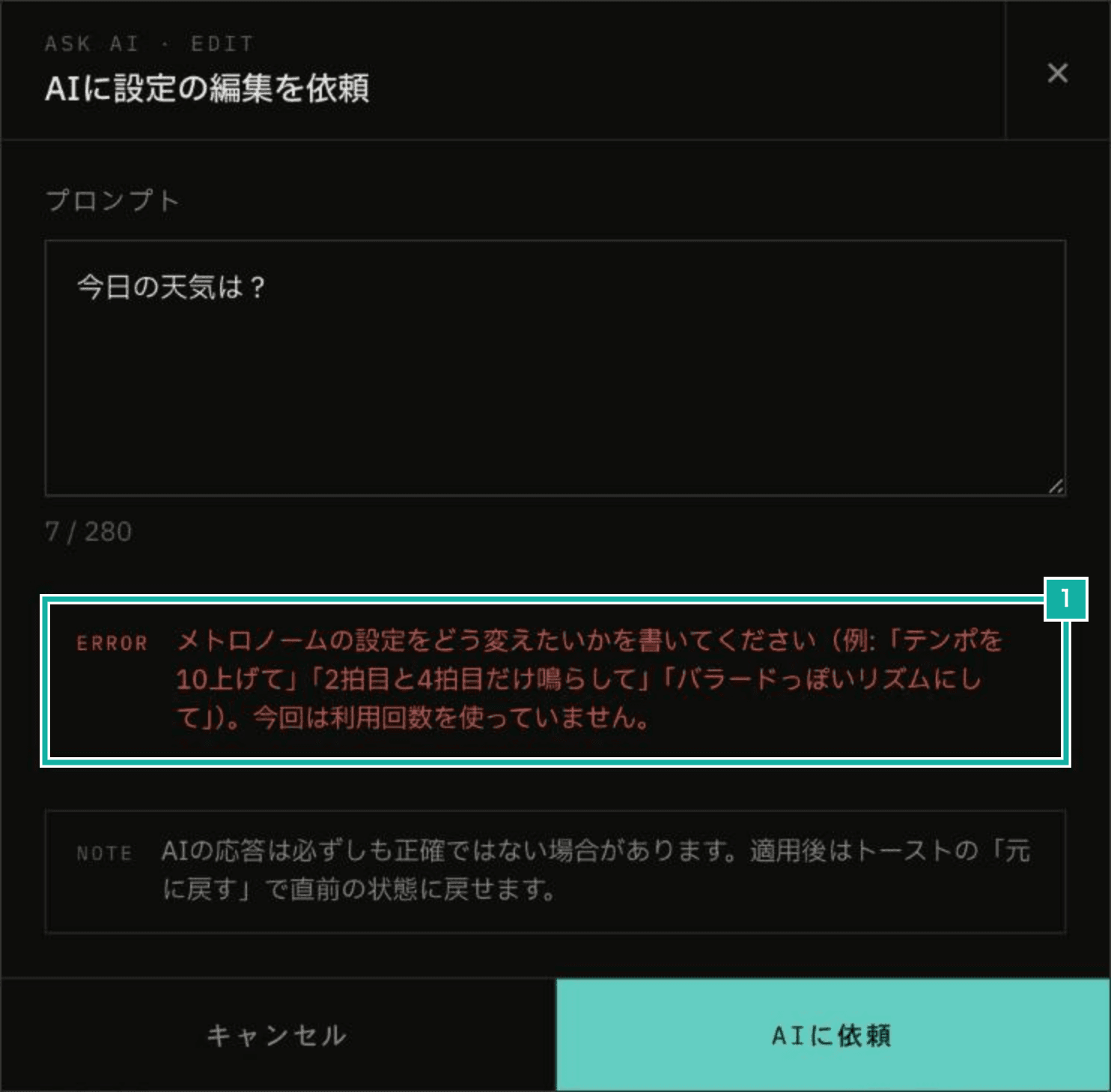
- Asks the user to rephrase and says the request did not count toward the usage
We set the threshold as high as 0.9 because Jev has been reported to give high probabilities even when it is unsure. If we reject a related request, the user cannot use the feature. If we let an unrelated request through, the model only replies that it cannot change the settings. The two mistakes hurt very differently, so we reject only when the probability is very high.
Classification happens before a request is counted, so without a limit, someone could send requests over and over and run up the cost of classification alone. So each user can be classified up to 30 times an hour. Beyond that, we skip classification and follow the normal flow (count the request and pass it to gpt-5-mini). We do the same when classification fails, so that the classifier never makes the feature unusable.
Only create and song requests go to Claude Sonnet 5.5
To choose a model, we prepared five create requests (a multi-track funk, a rock ballad, bossa nova, a 6/8 rock ballad and a basic 8-beat on drums) and tried them with four combinations of model and setting. "Reasoning low" and "effort low" both set how much the model thinks before answering; OpenAI and Anthropic just name the setting differently.
Model | Average time | Cost per request | Output tokens | Returned in a form the app can read |
|---|---|---|---|---|
gpt-5-mini (reasoning low) | 14.3 s | $0.0042 | 1,589 | 5/5 |
Claude Sonnet 5.5 (effort low) | 4.9 s | $0.0195 | 503 | 5/5 |
Claude Sonnet 5.5 (effort medium) | 6.9 s | $0.0218 | 732 | 4/5 |
Claude Opus 5.5 (effort medium) | 15.8 s | $0.0538 | 1,240 | 5/5 |
We loaded the results into the app and compared them by ear. Sonnet 5.5 did better than we expected with both effort low and effort medium.
Sonnet 5.5 with effort low returned in a third of the time of gpt-5-mini. It costs about 4.6 times as much as gpt-5-mini, but about a third of Opus 5.5. With effort medium, it wrote a pattern past the end of the bar for the 6/8 request, so we chose low.
Edits that only change the current settings, on the other hand, worked well with gpt-5-mini. It passed all 25 edit requests we test with (tempo, transposition, time signatures, adding bass notes and more). We send a request to Sonnet 5.5 only when Jev's most likely option is "create" or "song", and keep gpt-5-mini for everything else.
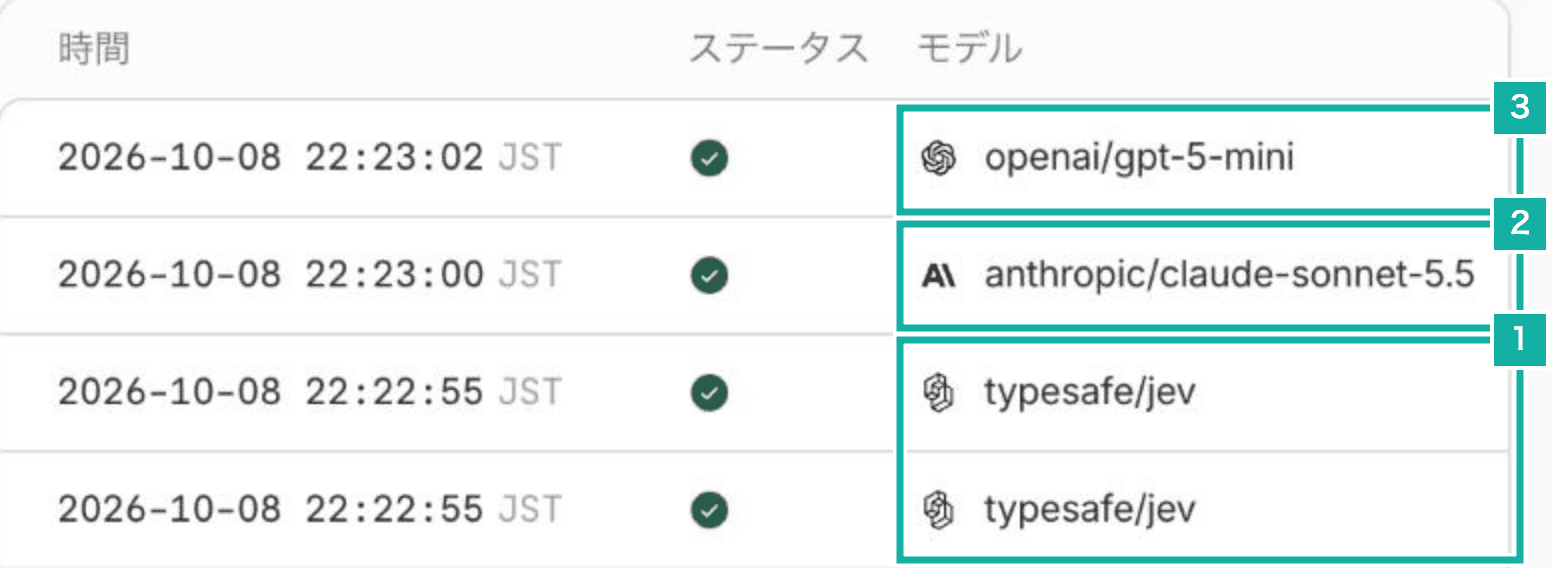
- Each of the two requests is classified with Jev
- The create request (a rock ballad) goes to Claude Sonnet 5.5
- The edit request (raising the tempo) goes to gpt-5-mini
After adding the routing, we tried 29 requests of all four kinds three times each, and all 87 runs passed. A run passes when the requested change shows up in the settings and the settings are in a form the app can read. Twelve runs went to Sonnet 5.5, taking 6.0 seconds on average.
Capping the cost
Sonnet 5.5 costs $0.02 to $0.04 per request. If someone sends large numbers of create requests, the cost adds up.
So we added an app-wide limit of 300 Sonnet 5.5 calls a day. Pro users and everyone else are counted separately, and once the limit is reached, requests go to gpt-5-mini instead of being stopped. Even under abuse, the Sonnet 5.5 cost stops at around $25 a day (300 calls × 2 × about $0.04).
export const shouldUseCreativeModel = async (
  kind: string | null,
  tier: PlanTier,
): Promise<boolean> => {
  if (kind !== "create" && kind !== "song") return false;
  try {
    const { success } = await getDailyGlobalCreativeAiRatelimit().limit(
      tier === "pro" ? "pro" : "free",
    );
    return success;
  } catch (error) {
    logServerWarning("Creative AI limit check failed", error);
    return false;
  }
};If one user uses up the Pro monthly limit of 50 requests, the measured cost per request gives roughly the following.
Usage | Monthly cost (estimate) |
|---|---|
All gpt-5-mini | About $0.2 |
All Sonnet 5.5 | About $1.0 to $1.3 |
Routed (if 30% of requests are create or song requests) | About $0.4 |
Routing costs about a third of sending everything to Sonnet 5.5.
Models we passed on
- Claude Opus 5.5: about 2.8 times the cost of Sonnet 5.5, and more than three times slower
- Claude Haiku 5.5: a twentieth of the price of Sonnet 5.5. But it had just been released, and when we tried it, Cloudflare's credit billing did not support it yet. It works if you register your own Anthropic API key with Cloudflare, but then billing is separate from the credits, so we passed
- DeepSeek: cheap, but through Cloudflare it only works if you register your own API key, and the data is stored in China, so we passed
Keeping an eye on classification and quality with tests
Through Cloudflare, we cannot pin a version of Jev. Only the model name typesafe/jev is accepted, and it is replaced by the latest version. So we keep a script that tests the classification (pnpm run eval:ai-classify) and use it from time to time to check that the rejection threshold still fits.
We also check the quality of edits with a script that tries the 29 requests with the same routing as in production (pnpm run eval:ai-edit -- --route). When we change the prompt or the descriptions of the settings fields that are passed to the model, we compare the number of passing runs before and after. One run costs about $0.4.