v2.74
Profile pages are here, and Friko has a new look
We added a profile page at /app/@username with a space tank where Friko swims and the practice records you choose to share. Friko's look and title at each level have also been redrawn.
October 31, 2026
The app in this version
Changes
- Below the tank on your profile (/app/@username) are your profile image, username, and a bio you write on the Profile tab in account settings. Others see your bio only while your profile is public.
- Below that are the same sections as your statistics: level, week streak and milestones, total and this week's time, this week's practice, and the practice calendar. Time per setting, your weekly goal, and quests are never shown.
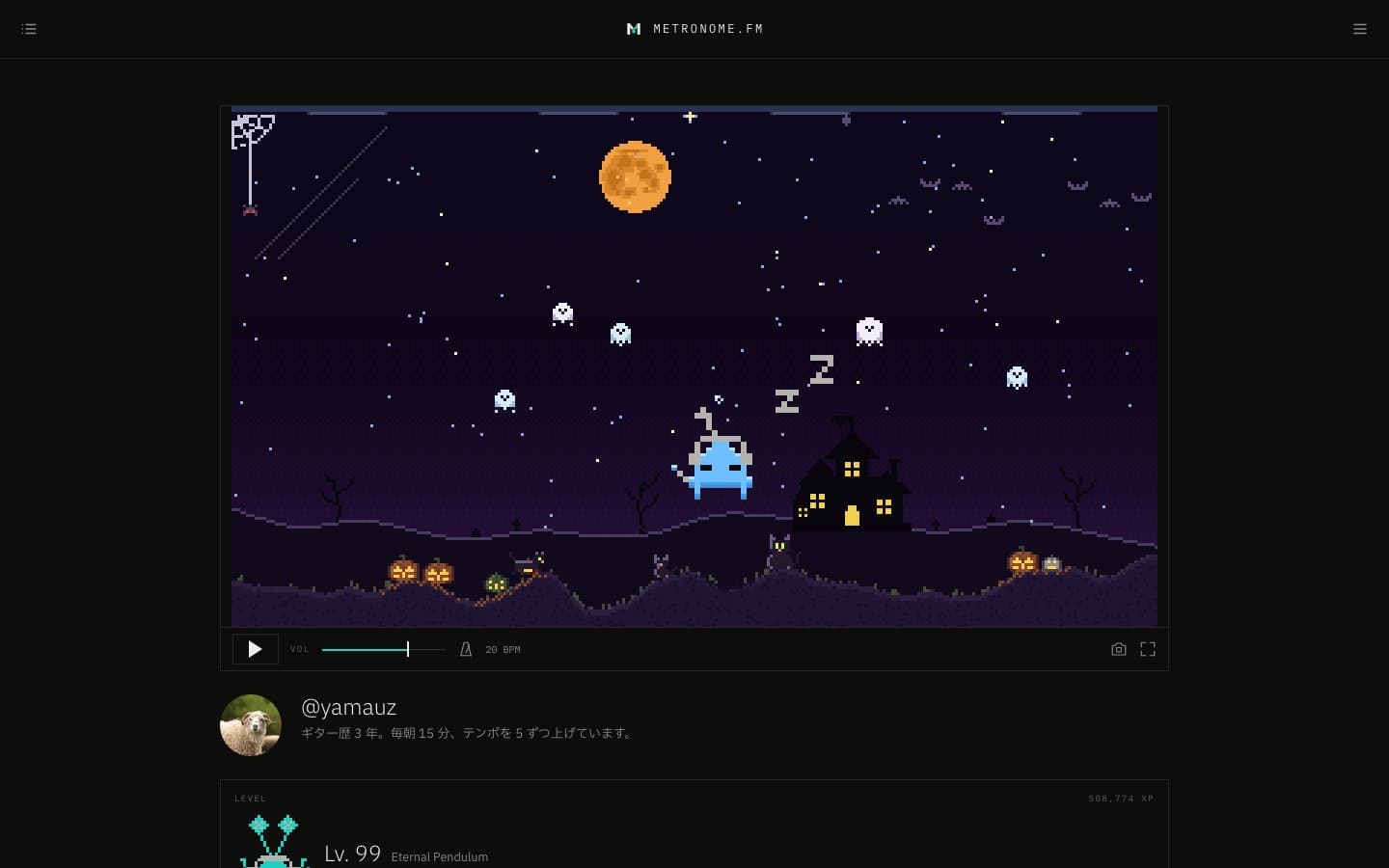
- Your profile now has a tank floating in space where Friko swims. Day and night follow the viewer's clock. Everyone sees the same tank.
- Pick a theme for the tank to change the sky colors, the sun and moon, and the weather along with the ground: gravel, grass, rock, ice, desert, and Garden, a Japanese garden you buy with M coins. Use Randomize or Flatten to remake the ground.
- In Garden, the snow on the borrowed view of Mt. Fuji deepens and fades with the seasons, and cherry petals in spring, fireflies on summer nights, autumn leaves, and winter snow drift through the tank. We also added a Halloween theme you buy with M coins: under a purple sky, a haunted house, dead trees, and gravestones stand on the hill, the windows light up at night, and an orange full moon rises.
- Koi are now a tank decoration. Buy the first one for 600 M coins (with a preview before you buy) to place them. Tap one to switch between Kohaku, Taisho Sanke, and Yamabuki Ogon, and drag it up or down to change its size. They swim just above the ground, cruising, suddenly darting, drifting to a stop, and turning around.
- Added two landmark decorations to the tank: a five-story pagoda and a Great Buddha. Unlock them with M coins from the Landmarks category in the catalog, and drag them sideways to move them. Tap the pagoda to switch its finish (plain wood, vermilion, or copper roofs) and the Great Buddha to switch between bronze, gold, and stone. The pagoda's wind bells sway when the wind blows and its doors light up at night, and incense smoke rises from the burner in front of the Great Buddha. Drag either one up or down to make it large, medium, or small.
- Added six Halloween decorations: jack-o'-lanterns, ghosts, bats, witches, black cats, and a spider. They work with any theme, and you choose how many of each to place. Drag pumpkins, ghosts, and black cats up or down to make them large, medium, or small, and black cats walk along the ground.
- Use Edit tank on your own profile to pick flowers, jellyfish, shooting stars, and other decorations from a catalog and place them in your tank. Besides the starting flowers, bubble vents, jellyfish, and crabs, each decoration is unlocked by buying the first one with M coins, regardless of your practice level. Choose how many to show with a slider, drag flowers and crystals to move where they grow, drag a flower up or down to change its height, and tap a flower to change its color. You can also pick the tank Friko's form (any level you've reached) and color. M coins for decorations build up just by logging in, and faster when you practice and finish quests. Turn off Friko's switch to hide it from the tank. While editing, tap Friko in the tank to cycle through the six colors.
- Use the camera button in the bar under the tank to capture the tank as it is right now. You can save the image, and if your profile is public, create a share link for each capture to post on social media. Each capture gets its own link, so the link card always shows the tank you captured.
- Display settings now let you choose what goes behind the metronome screen: None, Image, or Tank. Tank fills the screen with the tank from your profile.
- Make my profile and timeline public on the Profile tab in account settings makes your profile and practice timeline public together. They start private, and while they're private, others only see your avatar, username, and a note that it's private. If your practice timeline was public, your profile stays public too. Turn off Show my practice activity under Advanced to hide the same sections as your statistics. Progress toward the next level is shown only to you.
- The LEVEL section in your statistics now has a View profile link.
- Friko has been redrawn. Its body grows and evolves every five levels, and in between it puts on one item at a time, such as an instrument or a hat. When it evolves, it takes off what it was wearing and shows its new form. The title at each level has been renamed to match.
- The bell notifications at the top right now also list the M coins you receive (daily login rewards, level-ups, milestones, and weekly quests). Each notification shows an icon for its type (SYNC room, forum, M coins, and so on) instead of a person's avatar, and unread ones are marked with a line on the left edge. The × button on notifications is gone, and the list loads more as you scroll to the bottom. The number on the bell counts only what arrived since you last opened it and clears when you open it (each notification stays unread until you press it). Notifications are removed after 90 days. Account settings now has a Notifications tab where you choose which types of notifications to receive. You can also open it from the gear at the top right of the bell list.
- Fixed the SYNC room list closing right after opening when you pressed an invite notification outside the app (on your profile, in the docs, and so on). It now opens after moving to the app.