The metronome can now count the beats out loud: "one, two, three, four" in English, or "ichi, ni, san, shi" in Japanese. Layered on the click, it tells you which beat you are on without looking at the screen. You can also count with the voice alone, without the click.
The voice comes from audio files made in advance with TTS (text-to-speech), which the app plays. While making them, I ran into two problems: the intonation was all over the place from one number to the next, and some numbers sounded late against the beat. After the setting and how the voice is played, this post covers how I chose a TTS and how I fixed both problems.
The setting
Pressing SOUND in the bar at the bottom of the screen opens the audio settings, and that is where the new Voice count field is. You choose Off, Click+voice, or Voice only, and when counting is on, you also pick the voice language (English or Japanese).
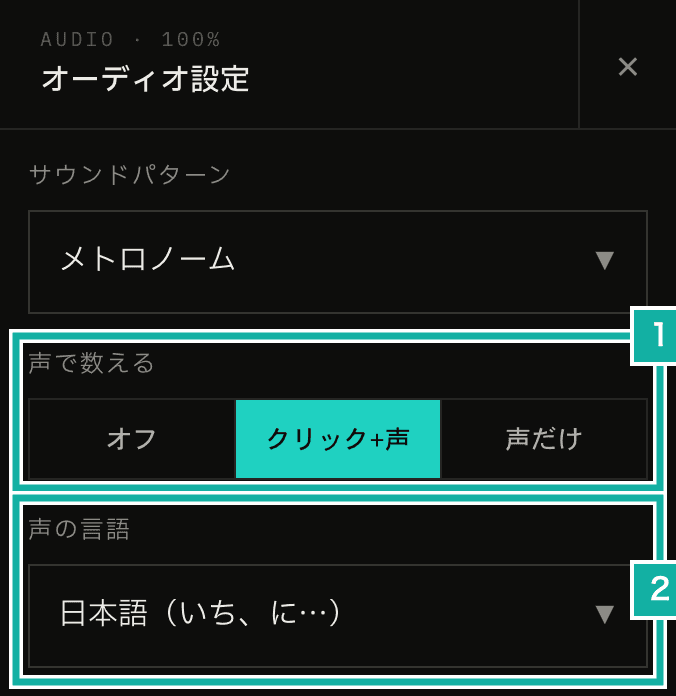
- Voice count. Choose whether to layer the voice on the click or to use the voice instead of the click
- Voice language. The first time you turn counting on, it is set to the display language
When I started building it, I had two controls: a select for the language (Off, English, Japanese) and a separate "Voice instead of click" switch. But Voice only is really a choice of the click's sound: a voice instead of a click. As a separate switch, the settings for how the beat sounds ended up in two places. So I combined them into one three-way choice for how to count, with the language picked below it.
I also considered making the voice one of the sound patterns, where you choose the click's sound. That would have made it impossible to layer the voice on the click, though. The click has a sharp attack and marks the beat precisely. The voice, on the other hand, has a softer attack because of its consonants (more on this later). Taking the timing from the click and the beat number from the voice seemed the most useful, so the voice is a separate setting from the sound pattern.
Voice only removes just the click at the start of each beat. The guide notes (the eighth or sixteenth subdivisions) and the base notes, a low tone layered on the click, still play. Muted beats are not counted.
Under Advanced in the audio settings, you can also set the voice volume and which channel the voice plays on.
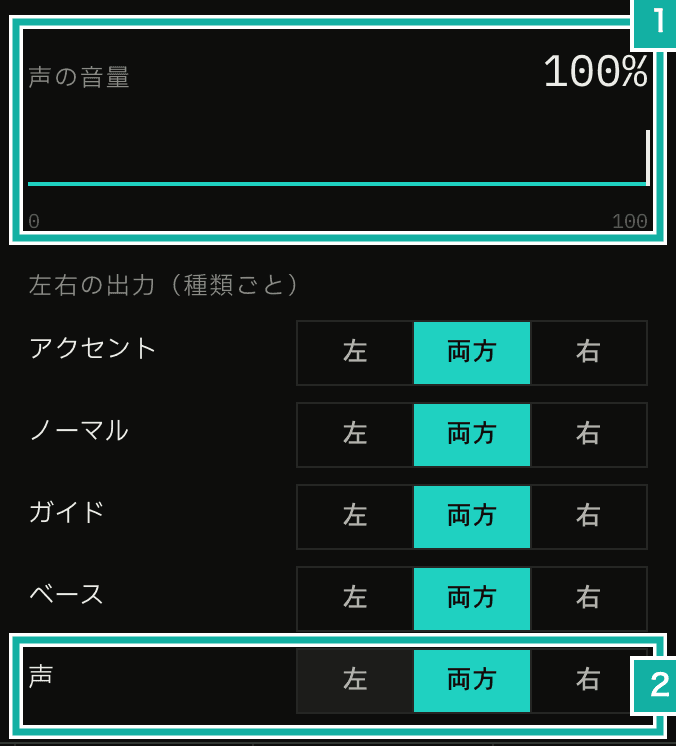
- Voice volume
- Which channel the voice plays on
Playing the voice from audio files in the AudioWorklet, like the click
Browsers have speechSynthesis (the Web Speech API), which is enough if all you want is to read text aloud. But the delay before it starts speaking varies by device and voice, so it cannot be lined up with the beat. Instead, I made the spoken counts from 1 to 16 into MP3 files in advance and play them in the AudioWorklet just like the click samples. How the files were made starts in the next section.
Larger numbers take longer to say. Japanese 11 ("juuichi") lasts 0.47 seconds, and at fast tempos it runs into the next beat's voice. So when the next voice starts, the previous one is cut with a 15 ms fade.
// Cut voices that started before the new one, with a short fade at the new voice's start
export const chokeVoiceCounts = (
  voices: Voice[],
  incoming: Voice[],
): Voice[] => {
  const starts = incoming
    .filter((voice) => voice.isVoiceCount)
    .map((voice) => voice.startTime);
  if (starts.length === 0) return voices;
  return voices.map((voice) => {
    if (!voice.isVoiceCount) return voice;
    const cutAt = Math.min(
      ...starts.filter((start) => start > voice.startTime),
    );
    if (!Number.isFinite(cutAt) || cutAt >= voice.endTime) return voice;
    const fadeStart = Math.max(
      voice.startTime,
      cutAt - VOICE_COUNT_CHOKE_SECONDS,
    );
    return {
      ...voice,
      endTime: cutAt,
      envelopes: [
        ...voice.envelopes,
        [
          { time: fadeStart, value: 1, curve: "set" },
          { time: cutAt, value: 0, curve: "smooth" },
        ],
      ],
    };
  });
};MP3 export, which saves the metronome's sound as an MP3 file, includes the voice, cut the same way.
Choosing a TTS
To save the work of recording a voice, I decided to make it with TTS. The app's AI features are called through Cloudflare AI Gateway. They are paid from Cloudflare credits (Unified Billing), and I don't hold API keys for each provider such as OpenAI. So for TTS, too, I started with what I could use through the gateway and pay for with the credits.
My first choice was OpenAI's TTS (/audio/speech). The chat models work through Unified Billing, but the audio API was rejected with a 401 saying no API key was provided. It seems Unified Billing can't be used to pay for TTS.
Next I tried the TTS models on Workers AI. Deepgram's Aura-2 worked for English. The only model that speaks Japanese was MeloTTS, and its Japanese came out garbled and unusable.
Finally I tried Gemini 3.8 Flash TTS (gemini-3.8-flash-tts), which became generally available in September 2026. Through the gateway, the text models worked but the TTS model was rejected with a 403, so I issued an API key in Google AI Studio and call Google directly. The free tier allows 3 requests a minute and 10 a day, which wasn't enough once I counted the retries, so I enabled billing. The voice only has to be made once with the generation script, so the app never calls the TTS while you use it.
Generating one word at a time made the intonation inconsistent
At first I sent the words to the TTS one by one: "ichi", "ni", and so on. Every word was read correctly, but played in a row the intonation was awful, with the pitch and tone changing from number to number.
Given a single word, the TTS seems to decide from scratch, each time, how to say one word on its own. My guess is that this keeps the tone from settling the way it does when a person counts in one continuous flow.
So I changed it to read 1 to 16 in one take and split the recording at the silences. The style instruction says to count like a workout or exercise call, saying every number short and clipped at the same pitch, tone, and strength, with the same pause between numbers. I also matched the Japanese readings to how exercise counts are called: "shi" for 4, "shichi" for 7, and "ku" for 9. The voice is Zephyr, one Gemini describes as bright.
{
  "model": "gemini-3.8-flash-tts",
  "input": [
    {
      "type": "user_input",
      "content": [
        {
          "type": "text",
          "text": "いち、に、さん、し、ご、ろく、しち、はち、く、じゅう、…、じゅうろく",
          "annotations": [
            {
              "type": "speech_metadata",
              "style": "体操やトレーニングの掛け声。明るく元気に、一定のテンポで数を数える。…"
            }
          ]
        }
      ]
    }
  ],
  "response_format": { "type": "audio" },
  "generation_config": { "speech_config": [{ "voice": "Zephyr" }] }
}The recording that comes back has about 0.3 to 0.8 seconds of silence between numbers.

Within a word there are also short breaks of about 0.1 seconds before a consonant, as in "i|chi" and "ro|ku". So only silences of 0.25 seconds or longer count as boundaries, and the take is regenerated if it doesn't split into 16.
The volume isn't evened out per word. Instead, the whole take is turned up or down together, based on its loudest point (the peak). Evening out each word would flatten the natural rise and fall of reading them in a row.
Checking with transcription
Each split word is transcribed with Whisper on Workers AI to check by machine that it sounds like the intended number.
Whisper's hallucinations got in the way here. Given only a 0.2-second clip like "go" or "ku", it came back with "ご視聴ありがとうございました" ("thank you for watching"). That is a stock phrase Whisper is known to return for almost silent input. Padding the clip with 0.5 seconds of silence on each side made it go away.
The words that still failed had been transcribed as a different word with the same sound: "juushi" (14) as 重視 ("emphasis"), "go" (5) as "GO!", "shi" (4) as "C", and so on. The sound was right, so I added those spellings to the list of accepted transcriptions for each word in the generation script.
Consonants made the voice sound late
When I listened to the finished voice, "san" (3) alone sounded late against the beat.
Each file has its leading silence trimmed so that the sound starts on the beat. But "san" begins with a quiet "s" hiss that lasts about 100 ms before the vowel "a". The ear takes the vowel as the beat, so the word sounded late by that much. Measuring the time at which the level first comes within 20 dB of the peak (-20 dB), the other words were at 0 to 30 ms, and "san" alone was at 110 ms.
So I kept at most 30 ms of consonant before the vowel, cutting anything earlier and fading in over 5 ms. A fricative is close to steady noise, so cutting its front still joins smoothly with the remaining 30 ms and the fade.
That fixed "san", but then "shi" (4) sounded late. The "sh" in "shi" is stronger than "s", about as loud as the vowel. Measured on the full signal, the consonant alone crossed the -20 dB threshold, so the word looked fine.
Vowels carry their energy below 1 kHz, while fricatives and breath noise sit higher. So I measured the onset again on the signal low-passed at 1 kHz to find where the vowel starts.
// Vowel onset: where the 5 ms RMS of the signal below 1 kHz first reaches -20 dB below its peak
const pcm = execFileSync("ffmpeg", [
  "-i",
  file,
  "-af",
  "lowpass=f=1000,lowpass=f=1000",
  "-f",
  "s16le",
  "-ac",
  "1",
  "-ar",
  "44100",
  "-",
]);The new measurement turned up more late words. All of them start with an "s" or "sh" fricative or a breathy "t".
Word | Vowel onset (before the fix) |
|---|---|
six | 150 ms |
seven | 160 ms |
shi (4) | 110 ms |
shichi (7) | 100 ms |
sixteen | 75 ms |
two, twelve | 65 ms |
ten | 55 ms |
I trimmed their consonants to 30 ms as well, bringing the vowel onset of all 32 words (1 to 16 in both English and Japanese) within 0 to 30 ms.
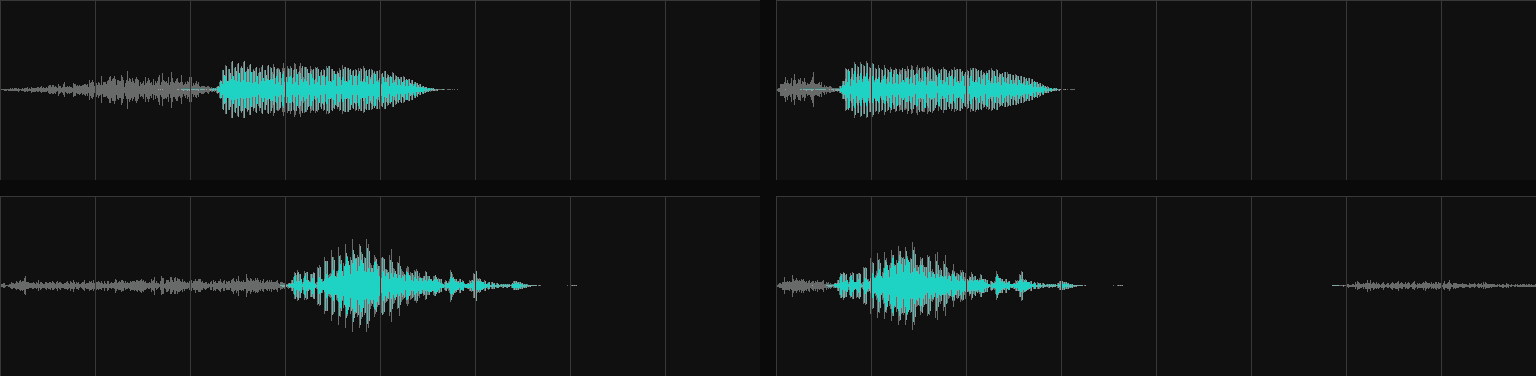
Gray is the full signal, teal is the part below 1 kHz, and the grid lines are 50 ms apart. Before the fix, the gray consonant ran on alone before the teal vowel began. After the fix, the vowel starts before the first grid line (50 ms) in both. Listening side by side, the lag is much smaller.