You can control Metronome.fm by voice, but until now you could only ask for the tempo, start, stop and switching tracks. Changing the time signature, adding a count-in or opening the tuner still meant putting your instrument down and touching the screen. So I added 39 new commands you can ask for by voice.
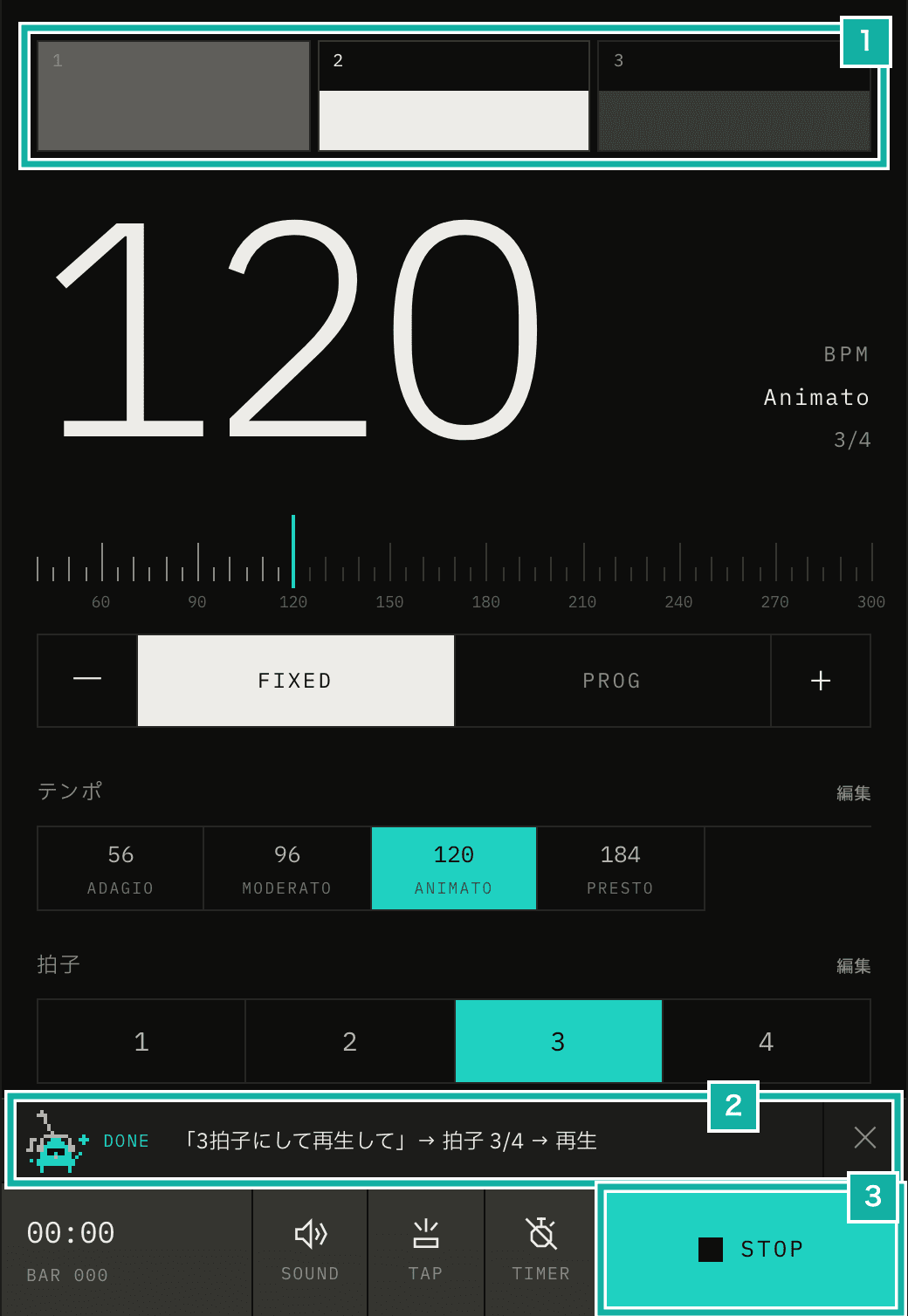
- The beat meter now has 3 beats
- What was heard, and the commands that ran, in order
- Playback started after the time signature changed
Requests are turned into commands by Jev, a cheap model that only makes judgments. Jev doesn't write text. Given a sentence and a question with options, it returns how likely each option is. The app only uses answers with a probability of 0.7 or more. Short, fixed requests like "start" and "stop" are decided inside the app without waiting for Jev.
In the previous post (Turning voice requests into commands with Jev, while ignoring talk during practice), I asked four questions in one call: tempo, playback, track, and whether it's a request to the app at all. From here on I call each of these questions an "axis". Adding a "should it do this command?" axis for every new command would mean more than 40 axes. This post covers how I added commands while adding almost no axes, and how I fixed what went wrong in testing.
One question for "which command?"
First I put every command, including the existing ones, into the options of a single question (about 50 options) and had Jev pick one. 46 of 51 phrasings came back right, so classifying the command itself works well. But it mistook things you say to yourself during practice, like "five more minutes", for the timer command (a probability of 0.95; numbers in parentheses below are the probabilities Jev returned). Also, a single question can only pick one of two commands asked at once. That was the reason for splitting into axes in the previous post.
So I kept the four axes and added just one axis (action) that picks "which other command is it?". Keeping things you say to yourself from running as commands is still the job of the "is this a request to the app?" axis.
export const VOICE_ACTION_CRITERIA = {
  mute: "Mute or unmute the sound of the metronome.",
  tuner: "Open or close the tuner (to tune an instrument).",
  timeSignature: "Change the time signature (meter), like 3/4, 4/4 or 6/8.",
  sound: "Change the click sound, like wood block, beep or cowbell.",
  countIn: "Change the count-in (bars that are counted before starting).",
  // ...34 more
  none: "None of the above, or not a request.",
} as const;For "switch to 3/4 and start", the playback axis returns start and action returns timeSignature. Commands run in the order stop → tempo → track → other commands → start, so playback is in 3/4 from the very first beat.
Asking every value question every time
The value also has to be decided: 3/4 or 6/8 for the time signature, which sound for the click. Jev only picks options and can't pull values out of text, so each value gets a question whose options are the candidates, and Jev picks one. The on/off question, which picks between "turn it on", "turn it off" and "neither is clear", is one of these value questions too.
Asking for the value after seeing the action answer would take two calls. Asking every value question every time keeps it to one call, but adds more questions. So I measured whether the number of questions changes the wait.
Questions | Wait (median) |
|---|---|
5 | 262ms |
15 | 260ms |
It barely changed, so every request now gets all the value questions at once. There are 17 questions now (the four axes, action, and 12 value questions), about 3,400 input tokens, roughly $0.00014 per call.
The time signature options use keys like m6_8 instead of 6/8 (no slashes), and are turned back into 6/8 afterwards. Numbers (BPM, timer minutes, track numbers) are still pulled out of the text by the app's own code rather than by Jev, as in the previous post. So that "3拍子にして" (make it 3 beats) doesn't set the tempo to 3, the tempo axis is ignored for commands that use a number, like the time signature or the timer, when the text contains only one number.
What went wrong in testing
For testing, I lined up 148 likely phrasings and had Jev answer them. Every axis was right for 96 of them. Most misses were in things said to yourself, where only the action axis was off. The "is this a request?" axis already filters those out, so they cause no trouble in practice. These were the misses that mattered.
Changing a setting also starts playback
For "play from both sides" (a request to play from both the left and right speakers) and "play eighth notes" (both said in Japanese), the playback axis answered start (0.90 and 0.93). Starting to click when you only wanted to change a setting is a problem. Now, when another command is involved, playback starts only if the text contains a word like "start" (再生, スタート).
The same applies when the action answer misses the threshold but some command still gets 0.5 or more. "左から出して" (play it from the left) failed to settle on the left/right output and ended up as just a start.
In English, "play" also shows up in setting requests like "play eighth notes", so only "and play" and "then play" are treated as words for starting.
"Stop the tuner" stops the metronome
"Stop" takes effect right away, without waiting for Jev or for you to finish speaking. So "stop the tuner" and "stop recording" stopped the metronome too. Now, if the text names the tuner, the timer, recording or another feature, a stop word doesn't stop the metronome and is treated as turning that feature off. The same goes when Jev's playback axis answers stop.
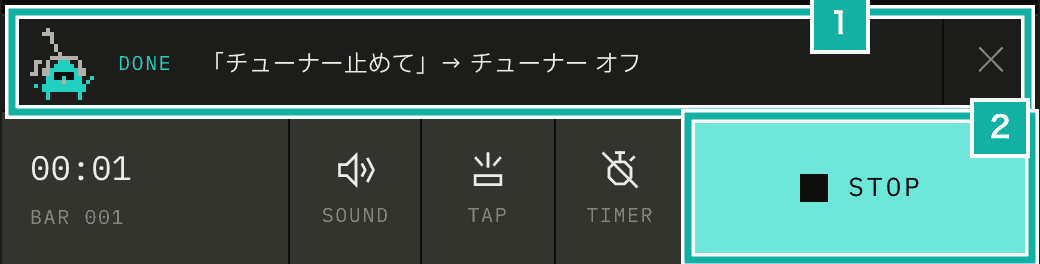
- Run as a request to close the tuner
- The metronome keeps playing
"Mute" gets the on/off backwards
For "ミュートして" (mute it), the on/off question answered off. It seems to have read silencing the sound as "off". I added "for mute, muting the sound is on" to the question.
Commands asked to turn on or off check the current state and do nothing if they're already that way. Running the on/off toggle as is would turn something off just because you asked to turn it on while it was already on.
"Gradually speed up" raises the tempo once
The tempo axis answered faster with 1.00, while progressive mode (where the tempo changes little by little) got 0.69 in the action answer, just short of the 0.7 threshold. Now, if the text contains words like "gradually", "だんだん" or "徐々に", the tempo axis answer (faster or slower) becomes the direction, whether the tempo goes up or down, and progressive mode is turned on.
Answers split between a command and none
For "トラックを追加して" (add a track), addTrack got 0.59 and none got 0.41, short of the 0.7 threshold. At first, the description of none said that changing the tempo, starting, stopping and going to the next or previous track were also none. Suspecting that pulled the answer toward none, I cut it down to "None of the above, or not a request.", but the split barely changed.
Jev sometimes splits like this, 0.6 and 0.4 between one command and none. It isn't torn between two commands, so when the split is only with none, the threshold drops to 0.5 and the command is chosen. But if the second-highest command, not counting none, is at 0.15 or more, Jev is treated as torn between commands and nothing is chosen. Talking to yourself is already filtered out by the "is this a request?" axis.
Then "再生して" (play) came out as toggling repeat (0.50) and would have run. It seems to have read "play" as "play again". In the app, "再生して" is decided without waiting for Jev, so this can't actually happen; it only showed up in testing. Even so, toggles where you mention neither a value nor on/off are left out of the 0.5 rule and still run only at 0.7 or more.
Results from 203 phrasings
I grew the test set to 203 phrasings (27 of them things said to yourself) and compared the command that would actually run, including values, instead of each axis. I ran it twice; one or two of the missed phrasings changed between runs, but the counts were the same.
Result | |
|---|---|
Correct | 190 of 203 |
Ran the wrong command | 0 |
Ran something for talking to yourself | 0 of 27 |
Wait (median) | 258ms, 276ms |
All 13 misses did nothing. "8分の6にして" (make it six-eight) split between the time signature (0.67) and the guide note subdivision (0.33), and "select track 3" leaned toward none. Since it does nothing when unsure, you can just say it again.
The Voice commands chapter of the manual now has tables of the commands with example phrases. Every example in the tables ran correctly in the test.
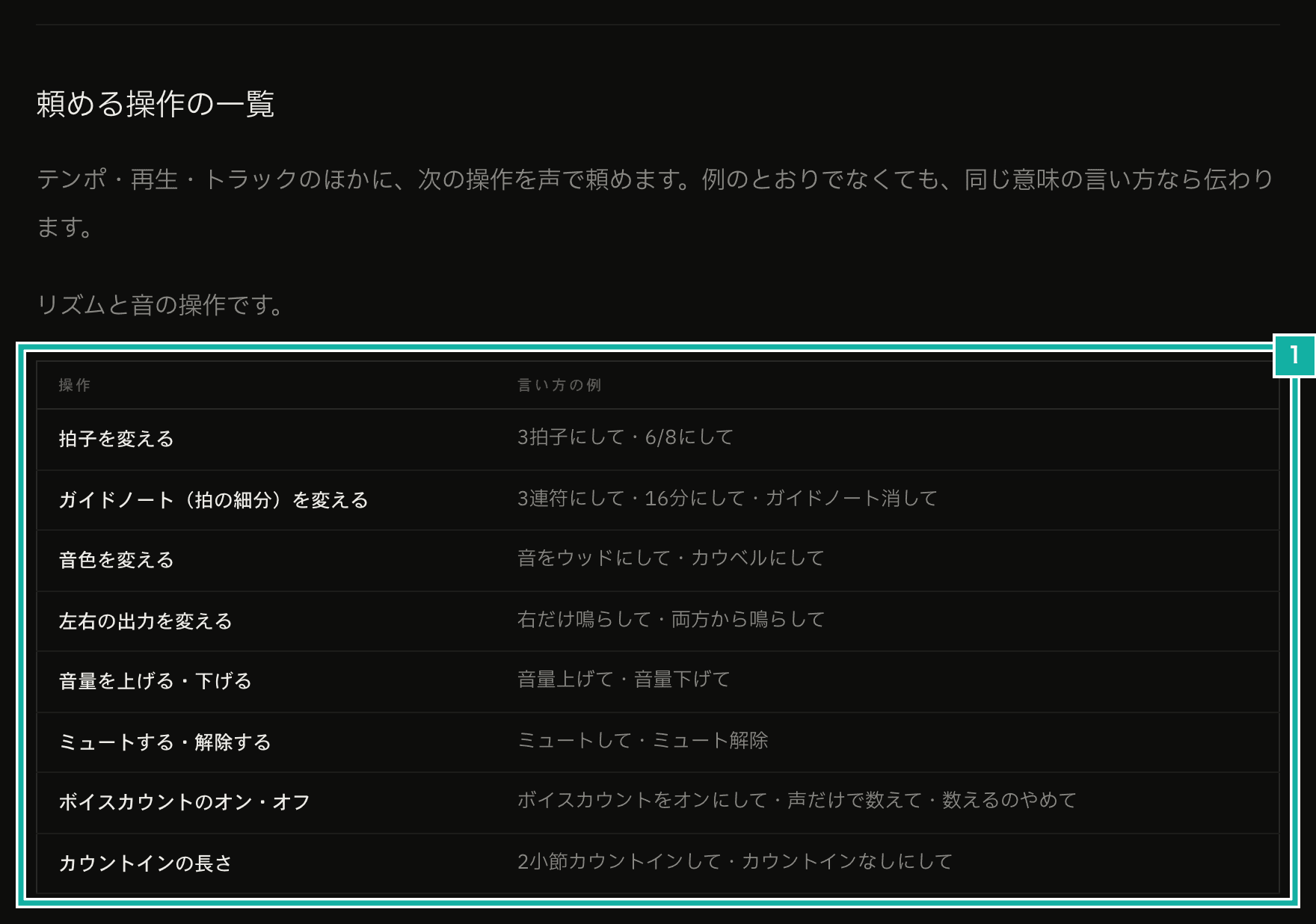
- Tables of commands and example phrases, in five groups: rhythm and sound, tempo, practice tools, display, and opening screens
Commands you can't give by voice
You can't ask for full screen, copying a setting's link or importing a setting from a file by voice. The browser only allows them right after you press a button, so they can't run from a voice request.
Resetting to the initial state and deleting a track can't be undone, so you can't ask for them by voice either. You can undo a tempo change, but not redo one, because Jev mistook "テンポをやり直して" (redo the tempo) for undo.