We built SYNC rooms, which let several devices play the same beat. Create a room and invite people, and the devices in the room follow the conductor (the person who created the room): they start and stop with the conductor and use the same metronome settings. It is meant for practicing together in the same room, such as a band, a wind ensemble, or a group lesson. Participants are found and invited by username, so you need to sign in and have a username to use it.
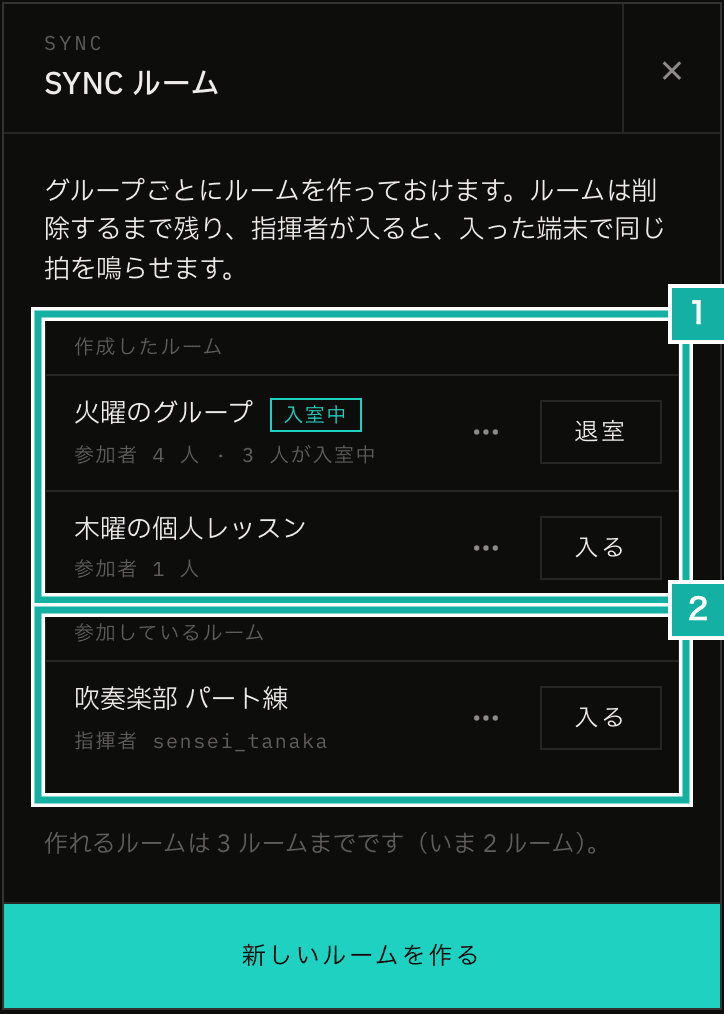
- Rooms you created. Make one for each group and join it each time you practice
- Rooms you were invited to. The conductor's name is shown
This post explains how the beat is aligned across devices in the browser, without installing an app. In order: why we share a start time instead of sending beat signals, how devices align with the server clock and how we keep that estimate from jumping, how the time is converted to the clock that plays sound, how output delay is corrected, how the room state reaches each device, and the approaches we passed on.
Share a start time, not beat signals
If the conductor sent a "play now" signal, the network delay would become the beat offset as is. The delay differs by device and by message, so sending every beat would still not line them up.
Instead, every device aligns its clock with the server clock in advance, and the conductor only shares a plan: "play beat 1 at this time." Each device reads this plan about once a second (more on that later), so the time is set 1.5 seconds ahead so that everyone can pick it up. Each device converts that time to the clock that plays sound (AudioContext time) and schedules the beats locally.
Playback in Metronome.fm was already built so that beat positions follow from the start time. Sharing the settings and the start time is enough to put the beats in the same place on every device. A device that joins midway skips the beats that have passed and plays the rest, so it plays from the same beat position as the other devices.
Align with the server clock
Clocks are aligned by measuring round trips, the same idea as NTP. A device asks the server for the time, and the time in the server's answer is treated as the time at the exact midpoint between asking and receiving the answer.
/**
 * Builds one sample from the send time t0, the server's answer t1, and the receive time t2.
 * Assumes the trip there and back took the same time, and places t1 at the middle of the round trip
 */
export const toClockSample = (t0: number, t1: number, t2: number) => ({
  offset: t1 - (t0 + t2) / 2,
  rtt: t2 - t0,
  at: (t0 + t2) / 2,
});If the trip there and the trip back take different times, half the difference becomes error. The shorter the round trip, the smaller the upper bound of that error.
In the first prototype, the conductor's device was the reference clock, and devices asked it for the time through Supabase Realtime broadcast. Broadcast only forwards a message to the other device; the server itself does not answer. So the question going out and the answer coming back each pass through the relay. We then built an API on a Vercel function that only returns the time, made the server the reference clock, and measured again.
Reference clock | Round trip | Spread of the clock estimate |
|---|---|---|
Conductor's device (through Supabase Realtime twice) | iPhone 183–185 ms | iPhone 18–33 ms |
Server (Vercel time API) | Mac 40.5 ms, iPhone 43 ms | Mac 5.8 ms, iPhone 4.9 ms |
The round trip dropped to about a quarter, and the spread of the estimate to a quarter to a sixth. The server time is Date.now(), kept in step by NTP. A Vercel function may run on a different instance (a separate copy of the function running on a server) each time it is called, and this keeps the reference the same on every instance.
With the server as the reference, we no longer depend on the conductor's device. The conductor's device aligns with the same server clock, so other devices keep playing even if the conductor's screen locks.
Requests to the time API skip the proxy that runs Clerk authentication (the Next.js code that receives requests to pages and APIs first). Going through the proxy made the round trip about 140 ms.
export const config = {
  matcher: [
    // Skip the ensemble time endpoint (/api/ensemble/time) to keep the round trip short (file extensions omitted)
    "/((?!_next|api/ensemble/time|[^?]*\\.(?:html?|css|js(?!on)|...)).*)",
    "/((?!api/ensemble/time)api.*)",
  ],
};Do not move the estimate suddenly
In the first prototype, the clock estimate moved about 8 ms over a few minutes, and the beat moved with it. The difference between the trip there and back changes with every query.
To keep this down, we changed the estimate in two ways.
First, from a fairly long period of samples, we pick only those with especially short round trips: the 10% with the shortest round trips from the last 3 minutes. The device and server clocks run at slightly different speeds, so the offset between them changes over time. If the chosen samples span 30 seconds or more, a line is fitted to how the offset changes, and the current offset is taken from it.
const recent = samples.filter((sample) => sample.at >= now - CLOCK_WINDOW_MS);
const count = Math.max(MIN_CLOCK_SAMPLES, Math.ceil(recent.length * BEST_RATIO));
const best = [...recent].sort((a, b) => a.rtt - b.rtt).slice(0, count);
const fit = span >= MIN_FIT_SPAN_MS ? fitLine(best, now) : null;
const offset = fit ? fit.intercept : median(best.map((sample) => sample.offset));Second, the offset value used for playback only moves a little at a time. Even when the estimate changes, the value moves toward it by at most 0.5 ms per second. At 0.5 ms per second, the tempo changes by only 0.05%. Only when the value and the estimate are 30 ms or more apart, such as right after joining a room, does the value switch to the estimate at once.
export const slewOffset = (current: number | null, target: number, elapsedMs: number) => {
  if (current === null || Math.abs(target - current) >= SNAP_THRESHOLD_MS) {
    return target;
  }
  const step = (MAX_SLEW_MS_PER_SECOND * elapsedMs) / 1000;
  return current + Math.max(-step, Math.min(step, target - current));
};Right after joining, a device asks for the time every 0.3 seconds to align quickly. Once 40 samples are collected, it widens the interval to 1.5 seconds to call the server function less often.
Convert to the clock that plays sound
The start time is a time on the server clock. With the offset from the previous section, it can be converted to a time on the device clock (performance.now()). To schedule sound, though, it has to be converted once more, into AudioContext time.
For this we use getOutputTimestamp(). This method returns which AudioContext time the sound now coming out of the speaker belongs to, paired with the matching performance.now() time. That lets us match the two clocks, including the output delay.
export const contextTimeHeardAt = (context: AudioContext, perfMs: number) => {
  const stamp = context.getOutputTimestamp?.();
  if (stamp?.contextTime && stamp.performanceTime) {
    return stamp.contextTime + (perfMs - stamp.performanceTime) / 1000;
  }
  // Before playback starts, or in browsers without support, approximate with the reported output delay
  const reportedLatency = context.outputLatency || context.baseLatency || 0;
  return context.currentTime + (perfMs - performance.now()) / 1000 - reportedLatency;
};The AudioContext clock and the device clock also run at slightly different speeds, so over a long session, playback drifts away from the mapping made at the start. To watch this, every 5 seconds we compare the time of beat 1, recalculated with the current clock alignment, against the time playback actually started, both in AudioContext time. If the drift goes over 5 ms twice in a row, playback restarts from the same start time.
Correct output delay by hand
Even with aligned clocks, the delay until sound leaves the speaker differs by device. The outputLatency reported by the browser is often unreliable, and Bluetooth adds even more delay.
We played a Mac and an iPhone through their built-in speakers and picked both up with one microphone. The iPhone's delay was almost constant.
Stage | iPhone delay (relative to the Mac) | Spread |
|---|---|---|
No adjustment | +22.4 ms | 1.4 ms (6 runs) |
After a 17 ms adjustment | -2.5 ms | 0.1 ms (3 runs) |
The value after the adjustment is -2.5 ms rather than 22.4 − 17 = 5.4 ms because the clock estimate moved while we were measuring (the roughly 8 ms movement in the first prototype, described in "Do not move the estimate suddenly").
Because the delay goes away after one adjustment, we built a manual adjustment before any automatic measurement. The conductor's device is the reference (0), and only members' devices change "Play earlier" in 5 ms steps. If everyone had an adjustment, it would be unclear which device to match.
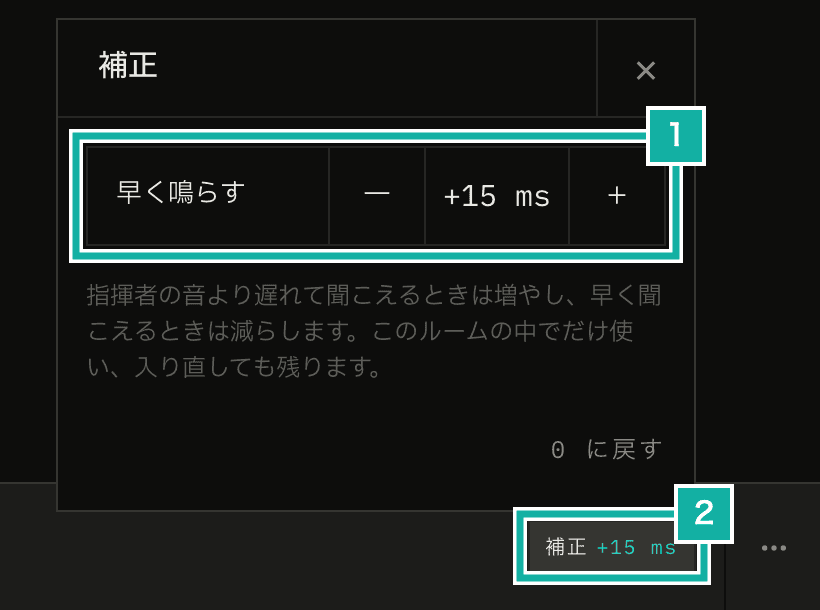
- Increase it if you sound later than the conductor. 5 ms steps, up to ±500 ms
- The button on the bar at the bottom of the screen shows the current adjustment
The adjustment is kept in the device's localStorage for each room and used again when you rejoin. We assumed the output device usually stays the same for each practice place.
Read the room state every second
The room state (whether it is playing, the start time, and the settings) lives in Upstash Redis, and members' devices read it about once a second. The plan the conductor shares (the start time), described in the first section, is part of this state. The start time points 1.5 seconds ahead, so a one-second interval is soon enough.
The API that devices read from is a Route Handler, not a Server Action. Server Actions are processed one at a time, so calling one every second would make other actions wait.
Room names and participants live in the database and stay until the creator deletes the room. So that the reads every second do not hit the database each time, Redis holds a copy of them. When the room or participants change, the copy is cleared, and it is copied again from the database the next time a device reads it.

- The conductor (crown) is at the left, followed by participants. People with a dot are playing, and dimmed people are not in the room
Every few of its once-a-second reads, a device also tells the server that it is in the room. It sends whether it is playing along with that, and reports right away when it starts or stops. The dots on the bar's avatars come from these reports.
Approaches we passed on
- Supabase Realtime: it worked in the prototype, but as described above, the server cannot answer with its time, so the round trip is long, and that also made the estimate move
- Cloudflare Durable Objects with WebSocket: each room could hold a server clock and state, and the round trip was expected to shrink further. But a Vercel function already brought it down to about 40 ms, and the difference did not justify building a new Cloudflare Worker and setting up its deployment, a custom domain, and separate production and development environments
- WebSocket on Vercel Functions: devices in one room could connect to different instances, so they could not share the room state
We also left out lessons in different places. Even if the metronome sound is aligned across devices, video calls add 100–300 ms of delay, so players would hear each other out of time.
How to use it is in the "Play together in a SYNC room" chapter of the manual.