Metronome.fm now has more patterns (guide notes played inside each beat, separate from the beat click). You can pick quintuplets, sextuplets, septuplets and thirty-second notes, and polyrhythms go beyond 3 against 2 to ratios like 4 against 3 or 7 against 4. With the eighth-note (8th) and sixteenth-note (16th) patterns, you can also set the swing amount (how hard they swing).
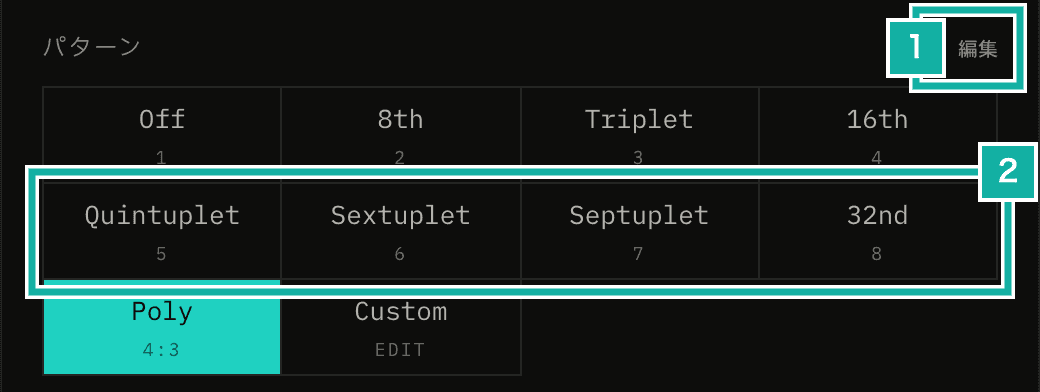
- Edit for Pattern. Choose which patterns appear in the section
- Quintuplets, sextuplets, septuplets and thirty-second notes, which can now be selected
This post covers how the positions of the guide notes are now calculated to support polyrhythm ratios and the swing amount. It also touches on how older saved settings are handled, and on choosing which of the added patterns appear in the section.
Guide notes are positions inside a beat
For each pattern, a function returns how far into the beat each guide note plays, as numbers from 0 up to (but not including) 1. The sequencer (the part that decides when sounds play) multiplies them by the length of one beat to get the times. The beat click plays at the start of the beat, so 0 isn't included. Eighth notes are [1/2], and triplets are [1/3, 2/3].
Quintuplets, sextuplets, septuplets and thirty-second notes simply return positions that divide the beat evenly (thirty-second notes divide it into 8).
/** Positions that divide one beat into count equal parts, except the start of the beat */
const evenlySpacedOffsets = (count: number) =>
  Array.from({ length: count - 1 }, (_, index) => (index + 1) / count);

case "quintuplet":
  return evenlySpacedOffsets(5);
case "32nd":
return evenlySpacedOffsets(8);What this approach couldn't handle as is were polyrhythms, which don't fit inside one beat, and swing, which moves the positions themselves.
Polyrhythms are calculated beat by beat
When you pick Poly, you can choose the number of notes and the number of beats, each from 2 to 9. With 4 and 3, the guide notes play 4 evenly spaced clicks over every 3 beats.
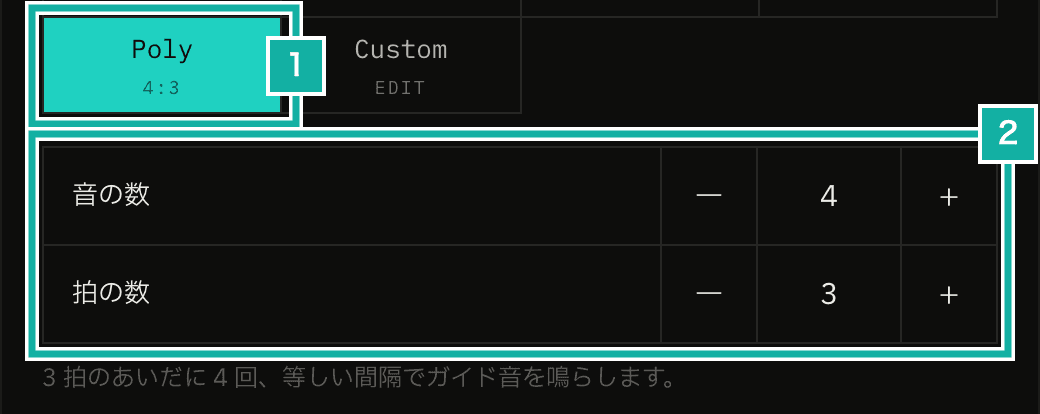
- The selected ratio appears under the button
- The number of notes and beats
A polyrhythm has a group of beats over which the ratio repeats (2 beats for 3 against 2; I'll call it a cycle). Until now, the 3 against 2 polyrhythm scheduled the times of two beats' worth of notes at once, on the first beat of each cycle. The last note was 4/3 of a beat after the start of the beat that scheduled it. Doing the same with any ratio would mean scheduling notes more than 3 beats ahead for 7 against 4.
Notes scheduled several beats ahead drift if the tempo changes in between, because the sequencer sets their times from the length of one beat at the moment they were scheduled. In progressive mode, which raises the tempo step by step, the tempo can change in the middle of a cycle.
So now each beat gets only the notes that fall inside it. With notes as the number of notes and beats as the number of beats, and counting the note at the start of the cycle as note 0, note k plays k × beats / notes beats after the start of the cycle. This position is split into which beat of the cycle it falls on (beatInCycle) and the position inside that beat.
const getPolyrhythmOffsets = (
  [notes, beats]: Readonly<PolyrhythmRatio>,
  totalBeatIndex: number,
) => {
  const beatInCycle = ((totalBeatIndex % beats) + beats) % beats;
  // The position is k × beats / notes beats. Split it into the beat and the remainder
  // while it is still an integer, so rounding errors can't put a note in the wrong beat
  return Array.from({ length: notes - 1 }, (_, index) => (index + 1) * beats)
    .filter((position) => Math.floor(position / notes) === beatInCycle)
    .map((position) => (position % notes) / notes);
};If the position were calculated with fractions, such as k × (beats / notes), a note that lands exactly on a beat boundary (with 4 against 2, the note that lands on the start of the 2nd beat of the cycle) could be mistaken for the end of the previous beat because of rounding errors. So k × beats is divided by notes while it is still an integer, and the quotient is the beat and the remainder is the position inside the beat.
With 7 against 4, the notes fall at these positions in the 4-beat cycle. The first note of the cycle lands on the beat click, so it isn't played as a guide note.
Beat in the cycle | Positions (inside the beat) |
|---|---|
1st beat | 4/7 |
2nd beat | 1/7, 5/7 |
3rd beat | 2/7, 6/7 |
4th beat | 3/7 |
The cycle is counted with the beat number since playback started, not the beat number inside the bar. In 3/4, a 3 against 2 cycle takes 2 bars (6 beats), and the clicks stay evenly spaced across bar lines.
Audio export, which saves the metronome sound as an audio file, uses the same function to place notes. So the exported waveform for 3 against 2 changed slightly. The note on the 2nd beat is now calculated as 1/3 of a beat from the start of its own beat instead of 4/3 of a beat from the previous one, which changes how the sample position (a single point of audio data) is rounded down. The difference is at most one sample, about 0.02 milliseconds at the export's 44.1 kHz.
Swing is now a single amount
Until now, there was a pattern called "16th(s)" for swung sixteenth notes, and a "Shuffle" switch in the custom beat (the Custom pattern, where you build your own rhythm). Both only moved the 2nd and 4th sixteenth notes to the triplet-feel position (2/3 of an eighth note), and you couldn't change how hard they swung.
If 16th(s) stayed a separate pattern and also got an adjustable amount, the difference between straight and swung sixteenths would be split between a button and a slider. If straight is simply a swing of 50%, there is only one place to choose it.
So 16th(s) is now gone and merged into 16th, and a swing slider appears when you pick 8th or 16th. The custom beat's shuffle switch is replaced with the same slider.
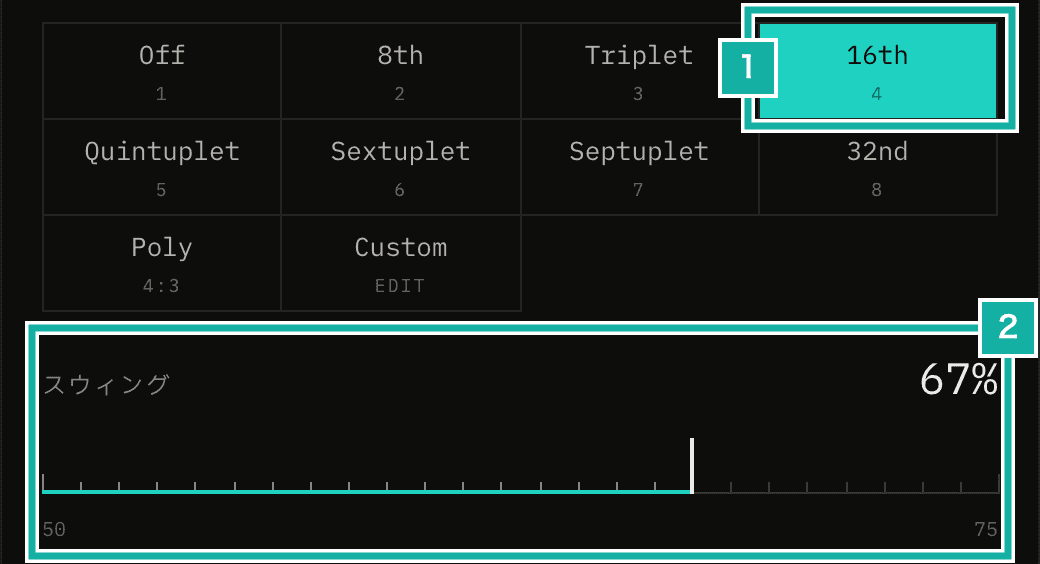
- Pick 16th and the slider appears below
- The swing amount (50 to 75% for both 8th and 16th)
The swing amount is the share of time taken by the first of the two notes being swung. For 8th, the beat is split into two; for 16th, each eighth note is. The second note is delayed until the first note takes up that share.
case "8th":
  // Delay the offbeat eighth by the swing amount (0.5 is the middle of the beat)
  return [swingRatio];
case "16th":
  // In each pair of sixteenths, delay the second one by the swing amount (0.5 is even spacing)
return [swingRatio / 2, 1 / 2, 1 / 2 + swingRatio / 2];With 16th, 50% gives straight sixteenths, 67% (2/3) gives the same triplet-feel position as the old 16th(s), and 75% gives a dotted-sixteenth feel. Swinging 8th lets you practice a jazz eighth-note swing.
Older settings that used 16th(s) load with a swing of 67%
Saved settings, the last state kept in the browser and exported settings files can still contain 16thShuffle (16th(s) on screen) or the custom beat with shuffle turned on. When they are loaded, the same function treats all of them as 16th (or the custom beat) with a swing of 2/3, so they keep sounding the same as before.
export const migrateLegacySwing = ({
  guideNoteType,
  swingRatio,
  isCustomBeatShuffleEnabled = false,
}: {
  guideNoteType: unknown;
  swingRatio?: unknown;
  isCustomBeatShuffleEnabled?: boolean;
}): { guideNoteType: GuideNoteType; swingRatio: number } => {
  const swing = normalizeSwingRatio(swingRatio);
  const legacySwing =
    swing > DEFAULT_SWING_RATIO ? swing : LEGACY_SHUFFLE_SWING_RATIO;
  if (guideNoteType === "16thShuffle") {
    return { guideNoteType: "16th", swingRatio: legacySwing };
  }
  if (guideNoteType === "custom" && isCustomBeatShuffleEnabled) {
    return { guideNoteType: "custom", swingRatio: legacySwing };
  }
  return {
    guideNoteType: isGuideNoteType(guideNoteType) ? guideNoteType : "off",
    swingRatio: swing,
  };
};To check that the sound didn't change, I used the exported waveform. The audio export tests record, for each pattern, a hash of the exported waveform (a short value computed from its bytes to check for an exact match). After rewriting the 16th(s) and custom beat shuffle tests as "16th with a swing of 2/3" and "custom beat with a swing of 2/3", the recorded hashes stayed the same. Unlike 3 against 2 in the previous section, these waveforms didn't change.
Choose which patterns are shown
With 10 patterns, the row grows to 3 lines. For people who don't use quintuplets or thirty-second notes, that's just extra lines.
So the Pattern section now has an Edit button, like the one for presets in the tempo and time signature sections. In the dialog that opens, you choose which patterns appear in the section.
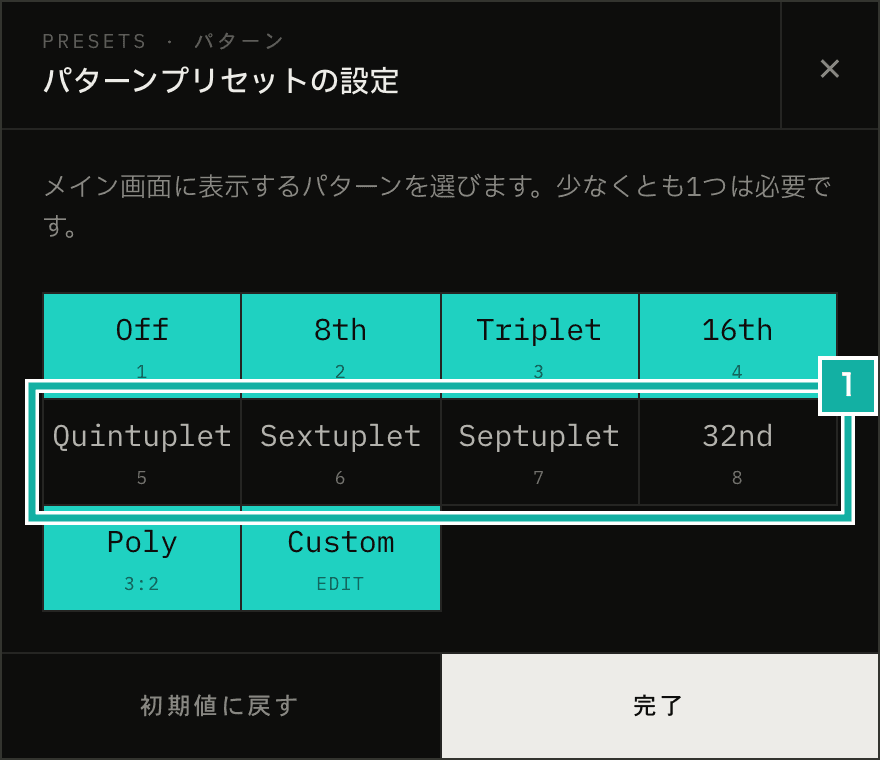
- Quintuplets, sextuplets, septuplets and thirty-second notes are off at first
At first, only the patterns that were already there (Off, 8th, Triplet, 16th, Poly and Custom) are shown. Quintuplets, sextuplets, septuplets and thirty-second notes appear once you turn them on in Edit. Which patterns are shown is kept when you save your settings.
The Pattern section of the manual also explains how to use them.