Until now, progressive mode did one thing: starting from the lower end of the BPM range (a low and a high BPM), it raised the tempo by a fixed amount at each interval. The interval is the Interval setting, counted in bars, seconds or minutes. You could not start fast and slow down (ritardando), or practice with a tempo that moves like a slope instead of stairs.
So progressive mode can now lower the BPM. Two more ways to move are available as well. One changes the tempo smoothly on every beat instead of all at once at each interval. The other moves in waves: go further, then step back a little, again and again.
This post covers what shape the three settings took and how the sequencer (the part that keeps the beat and plays the sounds) calculates the tempo.
Slowing down: keeping the range as it is and choosing a direction
You choose Direction at the top of Progressive settings. With Slow down, the tempo starts at the higher end of the range and moves to the lower end.
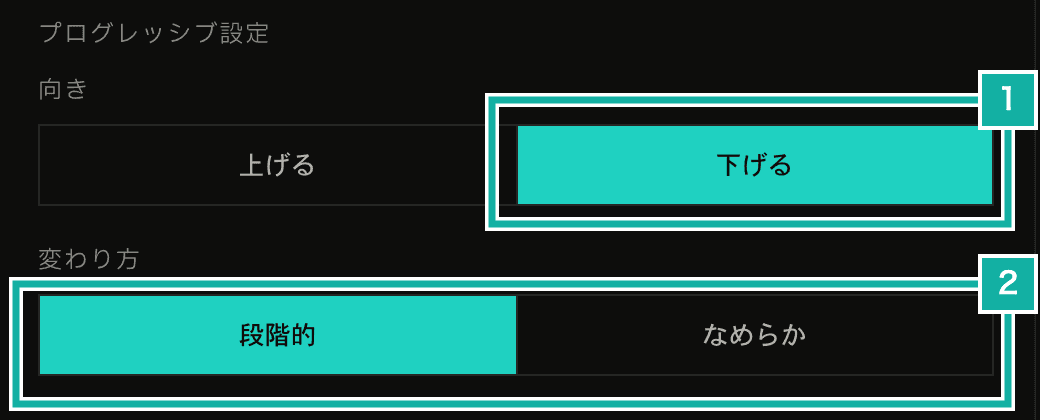
- Direction: speed up (accelerando) or slow down (ritardando)
- Change: in steps, or smoothly on every beat
There were two ways to shape this setting. One was to place a start BPM and a target BPM freely, and slow down when the target is lower. The other was to keep the range as low and high, and store speeding up or slowing down as a separate setting.
I went with the second. The BPM ruler that marks the range with two needles, the rule that keeps the needles at least 10 BPM apart, the database fields for saved settings and the format of exported settings files all assumed that the left end of the range is the lower one. The first option would have meant changing all of that. With the second, the only thing that changes is which end the tempo starts from.
In the code, one function works out the start and end BPM from the range and the direction. The places that used bpmRange[0] directly as the start BPM now use this function.
/** The BPM progressive mode starts at: the lower end for up, the higher end for down */
export const getProgressiveStartBpm = (
  range: readonly [number, number],
  direction: ProgressiveDirection,
) => (direction === "down" ? range[1] : range[0]);The large numbers on screen show start → end, so slowing down reads 180 → 120. The change per interval also shows as a negative number, like −5 BPM.
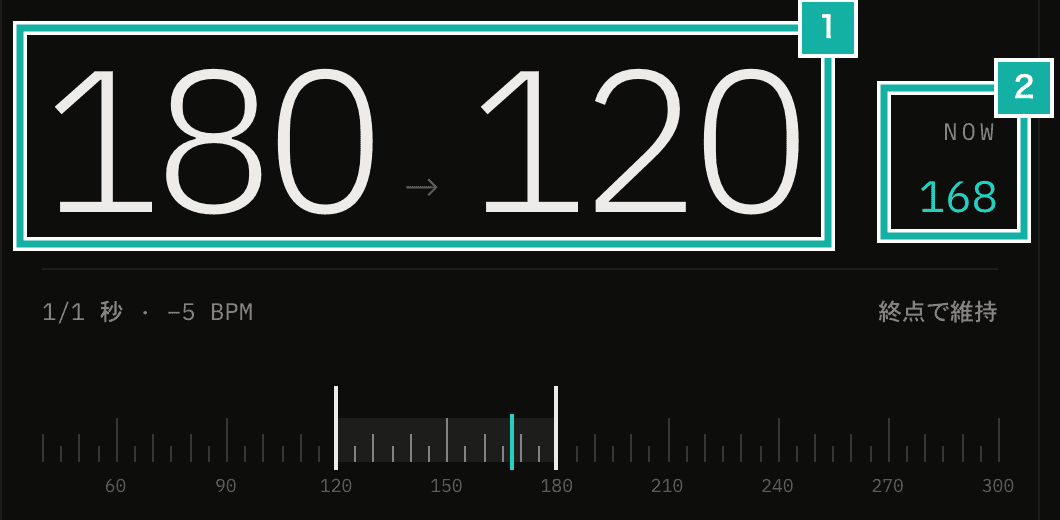
- Start → end. When slowing down, the higher BPM comes first
- Current BPM. With the smooth change, values between the steps of 5 show up too
The screen reader names of the ruler's needles (start and end) swap with the direction as well. The left needle is still the lower one on screen, but when slowing down the right needle is the start.
Smooth change: sizing each beat's change by its share of an interval
With Change set to Smooth, the amount that used to change all at once at each interval is spread over the beats. The rate is the same as with steps: the tempo moves by the set amount over one interval.
How far it moves on each beat depends on how much of an interval that beat is. When the interval is counted in bars, one beat is 1 / (beats per bar × bars per interval) of an interval. When it is counted in seconds or minutes, it is the time since the previous beat divided by the length of the interval.
const amount = isBars
  ? 1 /
    (Math.max(settings.timeSignature[0], 1) *
      Math.max(settings.progressiveBpmIntervalBars, 1))
: (beatTime - previous) / Math.max(getIntervalSeconds(settings), 1e-6);When counting in bars, the BPM at the start of the bar after each full interval is the same as with steps. With 4/4 and +4 BPM every bar, steps jump from 60 to 64, while smooth goes 60, 61, 62, 63, 64, one beat at a time.
A smooth change gives BPMs such as 61.25. The length of a beat (60 ÷ BPM seconds) is worked out from the unrounded value, and the BPM shown on screen is rounded. The sequencer runs on the audio thread and exchanges values with the screen's state through messages. So it tells the screen only on the beats where the rounded value changes, instead of sending a message every beat.
What happens at the end follows the steps setting. With steps, the end BPM also plays for one interval before looping or moving to the next track in multi-track. With smooth, it likewise waits one interval after reaching the end. But with smooth, the end can be reached in the middle of a bar, so when counting in bars, it plays the interval and then waits for the start of the next bar before moving to the next track. That way the track never changes in the middle of a bar.
Waves: go further by the rise, then step back
Turn on Wave (go further, step back), and the tempo rises by a set amount (Rise), then drops back at once by a set amount (Step back), again and again until the end. It is a way to practice by playing a tempo that is a bit too fast and then backing off to an easier one.
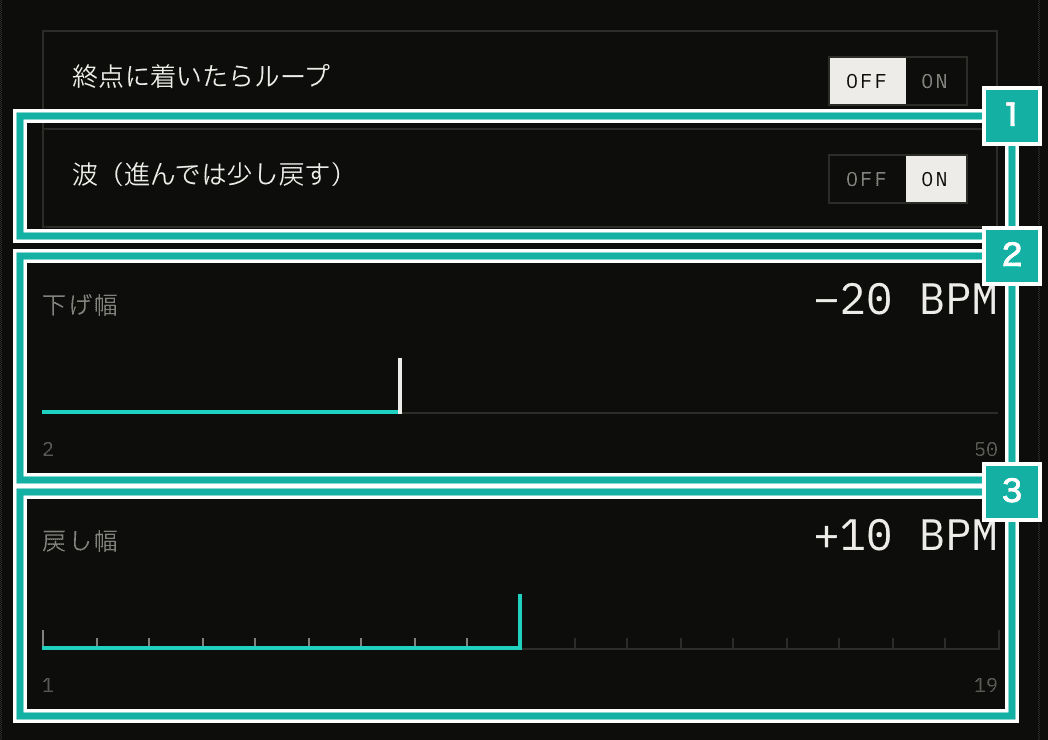
- Wave on or off
- Rise. When slowing down, it is called Drop
- Step back
A wave is defined by two values, Rise and Step back. On the way up, the tempo moves with the usual change and interval. With a range of 100–140, a BPM increment of +5, a rise of 20 and a step back of 15, it goes as shown below.
Wave | BPM |
|---|---|
1st | 100 → 105 → 110 → 115 → 120 |
2nd | 105 → 110 → 115 → 120 → 125 |
3rd | 110 → … → 130 |
4th | 115 → … → 135 |
Last | 120 → … → 140 (end) |
The current BPM alone is not enough to make this work. A tempo of 115, for example, can be partway through the first wave or the second, so there is no way to tell whether to keep going or step back soon. So the sequencer now remembers "the BPM where it steps back next" along with the current BPM. The code calls this BPM the peak of the wave.
// At the peak of a wave, step back instead of moving on
if (course.wave && hasReached(state.bpm, state.waveTarget, sign)) {
  return { state: fallBack(state, course), reachedEnd: false };
}
const target = course.wave ? state.waveTarget : end;
const bpm = notBeyond(state.bpm + sign * course.increment, target, sign);The next peak is where it stepped back to plus the rise. If that goes past the end, it stops at the end. When slowing down, only the direction of adding and subtracting (sign in the code) flips: drop by the Drop amount, then step back up.
Step back can only be set smaller than the rise. If it were the same or larger, a wave would make no progress and the tempo would never reach the end. When you move the rise slider down to the step back or below, the step back changes on its own to 1 BPM less than the rise.
Combined with the smooth change, the tempo rises a little on every beat and jumps back only when it steps back.