We built gap click, which silences (mutes) the click now and then so you can check whether you hold the tempo on your own. There are two ways to mute: Fixed bars, which plays a set number of bars and then mutes a set number of bars, and Random, which mutes single beats at random with the chance you set. If you rush (speed up) or drag (slow down) while the click is gone, you hear the drift when it comes back.
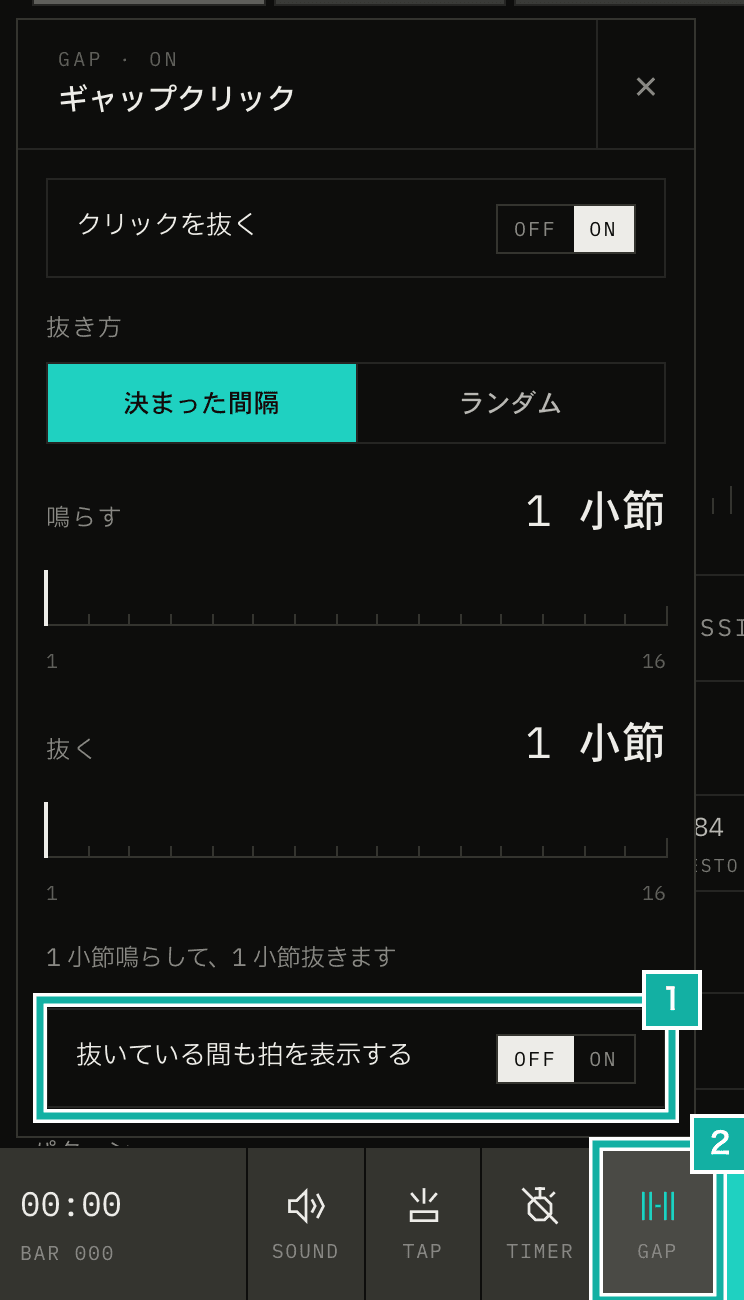
- When Keep showing beats while muted is off, the beat display also stops while muted
- GAP in the control strip lights up while gap click is on
This post covers four decisions we made while building it: where the mute decision lives and what it stops, how bars are counted, how the beat display stops, and where the setting types live.
The sequencer decides what to mute
The sound in Metronome.fm is made beat by beat by a sequencer (the part that decides when each beat falls and which sounds it plays), which runs on the audio thread inside an AudioWorklet. It decides which beat plays when and how bars are counted, so we had it decide whether to mute a beat too.
On a muted beat, the code that builds the beat's sounds is not called at all. If only the click were removed, guide notes (eighths, triplets), the custom beat's bass tones, and the voice count would still play and give you a cue.
const beatDuration = 60 / bpm;
// Muted beats play nothing (beats and bars keep counting)
const isGap = isGapBeat({ settings: gap, bar: gapBarCount, random });
const pulses = isGap ? [] : pushBeatSounds(beatTime, beatDuration);
emit({
  type: "beat",
  time: beatTime,
  beat: currentBeat,
  bar: barCount,
  interval: beatDuration,
  pulses,
  ...(isGap ? { gap: true } : {}),
});pulses is the list of times when clicks sound within the beat, and both the screen flash and the vibration read it. It is empty on a muted beat, so both stop without any change to the flash or vibration code.
The beat event itself is still sent. The bar count, timer, progressive mode (which raises the tempo step by step), and multi-track all move on with this event, so they carry on while muted as if the click were playing.
Bars are counted from when you press play
The sequencer already had two bar counters: barCount, used for the bar count on screen and the bar timer (a timer that stops after a set number of bars), and trackBarCount, which restarts for each track. Gap click uses neither, so we gave it a third counter.
// Counted from the start of playback. Not reset by track changes or by restarting the bar timer.
// Set to -1 when the settings change, so the next bar starts again from 0
let gapBarCount = 0;barCount goes back to 0 when you change the bar timer settings. trackBarCount goes back to 0 when the track changes in multi-track. Either one would break the play-then-mute pattern in the middle of practice.
If you change the pattern or the number of bars while playing, gapBarCount is set to -1. The decision function below never mutes when the bar number is negative, so the rest of the current bar is not muted. Counting starts again from 0 at the next bar, which plays.
The decision depends only on its arguments: the settings, the bar number, and the random number generator.
export const isGapBeat = ({ settings, bar, random }) => {
  if (!settings.isEnabled || bar < 0) return false;
  if (settings.type === "interval") {
    const cycle = settings.playBars + settings.muteBars;
    return cycle > 0 && bar % cycle >= settings.playBars;
  }
  return bar > 0 && random() < settings.randomPercent / 100;
};Fixed bars mutes the later bars of a cycle made of the bars to play plus the bars to mute. Bars are counted from 0, so with 3 bars on and 1 bar off, bars 0, 1, and 2 play and bar 3 is muted.
Random mutes single beats rather than whole bars because muting whole bars at random would feel too close to Fixed bars. We wanted a drill where you never know where the gap comes. In both patterns, the first bar (bar is 0) always plays, so you lock in the tempo before anything is muted.
The random number generator is passed in as an argument. Tests pass a function that returns fixed values and look at exactly which beats get muted.
The beat display can stop too
If the beat display keeps moving while muted, you can follow the beat with your eyes. So the settings have a Keep showing beats while muted switch (number 1 in the first image). When it is off, the current beat is not lit in muted bars.

- The current beat (beat 2) is lit

The beat meter reads the number of the playing beat from the store (where the app keeps its screen state) and lights it. We now also write whether that beat is muted, and when the switch is off and the beat is muted, the meter draws the current beat as -1 (no beat).
Besides the beat meter, the beat display can also be a pendulum or a ring. These two do not go through the store. They work out the current beat position from the audio clock every time the screen is redrawn (every frame). So when the switch is off, the position of a muted beat now comes back as null. null is treated the same as being stopped, so the pendulum glides back to the center.
if (
  !current ||
  (current.gap && !useUserSettingsStore.getState().gapClick.showBeats)
) {
  return null;
}The bar count and elapsed time in the control strip at the bottom of the screen keep moving while muted.
Keeping the setting types out of React
The setting types and ranges (1–16 bars, 10–90%) are used by both the settings panel and the sequencer. If they lived in the panel's file, the sequencer would import that file, and React and the translation library, which the sequencer does not use, would end up in the code that runs on the audio thread (the AudioWorklet bundle).
So we moved just the types and ranges into a file without React (gap-click-options.ts), and both the panel and the sequencer read from it. Before and after building gap click, the AudioWorklet bundle went from 26,238 bytes to 26,968 bytes, and the increase is only the mute logic.