I released a forum on Metronome.fm where people can talk about practice. Anyone who signs in can post, so I have to plan for ads and trolling.
Before a post is saved, an AI model checks it, and posts it judges to be spam or trolling are not published. Some posts still get past that check. For those, readers report them and an admin deals with them.
The forum is run by one person, so a report may not get a quick response. I decided to hide a post automatically once enough reports come in, without waiting for a human decision. This post covers the rule for hiding posts automatically and how I decide who is an admin. It also covers how the body of a hidden post is kept out of the browser, and two weaknesses that a security review found before release and I fixed.
Reporting a post
You can report someone else's post from the "⋯" menu in its top right corner.

- The ⋯ button at the top right of a post
- Report
When reporting, you pick one of four reasons: "Advertising or spam", "Abusive or trolling", "Unrelated to the forum", or "Other". You can also add a short note (up to 500 characters).
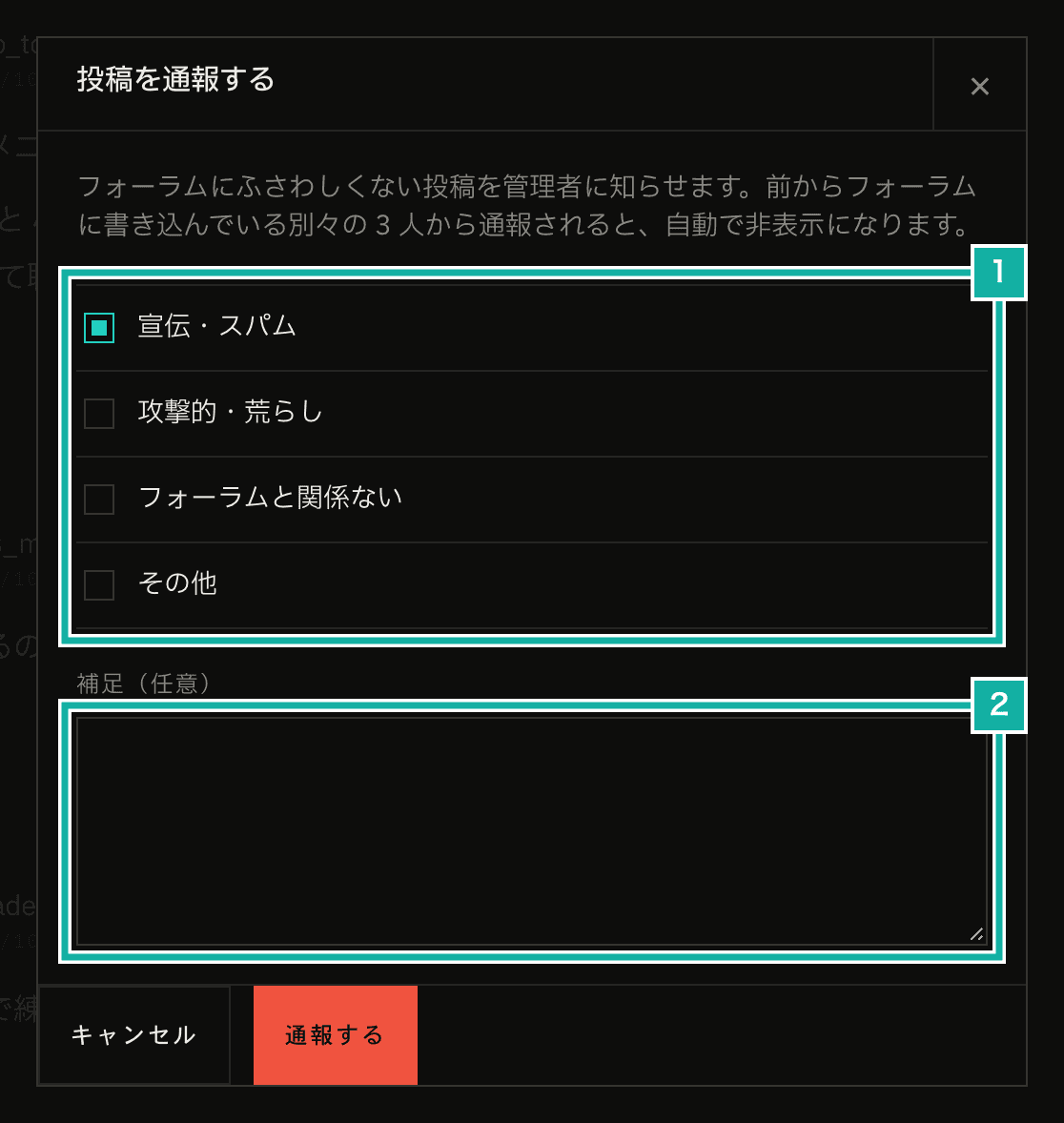
- The reasons
- The optional details field
Each person can report a given post once. You can't report your own posts or posts that are already hidden. To prevent rapid-fire reporting, one person can file at most 20 reports per hour.
Hiding a post after 3 separate reports
When 3 different people have reported a post, it is hidden at that moment. If we waited for an admin to look, the trolling post would stay visible in the meantime. A single report doesn't hide anything, because a report can be a mistake or harassment.
Only reports from people who have been posting in the forum for a while count toward those 3, though. I added this condition to fix a weakness found in the pre-release review, which is covered in a later section.
A hidden post shows "This post is hidden because it received several reports." in place of its body.
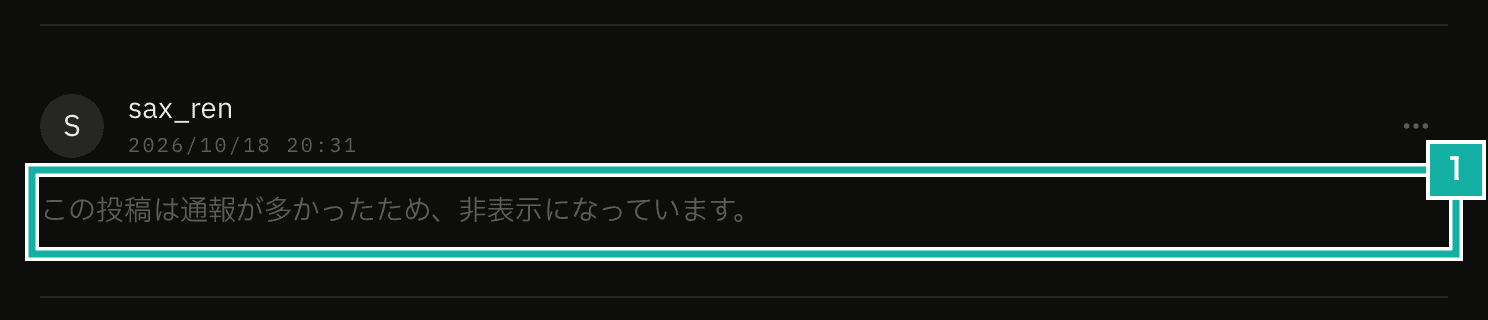
- The notice shown in place of the body
If the hidden post is the first post of a thread, the whole thread is hidden. It no longer appears in the list of threads, and opening the thread shows "Hidden topic" as its title. The title itself may contain trolling text.
Even the author can't edit a hidden post, so nobody can rewrite it to make it visible again. Only admins can unhide it.
If several people report at the same time, the post is hidden only once. When the database is updated, only posts that aren't hidden yet are affected.
Emailing the admins
The admins get an email when a post is reported for the first time and when a post is hidden automatically. Sending one for every report would mean several emails for a single post.
The email contains the thread title, the post ID, the number of open reports, the reason given in the latest report, and a link to the admin page. It does not include the note attached to the report. Anyone can write anything in that note, so including it would let anyone put whatever text they like into an email addressed to the admins. The notes are read on the admin page.
If the email fails to send, the report is still accepted. The report stays in the database, so it can be seen on the admin page.
Deciding who is an admin by verified email address
Admins are defined by the email addresses in the FORUM_ADMIN_EMAILS environment variable on the server. A signed-in person is an admin if their account on Clerk (the service that handles sign-in) has one of those addresses and that address is verified.
export const isForumAdmin = async (): Promise<boolean> => {
  const admins = parseForumAdminEmails();
  if (admins.length === 0) return false;
  const user = await currentUser();
  return (
    user?.emailAddresses.some(
      (address) =>
        // Only look at verified addresses
        address.verification?.status === "verified" &&
        admins.includes(address.emailAddress.trim().toLowerCase()),
    ) ?? false
  );
};The verification check is there so that adding an admin's address to your own account doesn't make you an admin. Anyone can add an email address to their account, but the verification code goes to that address's inbox, so only its owner can verify it.
When someone who isn't an admin opens the admin page (/forum/admin), they get the same page as for a page that doesn't exist (404). Not even the existence of the admin page is revealed.
What admins can do on the admin page
The admin page lists posts with open reports and posts that are hidden. "Dismiss reports" marks reports as handled. Dismissed reports no longer count toward the report count or toward automatic hiding.
For each post on the admin page, you can see the body, the reasons and notes from the reports, and the number of reports.
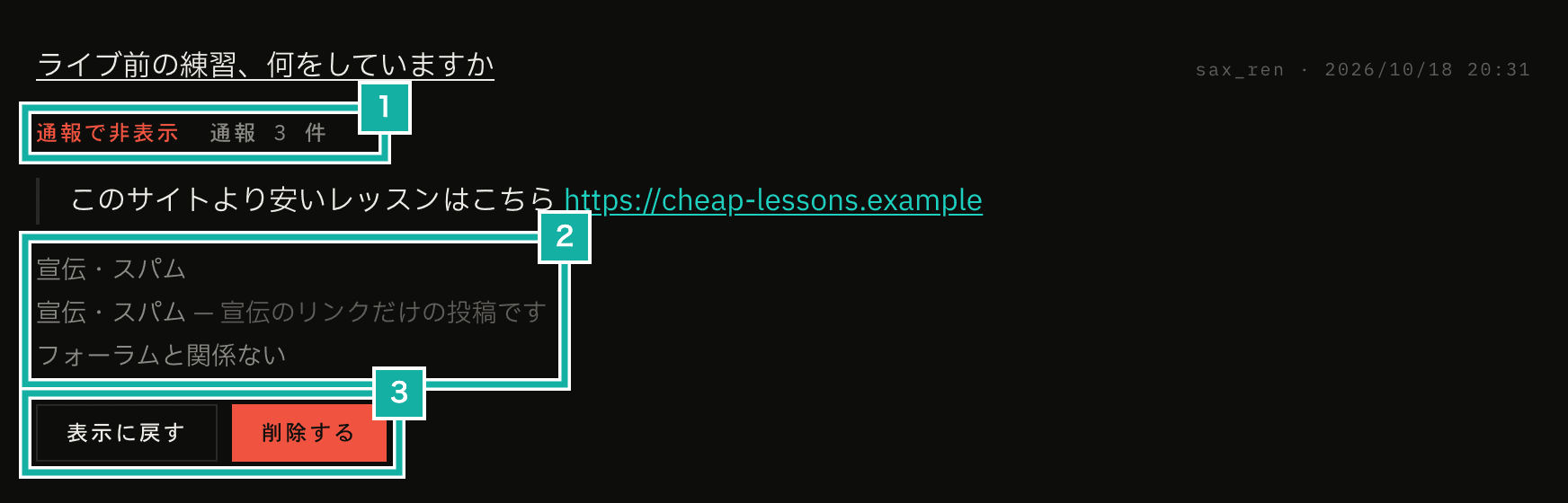
- Hidden automatically by reports, and the number of reports
- The report reasons and the notes added to them
- The unhide and delete buttons shown for a hidden post
These are the actions available for each post.
Action | What happens |
|---|---|
Unhide | Brings back a hidden post and dismisses its reports |
Hide | Hides the post at the admin's discretion and dismisses its reports |
Dismiss reports | Marks the reports as handled without hiding the post |
Delete | Shows "This post was deleted." in place of the body and dismisses its reports |
A hidden post shows Unhide and Delete. A post that isn't hidden shows Hide, Dismiss reports, and Delete.
Unhiding also dismisses the reports so that the same reports don't hide the post again right after it comes back.
Deleting a post also removes the images attached to it from storage. Deleting the first post of a thread removes the whole thread.
Admins can do the same from the thread page. When an admin opens a thread, the body of a hidden post is shown along with the note "This post is hidden (only admins can see it)."
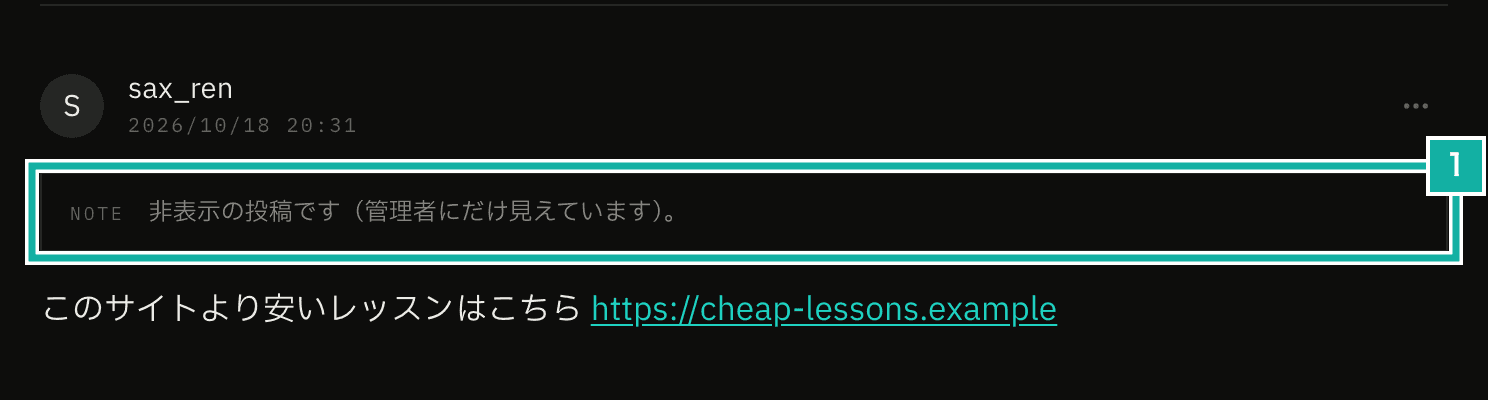
- The note that only admins can see the body
The body of a hidden post is never sent to the browser
For anyone who isn't an admin, the body of a hidden or deleted post is not sent to the browser at all. Making it invisible on screen would still leave the body readable.
The thread page reads the database on the server and passes the posts to the component that renders them (a client component). Values passed to that component go into the data sent to the browser along with the page (the RSC payload). If the body were passed along and only hidden on screen, it could still be read in the page source or the developer tools.
So the server code decides each post's state before passing it to the component, and clears the body and the reactions of any post that shouldn't be shown.
const state: ForumPostState = post.deletedAt
  ? "deleted"
  : post.hiddenAt || topic.hiddenAt
    ? isAdmin
      ? "hiddenForAdmin"
      : "hidden"
    : "visible";
// Return the body only for normal posts and for hidden posts viewed by an admin
const showBody = state === "visible" || state === "hiddenForAdmin";
return {
  id: post.id,
  body: showBody ? post.body : "",
  reactions: showBody ? summarizeReactions(post.reactions, viewerId) : [],
  state,
  // …
};For a hidden thread, the title and the metronome settings attached to the thread are cleared the same way. The component looks at the post's state (state) and shows either the "hidden" or the "deleted" notice.
Two weaknesses found in a review and fixed
After building all of this, I had Claude Code review the changed code for security with a security review skill before release. For reporting, it raised two findings of medium severity.
Three accounts could hide any post
At first, any 3 reporters were enough to hide a post. That meant anyone who created 3 accounts could hide any post.
So now only reports from people who have been posting in the forum for a while count toward hiding. That means people who have a post written more than 24 hours ago that hasn't been deleted or hidden.
const trustedReports = await prisma.forumPostReport.count({
  where: {
    postId: post.id,
    resolvedAt: null,
    // Count only reports from people with a post older than 24 hours that hasn't been deleted or hidden
    reporter: {
      forumPosts: {
        some: {
          deletedAt: null,
          hiddenAt: null,
          createdAt: {
            lt: new Date(Date.now() - FORUM_TRUSTED_REPORTER_MIN_POST_AGE_MS),
          },
        },
      },
    },
  },
});
const shouldHide = trustedReports >= FORUM_AUTO_HIDE_REPORT_COUNT; // 3Reports from brand-new accounts are still accepted, stored in the database, and listed on the admin page. If it's the first report on a post, the email goes out too. The only difference is that they don't count toward hiding. To hide a post with mass-created accounts, each account would have to write a post that the AI check doesn't flag as spam and then wait a day.
I also updated the description in the report dialog to "A post reported by 3 different people who have been posting in the forum for a while is hidden automatically." An end-to-end (E2E) test that drives a browser checks that reports from brand-new accounts alone don't hide a post.
Admin emails could flood the inbox
An admin email goes out the first time any post is reported. One person can file at most 20 reports per hour, but with more accounts reporting different posts, someone could keep emails going without hitting that limit. That could fill the admins' inbox and use up the number of emails we can send through the email service (Resend).
So admin emails now have an app-wide limit of 20 per hour. Past the limit, no email is sent and only a warning is logged. The reports remain in the database, so they show up on the admin page.
const { success } = await getHourlyGlobalForumAdminNotifyRatelimit().limit(
  FORUM_ADMIN_NOTIFY_RATE_LIMIT_IDENTIFIER, // The only recipients are the admins, so the identifier is a single fixed value
);
if (!success) {
  logServerWarning("Skipped notifying forum admins: hourly global limit reached");
  return;
}What is still weak
Against many accounts posting in bulk, the only safeguards are the per-person posting limit (20 per hour) and the AI check before saving. If many accounts write posts that the check doesn't flag as spam, nothing stops them. In that case they would have to be deleted one by one from the admin page.