You can now embed a saved setting (a tempo, time signature and so on saved under a name) in your blog or website, the same way you embed a YouTube video. Make the setting public in the share panel, copy the code under Embed in the same panel, and paste it into your page's HTML.
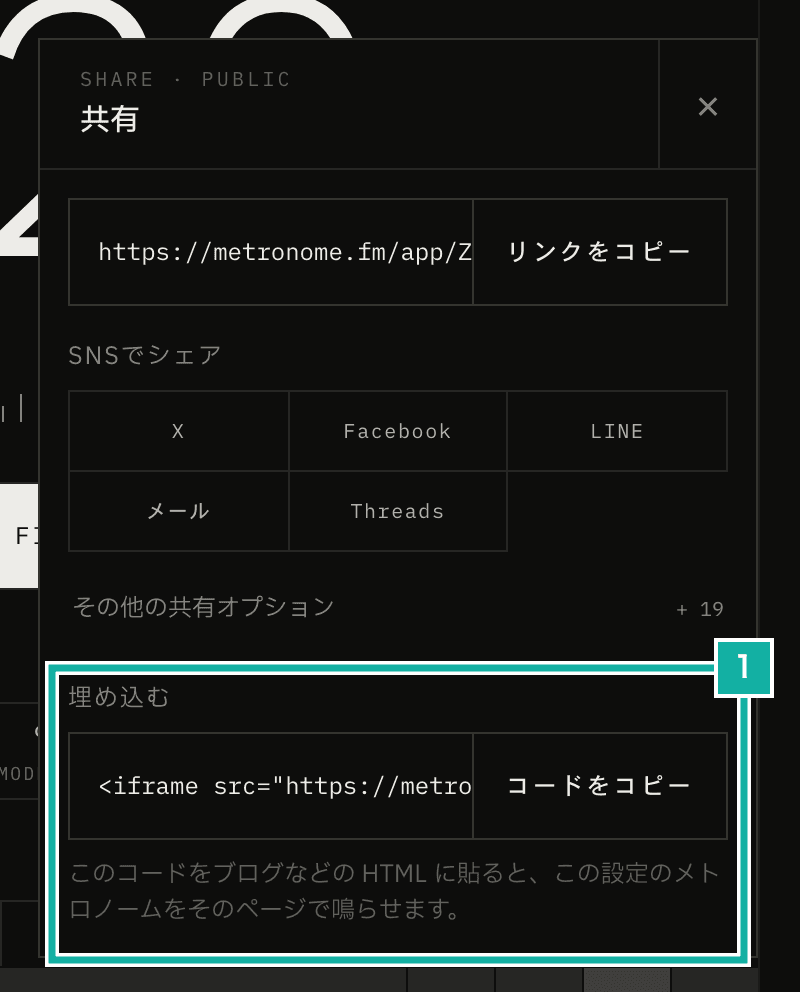
- Paste the copied code into your page's HTML. The button only works for public settings
The page then shows a small metronome with a play button. It plays with the same engine as the app, so beat accents, patterns, progressive mode, and multi-track all sound the same as in the app. We have in mind uses like putting a ready-to-play tempo on a practice log or a lesson page.
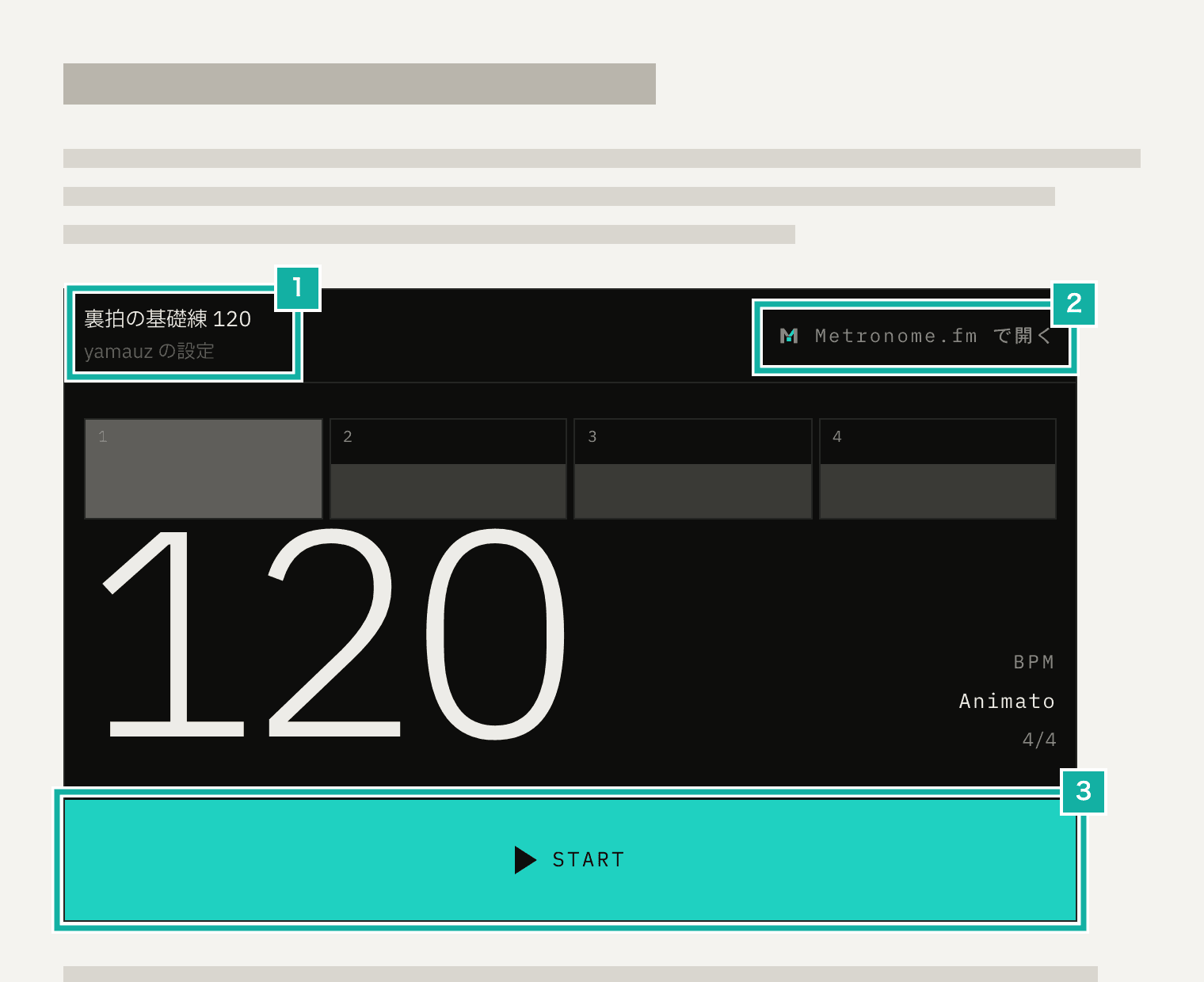
- The setting's name and creator
- Opens the same setting in the app (in a new tab)
- Play and stop. The Space key works too
This post covers the decisions we made along the way: how to limit which pages can go in an iframe, what changes inside an iframe on another site, and how to play with the app's engine while protecting the setting the visitor uses in the app.
Only one path can go in an iframe
Until now, Metronome.fm refused to load in an iframe on every page. This protects against clickjacking, where another site lays a transparent iframe over its own page and tricks people into pressing buttons they didn't mean to. We use two headers sent with each page for this: the CSP frame-ancestors 'none' and, for older browsers that don't support it, X-Frame-Options: DENY.
For embedding, we added a new page at /embed/{setting ID}. Only this page sends frame-ancestors *, and it doesn't send X-Frame-Options at all. The function that creates the headers takes an argument for whether framing is allowed.
// lib/security-headers.ts (excerpt)
const baseDirectives = (framing: Framing): Directives => ({
  "frame-ancestors": framing === "anywhere" ? ["*"] : ["'none'"],
  "base-uri": ["'self'"],
  "object-src": ["'none'"],
});

export const buildSecurityHeaders = (env: Env, framing: Framing = "deny") => [
  { key: "Content-Security-Policy", value: buildEnforcedCsp(framing) },
  // ALLOW-FROM is deprecated and can't say "anywhere", so pages that allow framing don't get this header
  ...(framing === "deny" ? [{ key: "X-Frame-Options", value: "DENY" }] : []),
  // …
];The headers are set per path in headers() in next.config.ts. Adding a rule for the embed page after the rule that matches all pages isn't enough to make embedding work. In Next.js, when two rules match the same path, a header with the same name is overridden by the later rule. A header that only one of the rules sets, however, stays as it is. On the embed page, the CSP is overridden by the later rule for embedding, but X-Frame-Options: DENY, which only the rule for normal pages sets, remains, so the page can't be embedded anywhere.
So we changed the path condition of the rule for normal pages so that it doesn't match the embed page (a negative lookahead in a regular expression).
// next.config.ts (excerpt)
async headers() {
  return [
    { source: "/((?!embed/[^/]+$).*)", headers: buildSecurityHeaders() },
    { source: "/embed/:settingId", headers: buildEmbedSecurityHeaders() },
  ];
},Only the single-level /embed/{setting ID} is excluded. At first, we excluded every path starting with /embed/, but that also let the 404 page for nonexistent paths like /embed/a/b load in an iframe. The site-wide 404 page has no reason to be in an iframe on another site. The fewer pages that can go in an iframe, the safer, so we limited it to one level. Our E2E tests check that the headers come out as intended on three paths: the embed page, an app screen, and a nonexistent path below the embed page.
Cookies don't reach an iframe on another site
When an iframe embedded on another site loads a page, the browser doesn't send SameSite=Lax cookies. On Metronome.fm, both the cookie that holds the sign-in state and the cookie that holds the language are SameSite=Lax. So inside an embed, every visitor is treated as a first-time visitor who isn't signed in. With that in mind, we made three decisions.
The first is that only public settings are shown. Even the owner doesn't see a private setting in an embed. If it showed only in the owner's browser, they wouldn't notice after pasting it that nobody else can see it. When a setting has been made private again or deleted, the embed shows a short notice that fits in the iframe.
The second is that playback limits are counted as a guest. People who aren't signed in (guests) have a limit on how long they can play each day. In the app, a guest's playback time is counted per browser ID stored in a cookie. That cookie doesn't reach the embed either, so we count per IP address. As in the app, time is counted every 10 seconds, and only while it's playing.
// app/embed/_components/embed-player.tsx (excerpt)
useEffect(() => {
  // Let playback wait for the result if play is pressed before the check finishes
  trackPlaybackLimitCheck(refreshPlaybackLimitState());
}, []);

useEffect(() => {
  if (!isPlaying) return;
  const interval = setInterval(() => {
    void syncPlaybackLimit({ tick: true });
  }, STATISTIC_SEND_INTERVAL_SECONDS * 1000);
  return () => clearInterval(interval);
}, [isPlaying]);The third is that sign-in doesn't happen inside the embed. When you reach the limit, the notice shows a Sign in link, as it does in the app. In the embed, pressing it opens the app in a new tab, where you continue signing in. Since the embed doesn't use the sign-in state, we also skip Clerk, our sign-in service, when the embed page is opened.
Playing with the app's engine without overwriting the setting you use in the app
We didn't build a separate small metronome for embedding. The demos in the manual and on the site's landing page use a simple player that's separate from the app, but it can't reproduce patterns or multi-track. The embed page loads the saved setting into the same container the app keeps its settings in (the store), and plays it with the same engine as the app. The metronome part only has the beats, the BPM, and the play button.
What we had to watch out for is that this store saves its contents to the browser's localStorage. The app uses this to restore your last setting the next time you open it. In an iframe on another site, the browser keeps storage separate, so it doesn't mix with the app's settings. But if you embed on one of Metronome.fm's own pages (like this blog), the storage is shared with the app, and the embedded setting would overwrite the setting you'd been working on in the app. So the embed page only stops writing.
// features/metronome/store/metronome-settings-store/persist.ts (excerpt, simplified)
const persistence = { enabled: true };

export const stopPersistingMetronomeSettings = () => {
  persistence.enabled = false;
};

// setItem of the storage passed to zustand's persist
setItem: (name, value) => {
  if (!isBrowserEnvironment() || !persistence.enabled) return;
  localStorage.setItem(name, JSON.stringify(value));
},The embed code
The code you copy is an iframe that fits the page's width, up to 640px.
<iframe src="https://metronome.fm/embed/{setting ID}" title="{setting name}"
width="100%" height="400" style="border:0;max-width:640px" loading="lazy"></iframe>The height is 400px. We first set it to 360px, but when we measured during development, the play button stuck out by 21px at that height. So we tightened the spacing and also raised the height to 400px.
title holds the setting's name, so screen readers can tell what's in the iframe. People name their settings freely, so we escape the name for HTML attributes before putting it in the code, so a " or < in it can't close the attribute early.