Until now, Metronome.fm only let you sign in with a Google or GitHub account. The sign-in screen is built in-house instead of using Clerk's UI, and I added an email address field to it. Enter your email address, a verification code arrives, and entering that code signs you in. There is no password.
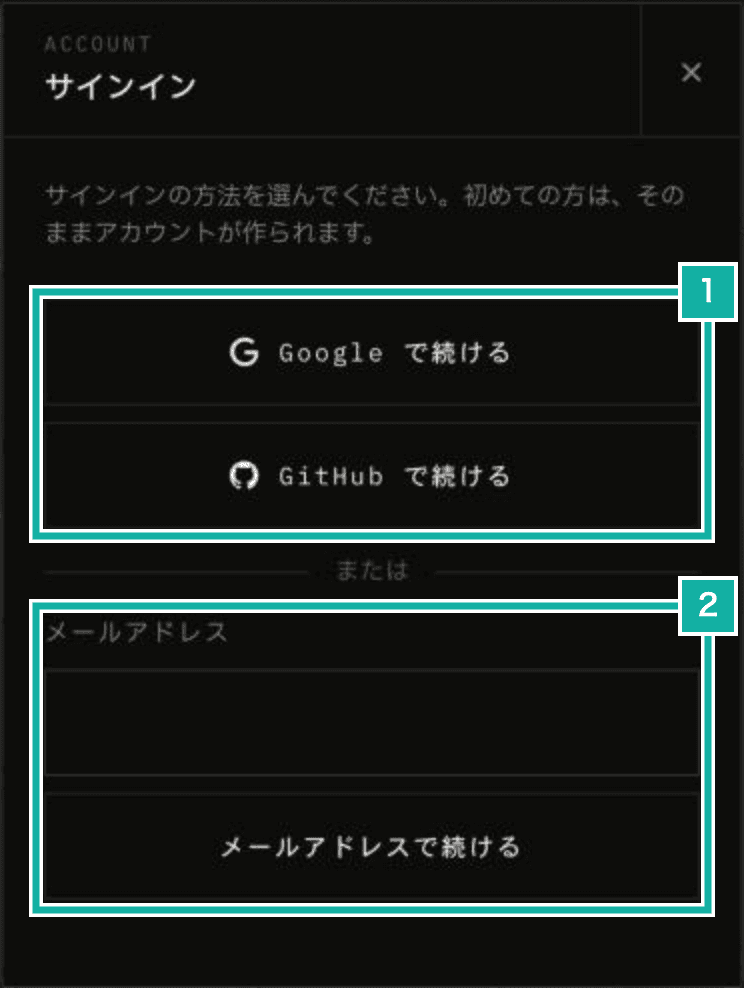
- The existing Google and GitHub buttons
- The new email address field
This post covers why I passed on other sign-in methods, the Clerk settings, how one field handles both signing in and creating an account, and why the E2E tests got stuck on bot protection.
Passing on Apple and X
With only Google and GitHub, I thought it was hard to get started for iPhone users and for musicians who don't use GitHub. So my first plan was to add Apple.
To use Sign in with Apple on the web, you have to create a Services ID and a key in Apple's developer portal, and that requires an Apple Developer Program membership ($99 a year). Paying an annual fee just for sign-in didn't seem worth it.
I also looked at X. Since February 2026 the X API is pay-per-use only, with no free tier for new developers. Every sign-in has Clerk read one X user record, which costs $0.01 each time, and credits are prepaid. Sign-in would stop working whenever the balance ran out, so I passed on X too.
That left verification codes sent by email. They cost nothing extra and work for people who'd rather not use a Google or other account. LINE, which is popular in Japan, will come separately.
Clerk settings
In the Clerk dashboard, under User & authentication › Email, I turned on signing in with an email address and verifying it when an account is created. Development and production are separate instances, so both have the same settings.
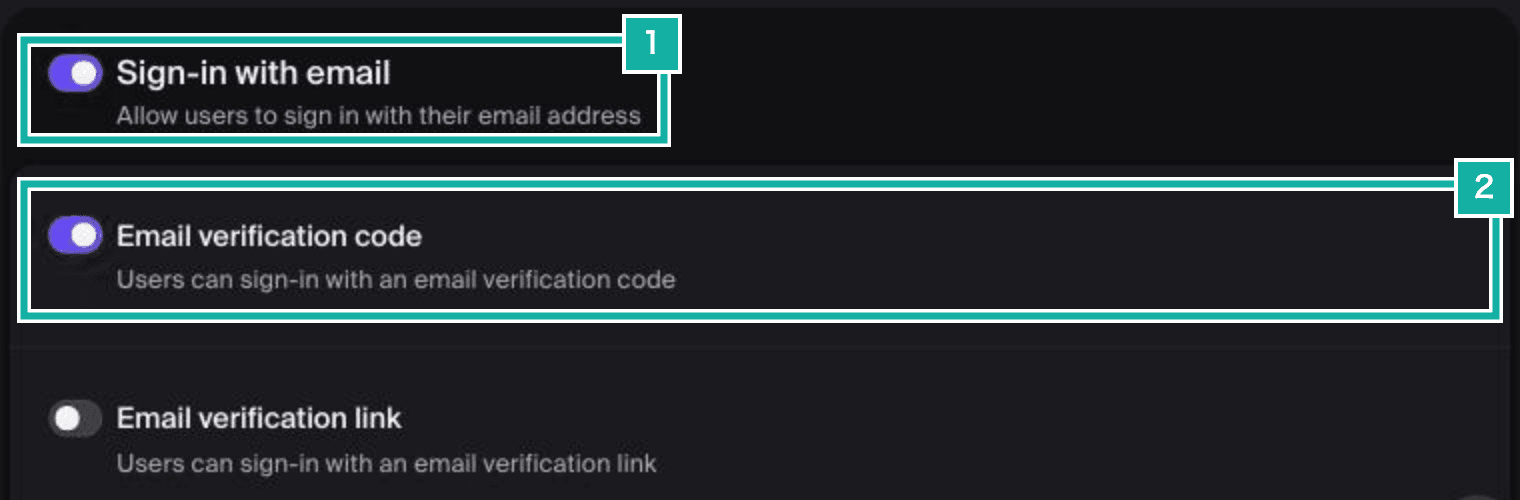
- Turn on signing in with an email address
- Verify with a code sent by email
Besides a code, Clerk can also verify by having you click a link in the email (Email verification link). A link gets awkward when you open the email on a different device from the one running the app, so I only use codes.
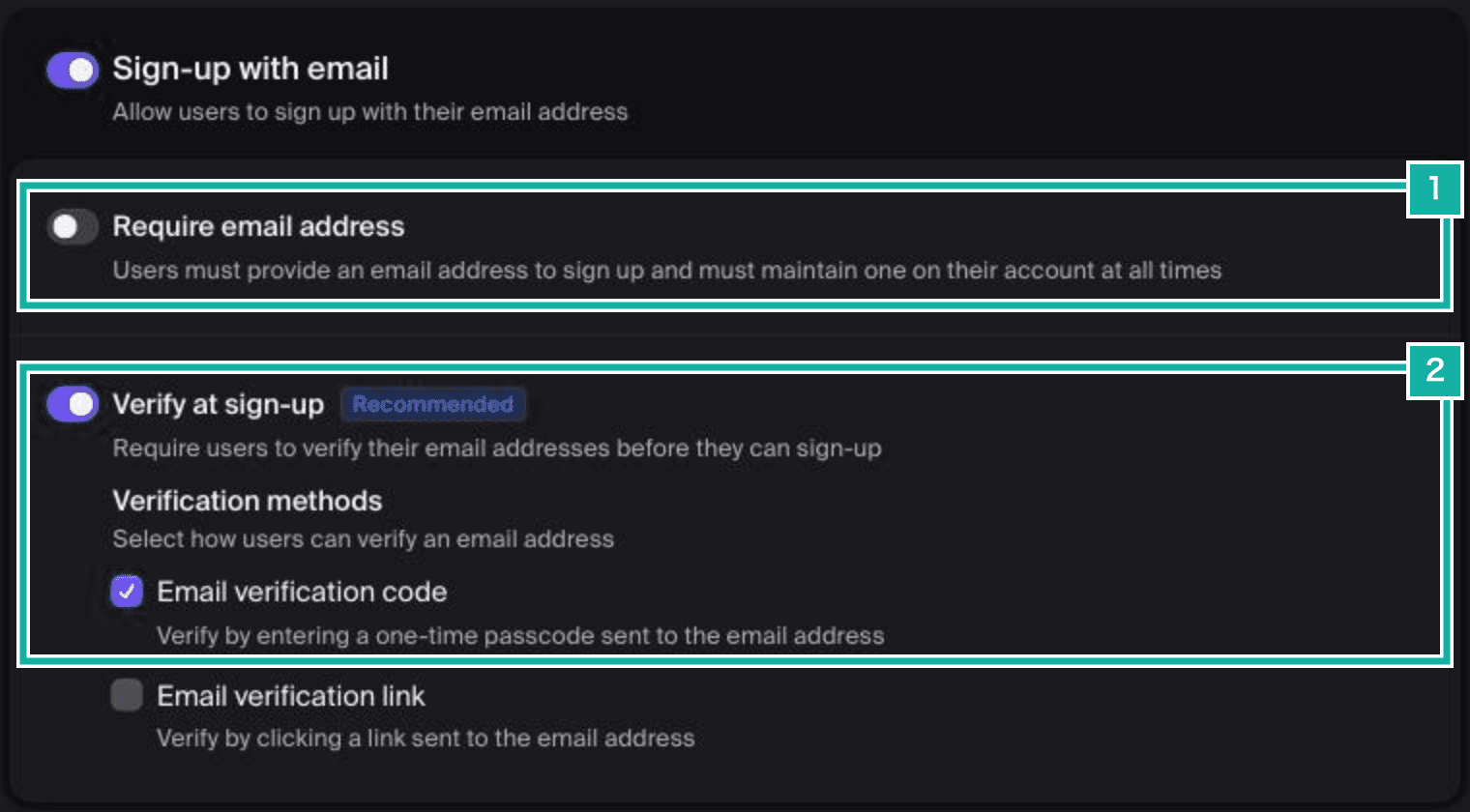
- Don't require an email address
- Verify the email address with a code when creating an account
Require email address stays off. LINE, which I'm adding next, doesn't return an email address unless you apply for permission. If email were required, people without one couldn't create an account with LINE.
You can also check the settings through Clerk's Frontend API at /v1/environment. If email_code is listed as a sign-in method, the dashboard settings have been saved.
{
  "used_for_first_factor": true,
  "first_factors": ["email_code"],
  "verifications": ["email_code"],
  "verify_at_sign_up": true
}One field for signing in and creating an account
The Google and GitHub buttons create an account right away for new users. I wanted email to work the same way, so there is a single field and the split happens after you submit.
First, the code is sent as a sign-in. If no account has that email address, Clerk returns a form_identifier_not_found error, and in that case the code is sent again as an account creation.
const sent = await signIn.emailCode.sendCode({ emailAddress });
if (!sent.error) {
  setEmailCodeFlow("signIn");
  setView({ kind: "emailCode", email: emailAddress });
  return FORM_OK;
}
// このメールアドレスのアカウントがなければ、そのままアカウントを作る
const notFound = parseClerkError(sent.error).some(
  (parsed) => parsed.kind === "identifierNotFound",
);
if (!notFound) return toErrorResult(sent.error, ["emailAddress"]);
const created = await signUp.create({ emailAddress });
if (created.error) return toErrorResult(created.error, ["emailAddress"]);
const signUpSent = await signUp.verifications.sendEmailCode();To check the code, the app calls signIn.emailCode.verifyCode or signUp.verifications.verifyEmailCode, depending on which way the code was sent, and signs you in with finalize once the flow is complete.
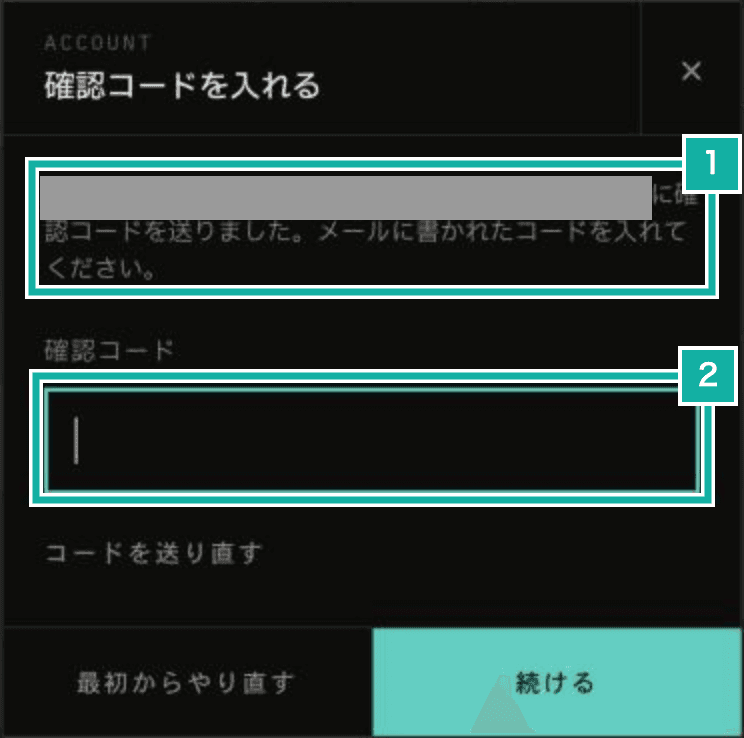
- The email address the code was sent to
- Enter the code you received
If you enter the same email address as an account you created with Google, you sign in to that Google account rather than getting a new one. The email address from Google is attached to the account as already verified.
E2E tests stuck on bot protection
Clerk runs bot protection (Cloudflare Turnstile) when an account is created. The E2E tests skip it with setupClerkTestingToken from Clerk's @clerk/testing.
Even so, the test that creates an account with a new email address got stuck right after submitting the address. The test that signs in to an existing account passed.
setupClerkTestingToken intercepts requests to Clerk's Frontend API with a Playwright route and rewrites captcha_bypass in the response to true. When this value is true, Clerk in the browser skips Turnstile. It only rewrites the value inside response and client, not inside meta.client in error responses.
With a new email address, the first sign-in attempt fails with a 422 (no such account). The meta.client in that response sets captcha_bypass back to false, so Turnstile runs during the account creation that follows, and in the E2E browser the check never finished. Reading window.Clerk.client.captchaBypass before and after submitting showed it change from true to false.
I fixed it by adding a route in the E2E tests that also rewrites meta.client. In Playwright, page routes run before browser context routes, so adding it after setupClerkTestingToken makes this route the one that answers.
await page.route(new RegExp(`^https://${escaped}/v1/`), async (route) => {
  const url = new URL(route.request().url());
  url.searchParams.set("__clerk_testing_token", testingToken);
  const response = await route.fetch({ url: url.toString() });
  const json: unknown = await response.json().catch(() => null);
  if (!isRecord(json)) {
    await route.fulfill({ response });
    return;
  }
  for (const client of [
    json.client,
    isRecord(json.response) ? json.response : undefined,
    isRecord(json.meta) ? json.meta.client : undefined,
  ]) {
    if (isRecord(client) && client.captcha_bypass === false) {
      client.captcha_bypass = true;
    }
  }
  await route.fulfill({ response, json });
});For the codes, the tests use test email addresses from Clerk's development instance (addresses containing +clerk_test), which accept 424242. No email is actually sent.
Dropping provider names from the copy
The note in the pricing table said "Google sign-in required", while the landing page and docs said "Google or GitHub". Since more sign-in methods are coming, I rewrote these so they no longer list names. The pricing table now says "Sign-in required", and the sign-in screen says "Choose how you'd like to sign in". Only places that need an explanation, such as the docs, say "a Google or other account, or your email address".