You can now play a drone, a note of your choice that keeps sounding. When you play along with a drone, notes that are off pitch make the sound waver (beating), so it helps you tune by ear and practice long tones.
You choose the note from the 12 notes C to B and an octave from 2 to 5 (A3 is 220 Hz). The sound is a sine wave or an organ-like tone. It can also play together with the metronome. You open the drone from the menu, or from DRONE in the bar at the bottom of the screen (the row of buttons with START).
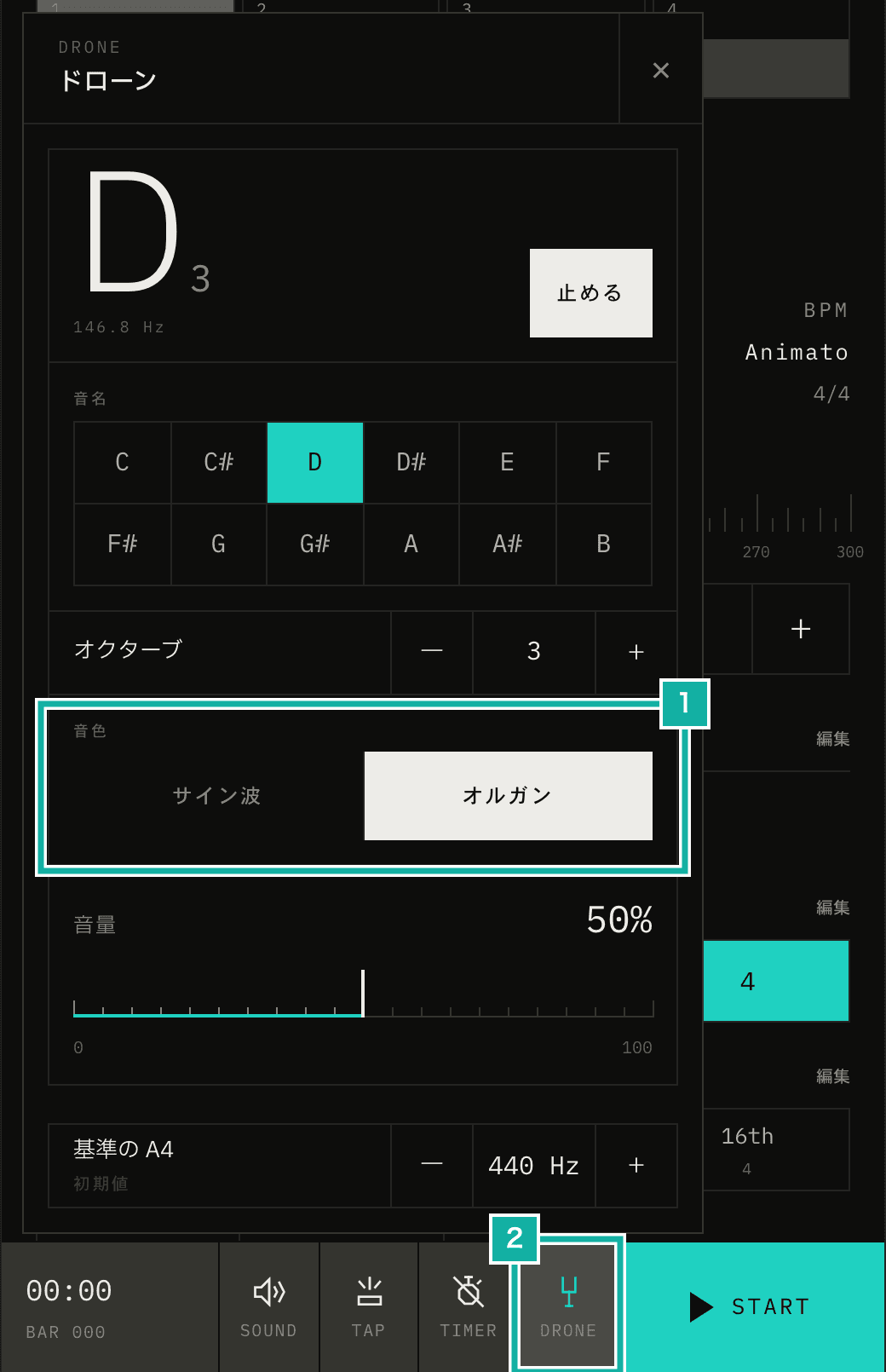
- Choose a sine wave or an organ sound
- While the drone plays, DRONE in the bar lights up
This article covers how the drone sound is made, in four parts: why it is generated with Web Audio instead of audio files, how the organ sound is built, how the note can change while playing without a click, and how it plays apart from the metronome.
Making the sound on the spot instead of using the bass tone audio
Metronome.fm already has a bass tone that plays a low note on the beat. Its audio is one MP3 per note for the 12 notes from E2 to D#3.
The drone does not use those files. Each MP3 is about 1.7 seconds long, only enough for one beat, while the drone keeps playing the whole time it is open. The range doesn't fit either: the MP3s cover E2 to D#3, while the drone lets you choose octaves 2 to 5. On top of that, the drone screen lets you set the reference A4 anywhere from 415 to 466 Hz. The pitch is decided on the spot from these choices.
So the sound comes from an OscillatorNode, and the frequency is calculated in equal temperament from the reference A4.
export const noteFrequency = (noteIndex, octave, referenceA) => {
  const midi = (octave + 1) * 12 + noteIndex; // A4 = 69
  return referenceA * 2 ** ((midi - 69) / 12);
};Building the organ sound from overtones
A sine wave is a pure tone with no overtones. Its pitch is easy to hear, but on small speakers like a phone's, low notes can be hard to hear. So as a second sound, you can also choose an organ-like tone with overtones.
An OscillatorNode accepts a PeriodicWave, which defines the waveform by listing the strength of each harmonic. The first entry is the DC offset, which makes no sound, so it is set to 0. The second is the fundamental, followed by the 2nd and 3rd harmonics.
// Strength of the fundamental, 2nd harmonic, and so on.
// Higher harmonics are kept low so it is easy to listen to for a long time
const ORGAN_HARMONICS = [0, 1, 0.5, 0.32, 0.16, 0.1, 0.05, 0.03];

const real = new Float32Array(ORGAN_HARMONICS.length);
const imag = Float32Array.from(ORGAN_HARMONICS);
oscillator.setPeriodicWave(context.createPeriodicWave(real, imag));By default, a PeriodicWave scales the resulting wave so its peak amplitude is the same no matter how many overtones there are or how strong they are (normalization). Adding overtones does not make it clip, and you can switch from the sine wave without changing the volume. Rendering A3 to an audio file with the same processing as the app and measuring it, both sounds peaked at -10.9 dB (where 0 dB is the ceiling just before clipping).
Changing the sound while playing, without a click
Changing the volume or frequency all at once breaks the waveform mid-cycle and makes a click. Since you can change the note, octave, sound, and volume while the drone plays, the values move toward their targets gradually with setTargetAtTime.
const now = context.currentTime;
// Pitch eases with a 10 ms time constant, volume with 40 ms
oscillator.frequency.setTargetAtTime(frequency, now, 0.01);
gain.gain.setTargetAtTime(toGain(volume), now, 0.04);setTargetAtTime approaches the target along an exponential curve. The time constant sets how fast it changes, and after three time constants, about 95% of the gap is closed. That is about 30 ms for pitch (10 ms) and about 120 ms for volume (40 ms). Pitch changes quickly so a note change does not sound like a slide. Volume changes more slowly so it does not click.
When the drone starts, the volume rises from zero. When it stops, the volume falls toward zero, and the OscillatorNode stops 0.3 seconds later, once the volume is low enough.
A word on how loud the drone is. The volume slider value (0 to 100%) is squared and then used as the gain multiplier (the GainNode value). At 100%, the gain is 0.3, loud enough not to be buried when played together with the metronome's bass tone (gain 0.22).
const toGain = (volume) => 0.3 * volume ** 2;Playing apart from the metronome, and stopping on close
The metronome plays its sounds beat by beat in an AudioWorklet, on a dedicated audio thread separate from the one that runs the page. The drone plays in a separate AudioContext, so it keeps playing when the metronome stops and can play at the same time.
On iPhone, the drone keeps playing with the screen off. To make that work, it switches the Audio Session to playback before it starts.
If DRONE is in the bar, the drone opens as a panel above it. If not, it opens as a dialog (you choose which buttons appear in the bar in Display settings). Either way, the drone plays only while it is open and stops when you close it. Neither covers the bar at the bottom of the screen, so you can press START there to play the metronome while the drone is open.