You can now play a 1- or 2-bar count-in before bar 1 after you press START. It helps when you want to come in right at the top of a piece.
Until now, only recording had a count-in: 8 beats. It was fixed at 8 regardless of the time signature, so in 3/4 it came out as 2 bars and 2 beats, which made the top of bar 1 hard to find. Now the count-in for both playback and recording is played the same way, and its length is set in bars.
This post covers how the settings are split, the count-in sound, how the count-in is played on the audio thread, and how the timer and statistics are kept from counting it.
Separate settings for playback and recording
Pressing SOUND in the bar at the bottom of the screen opens the audio settings, which now have two count-in rows. Each lets you choose Off, 1 bar or 2 bars.
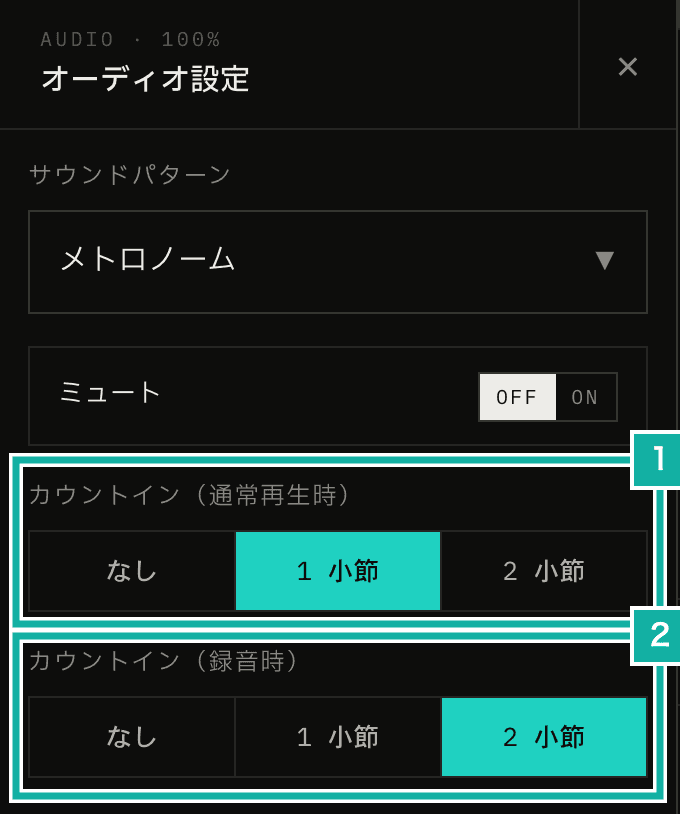
- Count-in (playback). Used for normal playback
- Count-in (recording). Used when you press START while armed to record
When you press START while armed to record (with the microphone ready to record), the recording setting is used. Otherwise the playback setting is used. Each time you press START, only one of the two settings applies, so two count-ins never play back to back. You can, for example, practice with no count-in and still get 2 bars when you record.
A bar has as many beats as the current time signature: 3 beats in 3/4, 7 in 7/8. The tempo is the same as bar 1, and in progressive mode, which raises the BPM bar by bar, it's the start BPM. When playback starts in the middle of a bar, as with tap tempo, there's no count-in.
If you had the old 8-beat recording count-in turned on, your recording count-in is now 2 bars. In 4/4 that's the same 8 beats as before; in 3/4 it's 6 beats.
A count-in sound that differs from the click
Whatever sound pattern you choose, the count-in plays in a high electronic tone that differs from the click. It's a short 80 ms sine tone: 1760 Hz on the first beat of each bar and 880 Hz on the others. Because the first beat is an octave higher, you can hear where the bar changes even in a 2-bar count-in.
case "countIn": {
  // Follows the master volume only (audible even with accent and normal volume at 0)
  const gain = master * COUNT_IN_GAIN;
  const stopAt = time + COUNT_IN_SECONDS;
  voices.push({
    source: {
      type: "sine",
      frequency: sound.accent ? 1760 : 880,
    },
    startTime: time,
    endTime: stopAt,
    gain: 1,
    envelopes: [
      [
        { time, value: 0, curve: "set" },
        { time: time + 0.002, value: gain, curve: "linear" },
        { time: stopAt, value: 0.001, curve: "exponential" },
      ],
    ],
    fadesOutOnStop: false,
  });
  break;
}The click sounds include an electronic beep too, but the count-in doesn't follow the sound you pick. If it did, with some sounds you couldn't tell it apart from the clicks from bar 1 on. It follows only the master volume, so you still hear it with the accent volume or the normal (unaccented beat) volume turned down. It stays silent while muted.
The count-in is played by the sequencer on the audio thread
In this app, beats are counted by a sequencer running on the AudioWorklet audio thread. It decides which beat sounds when and with what sound, and tells the main thread each time a beat plays.
The count-in is played by that sequencer too. When playback starts, it gets the number of count-in beats, plays those first, and then starts bar 1.
advance: (untilTime) => {
  while (!stopped && nextBeatTime < untilTime) {
    if (countInRemaining > 0) {
      advanceCountInBeat();
    } else if (!advanceBeat()) {
      break;
    }
  }
  return takeOutput();
},Count-in beats are reported as a separate kind of message (countIn), not as the beats from bar 1 on (beat). Recording starts on the first beat, and the bar timer counts bars with bar. If the count-in were sent as beat, every piece of code that receives beat would need an extra "skip it if it's a count-in" check. With a separate kind of message, code that doesn't deal with the count-in keeps working as before.
| {
    type: "countIn";
    time: number;
    /** Beat number within the bar */
    beat: number;
    /** Count-in beats left, including this one */
    remaining: number;
    interval: number;
    pulses: BeatPulse[];
}The other way round, the parts that should move during the count-in also listen for countIn: the beat display, the pendulum, and vibration and screen flashes on the beat. While the count-in plays, the bar at the bottom of the screen (where START and the elapsed time are) shows the beats left instead of the bar number.
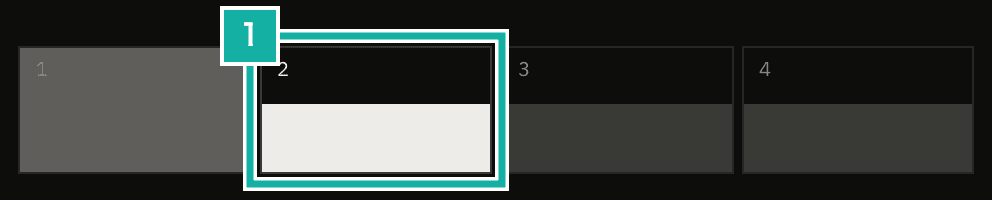
- The beat display keeps moving with the beats during the count-in

- The elapsed time stays at 0, and the beats left (COUNT 3) replace the bar number
The 8-beat recording count-in now uses the sequencer too
The old 8-beat recording count-in was played outside the sequencer. The recording feature scheduled 8 AudioBufferSourceNodes on the main thread, then handed the sequencer the time after the 8th beat so it would start bar 1 there. The sound was the click used by the BPM detection feature.
That way, the sequencer never saw the count-in beats. The beat display and the pendulum stood still. And to match the 8 beats to the length of a bar, the main thread would have had to work out the beat count from the time signature separately from the sequencer. Now the 8-beat count played outside the sequencer is gone, and recording uses the sequencer's count-in as well.
All the recording feature keeps is one function that, when playback starts, returns the recording count-in length if you're armed to record. In the code, the metronome's playback part doesn't call the recording feature directly. So the recording feature registers this function, and the playback part calls it every time playback starts.
const countInBeats =
  startBeat === 0
    ? countInBeatsOf(
        // Recording setting while armed, playback setting otherwise
        resolveCountInOverride() ?? useUserSettingsStore.getState().countInBars,
        state.timeSignature[0],
      )
: 0;During the count-in, the recording strip shows COUNT IN. This label is also switched by the recording feature when it receives a countIn message.
Keeping the timer and statistics from counting the count-in
Three things don't count the count-in: the bar count, the bar timer, and progressive mode. All of them are based on the bars the sequencer counts from bar 1 on.
What needed changes was the code on the main thread that measures time.
- Seconds and minutes timer: it used to start a
setIntervalthe moment playback started. With a count-in, it now starts when the firstbeatevent arrives. - Elapsed time and statistics: the start time is now the moment playback started plus the count-in length (beats × 60 ÷ BPM). Statistics count from that time, so playback stopped during the count-in isn't recorded.
Elapsed time and statistics can work this way because the count-in length is known before playback starts. The start time can be set right away instead of waiting for bar 1.
Tests
The sequencer's unit tests check the times of the count-in beats and that only the first beat of each bar is accented. They also check that bar 1's accent comes exactly one beat after the last count-in beat, and that the bar timer and progressive mode don't count the count-in.
The E2E tests (which run the app in a browser) collect a log of the sounds played (the kind of sound and when it plays). Count-in sounds are logged as countIn, so the tests count 4 of them for 1 bar of 4/4 and 6 for 2 bars of 3/4. For recording, they check that recording starts at bar 1 after the count-in, and that the playback count-in doesn't play while armed.