Metronome.fm now lets you choose compound meters such as 6/8 and odd meters such as 7/8. You can choose the bottom number of the time signature (2, 4, 8 or 16) and beat groups, such as 7/8 split into 2+2+3.
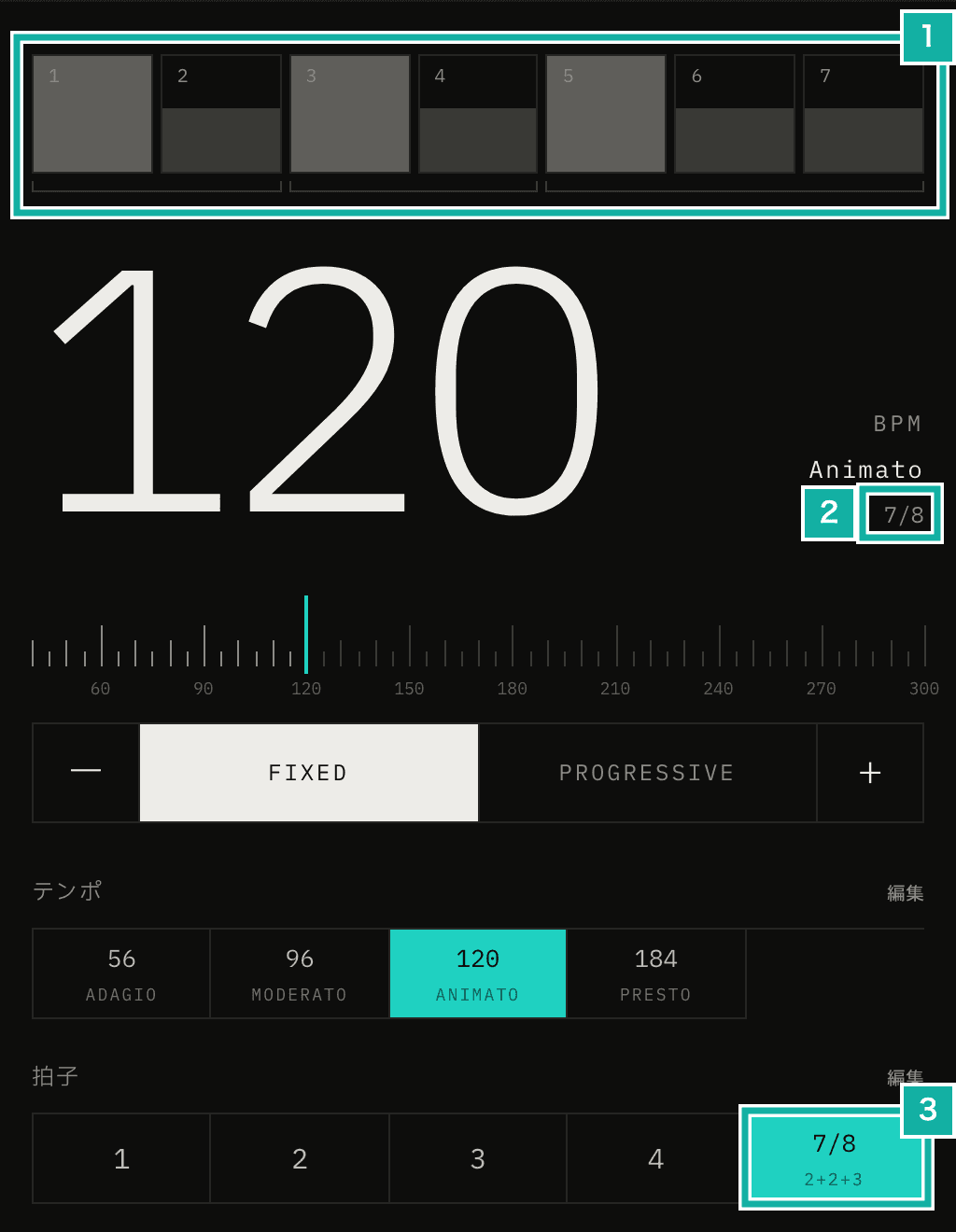
- The beat meter and the group brackets under it. The first beat of each group (beats 1, 3 and 5) becomes an accent
- The time signature
- The button in the time signature row, with the groups underneath
That said, if you only listen to the clicks, the app could already play the same thing with a beat count and accents. This post covers why we made the bottom number and beat groups selectable anyway, and how they are stored.
The same clicks were already possible
When you choose 9/8 (3+3+3), beats 1, 4 and 7 of the nine beats become accents. That sounds exactly the same as choosing 9 beats (9/4) and turning beats 4 and 7 into accents by hand.
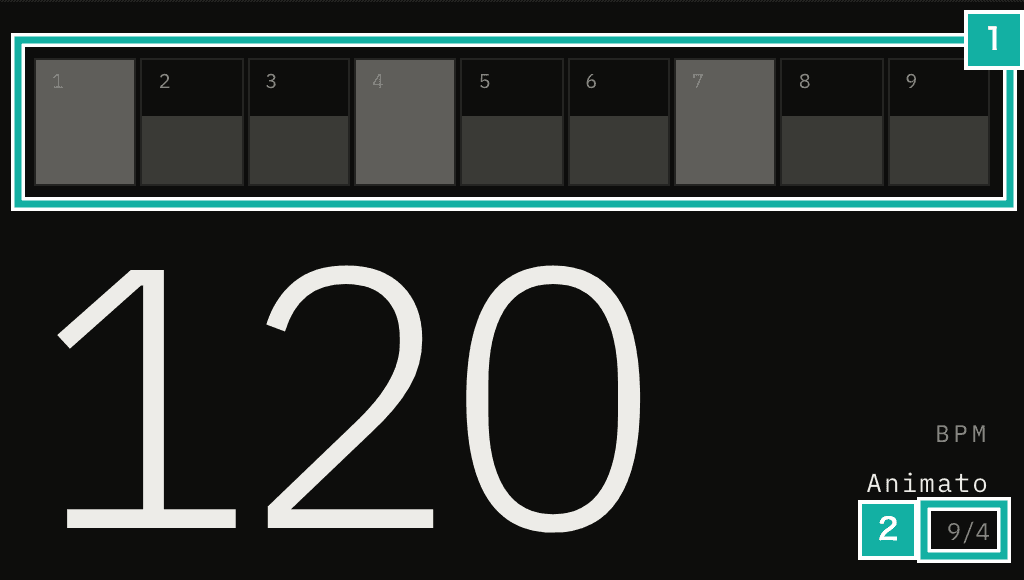
- The beat meter. No group brackets
- Shown as 9/4
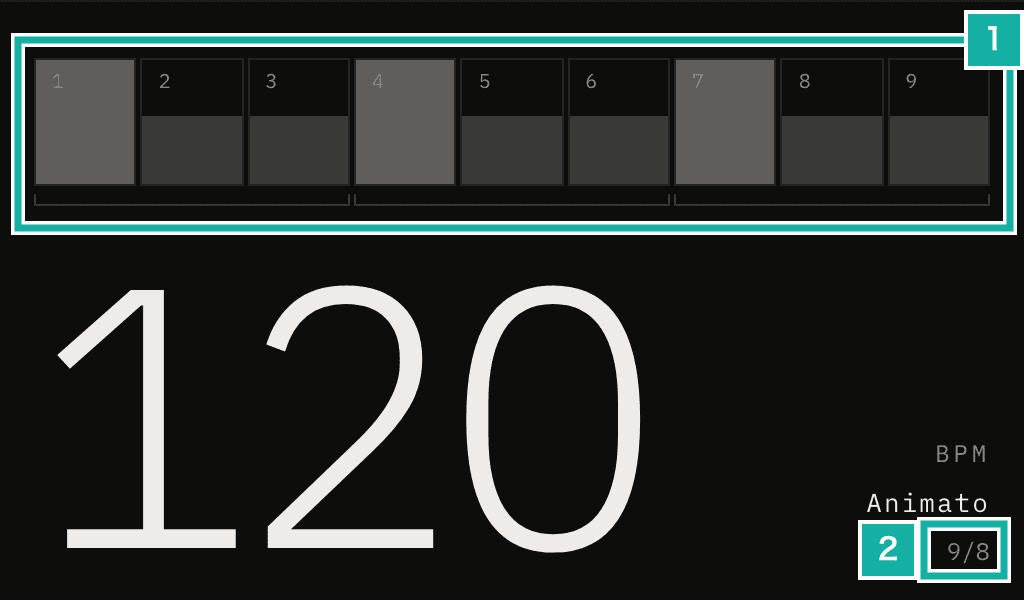
- The beat meter, with brackets for three groups
- Shown as 9/8
The sequencer, the part of the app that plays the beats, advances by 60 / BPM seconds per beat and starts a new bar after the number of beats (the top number). It looks at neither the bottom number nor the groups.
// Schedule the sounds for one beat, then move to the next (excerpt)
const beatDuration = 60 / bpm;
pushBeatSounds(beatTime, beatDuration);
nextBeatTime += beatDuration;
currentBeat = (currentBeat + 1) % settings.timeSignature[0];At the same BPM, the spacing of the clicks and the position of the accents do not change. This change did not touch the sequencer either.
Why we made the bottom number and groups selectable anyway
What differs is everything other than the sound.
9 beats (9/4) + accents by hand | 9/8 (3+3+3) | |
|---|---|---|
Time signature shown | 9/4 | 9/8 |
Group brackets | None | Three |
Stored time signature | "9" | "3+3+3/8" |
Accents | Set one beat at a time | Placed on the first beat of each group when you choose it |
The format of the stored string is covered later, in the section on storing it without a new database column.
A setting built from a beat count and accents is saved only as "9/4 with three accents". Someone you share it with cannot tell whether it was meant to be 9/8. People who wanted to practice 6/8 had to change the beat count and then fix the accents one beat at a time.
So we made the bottom number and the groups selectable. 6/8 can now be chosen and saved as 6/8, and 7/8 as 2+2+3.
The BPM counts the bottom note
For meters with a bottom number of 8, we had to decide which note the BPM measures.
- Count the bottom note (chosen): 6/8 plays six 8th notes, and the BPM is the speed of the 8th note
- Count the groups (not chosen): in 6/8 at BPM 60, a dotted quarter plays 60 times a minute
For 6/8 and 12/8 alone, counting the groups is closer to how the music is written. In 7/8 counted 2+2+3, though, the groups are two, two and three 8th notes long. There is no single group to count as one beat, so the meaning of the BPM would shift.
Counting the bottom note means one click is one beat of the BPM in every meter. The sequencer and the MP3 export did not need to change. To play 6/8 with a dotted quarter at 60, set the BPM to 180.
Beat groups are stored separately from accents
We also compared two ways to store the groups.
- Store the groups (chosen): save groups such as
[2, 2, 3]with the time signature and put accents on the first beat of each group - Only arrange the accents (not chosen): choosing "7/8 (2+2+3)" just arranges the accents in that shape, and the groups are not saved
Only arranging the accents would add nothing to what is saved. But once you change a single accent, the original groups are lost, and there would be no brackets to show.
Because the groups are stored, the brackets stay on screen even after you change accents, and the groups remain in saved and shared settings. Choosing a grouped meter only places accents on the first beat of each group; after that you can change each beat freely.
Storing "2+2+3/8" without a new database column
Saved settings already stored the time signature in the database as a string with only the top number, such as "4". We decided to put the time signature, written the usual way, into that same column.
Time signature | Stored string |
|---|---|
4/4 | "4" |
6/8 | "6/8" |
7/8 (2+2+3) | "2+2+3/8" |
A meter with a bottom number of 4 and no groups is written with the top number only. Every "4" saved so far still reads as 4/4. Since no column was added, no database migration was needed.
// Turn a time signature into a string (excerpt)
export const formatMeterKey = ({ numerator, denominator, grouping }: Meter) => {
  const normalized = normalizeBeatGrouping(grouping, numerator);
  if (normalized.length > 0) {
    return `${normalized.join("+")}/${denominator}`;
  }
  return denominator === 4 ? `${numerator}` : `${numerator}/${denominator}`;
};The same string is used for the names of time signature presets (the buttons in the time signature row, covered in the next section) and for the value of the Set time signature keyboard shortcut. You can write 6/8 or 2+2+3/8 there.
Typing in meters that are not listed
Edit in the time signature row (number 3 in the first image) lists 2/2, 3/2, 3/8, 6/8, 9/8, 12/8, 5/8 (2+3 and 3+2) and 7/8 (2+2+3, 2+3+2 and 3+2+2). Any other meter can be typed into Add a time signature.
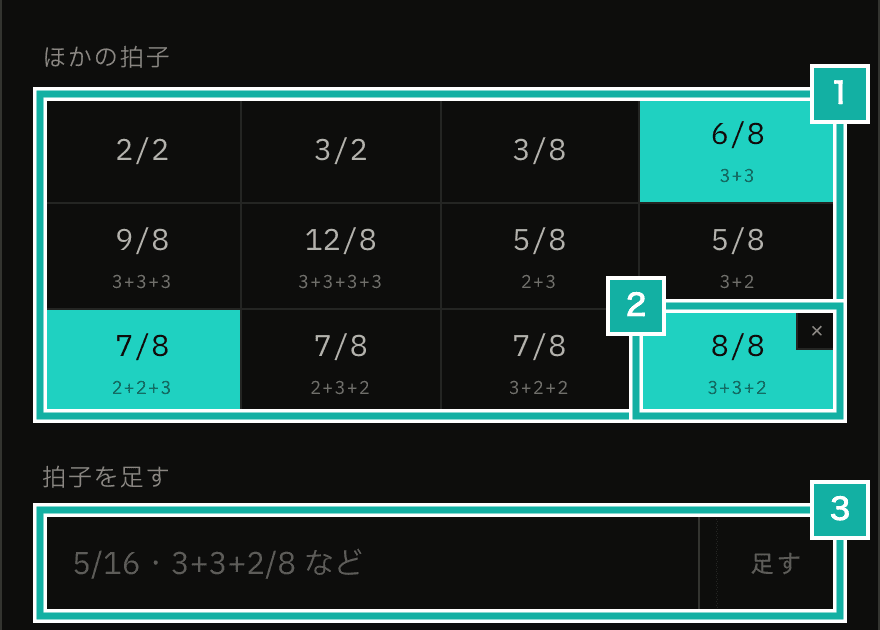
- Compound and odd meters
- A typed-in meter. Remove it with ×
- Type something like 5/16 or 3+3+2/8
The bottom number can be 2, 4, 8 or 16, with up to 16 beats. The beat limit matches the existing limit for meters with a bottom number of 4, and the beat meter is built so that 16 beats fit even on a phone.
Works with AI settings edits too
The feature that lets you ask the AI to edit your settings exchanges the settings as JSON. We added the bottom number (beatUnit) and the groups (beatGrouping) to it.
Until now, the prompt taught a workaround for requests like "make it 6/8": One was six beats, with one 8th note per beat and accents on beats 1 and 4. The other was two beats, with guide notes that split each beat into three. Now that the bottom number and groups can be written, the settings can come back as 6/8 itself. We also added to the prompt that a request for 7/8 counted 2+2+3 should come back with accents on the first beat of each group.
This JSON has the same shape as the settings files you export and import. The new fields have values to use when they are left out (4 and no groups), so settings JSON exported earlier still imports as before.
Things to watch for
Guide notes in Pattern (where you choose the guide notes played within a beat) and the grid in custom beats (rhythms you build by placing sounds on a grid that splits each beat) divide one beat, which is the bottom note. If you choose the 8th button in Pattern in 6/8, each 8th note is split in two, so it plays 16th notes. The button still says 8th, so keep this in mind when the bottom number is 8.