You can now play the metronome click in only the left or right ear. Hear the click in one earbud and the backing track or your own instrument in the other. On stage, you can send the click to only one side of your in-ear monitors.
Sending sound to the left or right is called panning. With the usual Web Audio API approach, panning this app's sound to one side made it twice as loud. This post covers the setting, where the panning is calculated, and how I kept the sound from getting too loud.
Where the setting is
The audio settings, which open when you press SOUND in the bar at the bottom of the screen, now have an Output channel field. You choose from Left, Both, and Right.
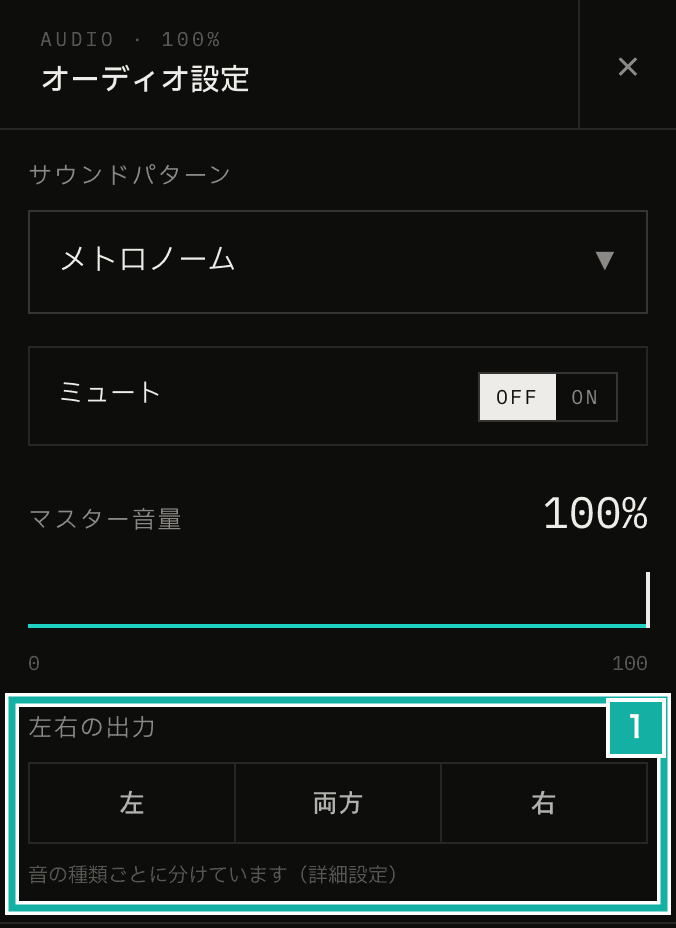
- Output channel. Pressing one sets every sound type to that channel.
I made it a three-way choice instead of a slider that moves the sound gradually. When you put the click in one ear, there is no reason to pan it halfway.
You can set the channel for each sound type. There are four: accent for the strong beats, normal for the other beats, guide (guide notes) for the finer subdivisions between beats, and base (the base tone), a low sound layered on the click. Under Advanced, Output channel by sound lets you, for example, send only the beat clicks (accent and normal) to the left and keep the guide on both sides.
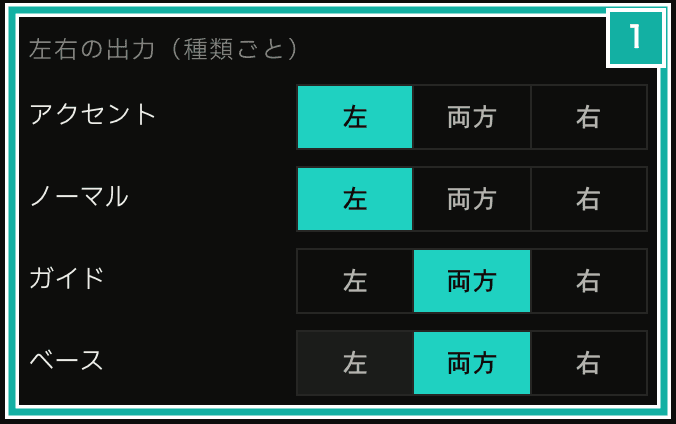
- The channel for each sound type. In this example only the beat clicks (accent and normal) go to the left.
The overall three-way choice is a button that changes all four types at once. When the types point in different directions, none of the overall options is selected, and the panel says the sounds are split by type.
If the overall channel and the per-type channels were stored separately and combined, it would be hard to tell which side the guide plays on when the overall setting is Left and the guide is Right. So the only values the app keeps are the four per-type channels.
Panning inside the AudioWorklet instead of using a StereoPannerNode
The usual way to pan in the Web Audio API is to connect a StereoPannerNode. In this app, though, the sound is generated by an AudioWorklet whose output already has two channels (left and right). The worklet mixes each sound it plays (a voice) into the output buffer one by one. If it multiplies each voice by a left and a right gain factor (coefficient) while mixing, it can pan without any extra node.
To pan each sound type differently with StereoPannerNode, I would need to split the output into one stream per type. Inside the worklet, each voice only needs a pan value. The same calculation also works for the feature that exports the metronome sound as an MP3 file.
Panning to one side doubles the level
StereoPannerNode had one more problem: with stereo input, the sound you pan to one side gets louder.
When the input has two channels, StereoPannerNode adds the other channel, unchanged, to the side you pan toward. If both channels carry the same sound, panning fully left makes the left channel twice as loud (+6 dB). I checked this in the browser with a signal at an amplitude of 0.5 on both channels.
Input | Center (pan 0) | Left only (pan -1) |
|---|---|---|
Stereo (0.5 on both channels) | L 0.5, R 0.5 | L 1.0, R 0 |
Mono (0.5) | L 0.354, R 0.354 | L 0.5, R 0 |
The worklet's output has two channels, so connecting it to a StereoPannerNode gives the first row of the table (stereo). Among the click sounds, the acoustic Metronome sound comes from a stereo file with exactly the same sound on both channels. The electronic sounds are generated in one channel and played on both sides. Either way, panning left would play the click at twice the level.
So the side you pan toward gets a mix of both channels (their average), and the other side is silenced. If both channels carry the same sound, the panned side stays at the same level as in the center. Sources whose channels differ slightly, like the acoustic Drum sound, don't get too loud either, because the two channels are averaged.
// Takes a pan from -1 (left only) to 1 (right only) and returns
// the coefficients from the input channels to the output channels
export const panMatrixOf = (pan: number): PanMatrix => {
  const amount = Math.min(1, Math.abs(pan));
  const near = 1 - amount / 2; // same-side sound on the panned side
  const cross = amount / 2; // opposite-side sound mixed into the panned side
  const far = 1 - amount; // the other side
  return pan < 0
    ? { leftToLeft: near, rightToLeft: cross, leftToRight: 0, rightToRight: far }
    : { leftToLeft: far, rightToLeft: 0, leftToRight: cross, rightToRight: near };
};At a pan of -1 (left only), the left channel gets a mix of half of each input channel and the right channel gets nothing. At a pan of 0 (both), left stays left and right stays right, as before.
Tests
Playwright E2E tests can't capture the audio output itself. So this app already records when the worklet plays each sound, to check beat timing. I added a pan field to that record, and the tests use it to check which side each sound played on.
The tests check that every click record has a pan of -1 when you choose Left and press play, and that only the accent has a pan of 1 when you set just the accent to Right under Advanced. Sounds on both sides (pan 0) get no pan field in the record, so the normal rows below show undefined.
const sounds = await playUntilClickCount(page, audioRecorder, 5);
expect(sounds.map((sound) => ({ kind: sound.kind, pan: sound.pan }))).toEqual([
  { kind: "accent", pan: 1 },
  { kind: "normal", pan: undefined },
  { kind: "normal", pan: undefined },
  { kind: "normal", pan: undefined },
  { kind: "accent", pan: 1 },
]);Unit tests cover the left and right coefficients (the values panMatrixOf returns).