Android phones can now vibrate on the beat (iPhones can't; I explain why below). It helps when you practice in a loud room, or when following the beat by ear alone is hard. Muting all sound in the audio settings doesn't stop the vibration, so you can keep time by vibration alone, with no sound.
Vibrating from the browser is just a call to navigator.vibrate(), but keeping it in sync with the sound took some work. Fewer browsers support it than I expected, and on a real phone I also got stuck when the vibration request went through but nothing vibrated. This post covers those three things: staying in sync with the sound, which browsers vibrate, and why my phone didn't vibrate at first.
Where the setting is
The audio settings, which open when you press SOUND in the bar at the bottom of the screen, have a "Vibrate on beat" row. When it's on, accent beats (the beats played stronger) vibrate for 60 ms and normal beats (all the others) for 25 ms. Beats you've muted in the beat settings (beats that play no sound) don't vibrate. With a custom beat, it vibrates at every position where a click sounds.
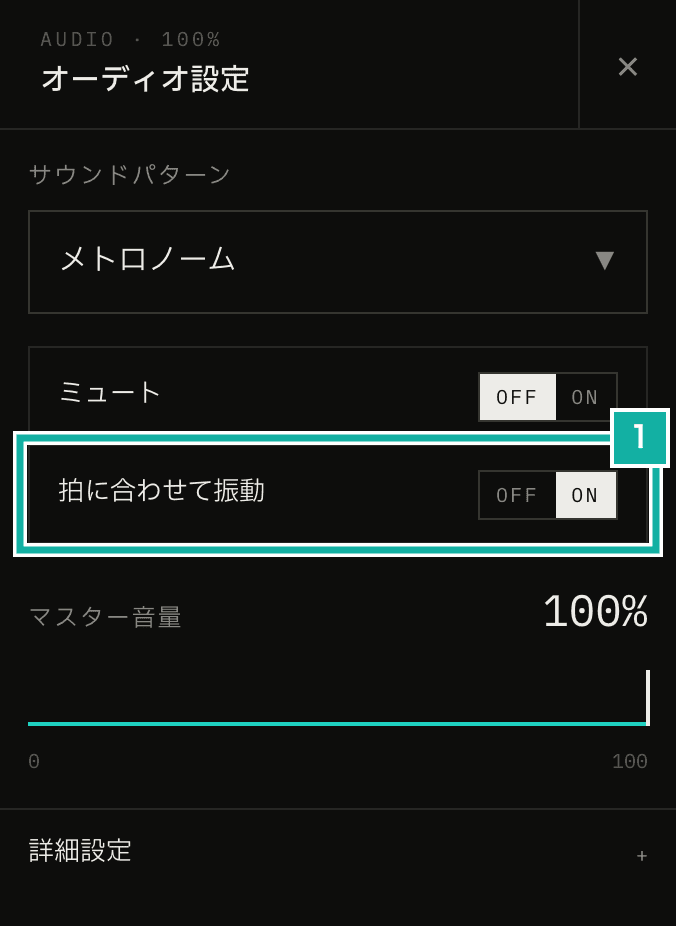
- Vibrate on beat. It only appears where vibration works
The Web Vibration API only lets you choose how long to vibrate, and a pattern of vibrating and pausing. You can't set the strength (amplitude). Accent and normal beats differ by length only.
Vibrating in sync with the sound
The app plays its sound on the audio thread of an AudioWorklet. The audio thread also counts the beats and sends the main thread a message saying "this beat sounds at this time". The pendulum display uses those messages to move in sync with the sound.
navigator.vibrate() can't be called from the audio thread, only from the main thread. So I added the time of each click, and whether it's an accent (pulses), to the beat message. A custom beat can click several times within one beat, so one beat's message can carry several pulses.
// While working out the clicks for each beat, also collect the time and strength for vibration
if (event.beat.state !== "muted") {
  const accent = event.beat.state === "accent";
  const same = pulses.findIndex((pulse) => pulse.time === soundTime);
  if (same === -1) {
    pulses.push({ time: soundTime, accent });
  } else if (accent) {
    // If an accent and a normal click overlap in a custom beat, use the accent
    pulses[same] = { time: soundTime, accent };
  }
}The message reaches the main thread a little before the sound is played. On top of that, you actually hear the sound later by the output latency (outputLatency). On the main thread, the app works out which point on the audio clock is coming out of the speaker right now, waits from there until the click's time, and then vibrates.
const context = audioEngine.getAudioContext();
// Sound is heard later by the output latency, so find the time being heard now
const now = context.currentTime - (context.outputLatency || 0);
for (const pulse of event.pulses) {
  const delayMs = (pulse.time - now) * 1000;
  // Skip vibrations more than 30 ms late; they would feel off
  if (delayMs < -30) continue;
  setTimeout(
    () => navigator.vibrate(pulse.accent ? 60 : 25),
    Math.max(0, delayMs),
  );
}setTimeout is delayed when the main thread is busy, so the vibration is less precise than the sound.
When you stop playback, the app cancels the scheduled vibrations and calls navigator.vibrate(0) to stop any vibration. While the page is in the background the browser won't vibrate, so nothing is scheduled.
Muting all sound in the audio settings only stops the audio thread from making sound; the beat messages keep coming. That's why vibration keeps going while muted.
Only Chrome and similar browsers on Android vibrate
When I checked support before building it, the only browsers that actually vibrate were Chrome and other Chromium-based browsers on Android.
Environment | navigator.vibrate | Vibrates |
|---|---|---|
Chrome and similar on Android | Present | Yes |
iPhone and iPad (any browser) | Missing | No |
Firefox on Android | Present | No |
Chrome and similar on a computer | Present | No (no vibration motor) |
Safari on iPhone has never supported the Vibration API. Every browser on iPhone, Chrome included, runs on WebKit, so they all behave the same.
Since iOS 17.4, toggling an <input type="checkbox" switch> gives haptic feedback. A workaround spread that toggled it from JavaScript to vibrate, but it's reported to have been closed in iOS 26.5. Haptics now only fire when a finger presses the switch. A metronome ticks on a timer, so this approach didn't work. Vibrating on iPhone needs a native app.
Firefox on Android has navigator.vibrate, but calling it doesn't vibrate. Firefox is reported to check for a vibration permission without ever showing a prompt to ask for it, so the call is treated as denied. The W3C's 2024 implementation report for the Vibration API (test results for each browser) also found that only Chrome on Android passed the tests.
So the row is shown only under these conditions.
export const isVibrationSupported = ({
  hasVibrate, // "vibrate" in navigator
  isCoarsePointer, // matchMedia("(pointer: coarse)").matches
  userAgent,
}) => hasVibrate && isCoarsePointer && !/Firefox\//.test(userAgent);Chrome on a computer has navigator.vibrate too, so I limited it to touch-first devices (pointer: coarse). Firefox is excluded by its User-Agent. I'm not a fan of User-Agent sniffing, but it seemed better than showing a setting that does nothing when turned on.
On a real phone, the cause was the haptic feedback setting
When I tried it on my Android phone (a Redmi Note 13 Pro 5G running Xiaomi's HyperOS), turning it on and pressing play didn't vibrate at all.
To check whether Metronome.fm's code was at fault, I made a page with a button that only calls navigator.vibrate(500). It returned true, and the phone still didn't vibrate. true means the browser accepted the request; it doesn't guarantee the motor ran.
The cause was that haptic feedback was off in the phone's settings. After turning it on, Metronome.fm vibrated too. On HyperOS, it seems that turning haptic feedback off also blocks vibration from the browser.
A web page has no way to tell whether the phone's settings are blocking vibration. The manual now says: if nothing vibrates after you turn it on, check the phone's haptic feedback setting.
Tests
In the E2E tests, Playwright's hasTouch and isMobile emulate a touch device, and navigator.vibrate is replaced with a function that records calls. The test plays at 120 BPM in 4/4 and checks that the first four calls are 60, 25, 25, 25. It also checks that vibration is called while muted, and that the row doesn't appear on a computer screen.
await page.addInitScript(() => {
  window.__vibrations = [];
  Object.defineProperty(Navigator.prototype, "vibrate", {
    configurable: true,
    value: (pattern) => {
      window.__vibrations.push(pattern);
      return true;
    },
  });
});Still, tests can't catch a call that succeeds without vibrating, like on my phone. In the end, it had to be checked on a real device.