The screen can now flash on the beat. It helps when it's hard to follow the beat by ear, or when you watch a phone on a music stand or a tablet in front of a drum kit from a distance. Muting all sound in the audio settings doesn't stop the flash, so you can keep time by light alone, without any sound.
Flashing alone would only take changing the screen color on every beat. But a feature that blinks the whole screen has to be built so that it doesn't become the kind of flashing that can trigger photosensitive seizures. This article focuses on how the number of flashes is limited and how accented beats (the beats played stronger) and normal beats (all the others) are told apart.
Where the setting is
Display settings in the menu has a Beat flash section. Turn on Flash the screen on beat, and the screen lights up on the beat while playing. It's off by default.
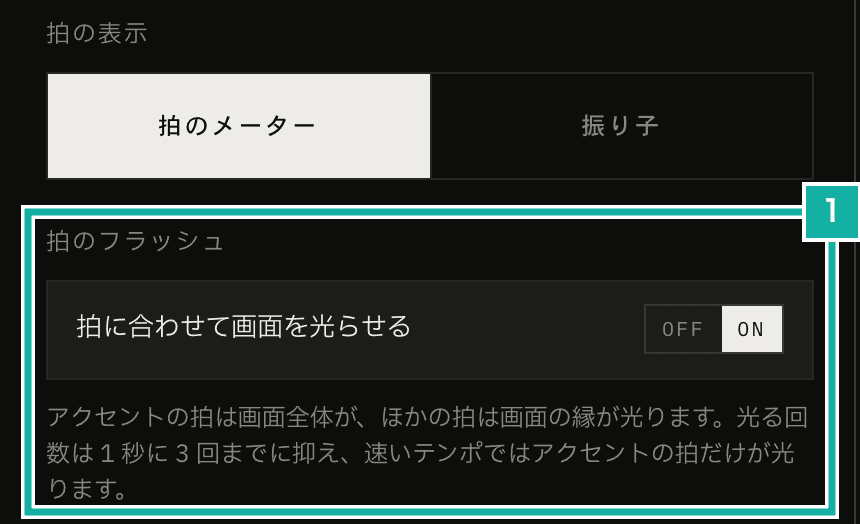
- Beat flash. The description explains how it flashes and that the number of flashes is limited
Combined with full screen, the beat display and BPM stay large while the flash uses the screen right up to its edges.
Telling beats apart by area, not just color
On accented beats the whole screen lights up, and on normal beats a 20px frame appears around the edges. Beats you've muted in the beat settings (beats that play no sound) don't flash.
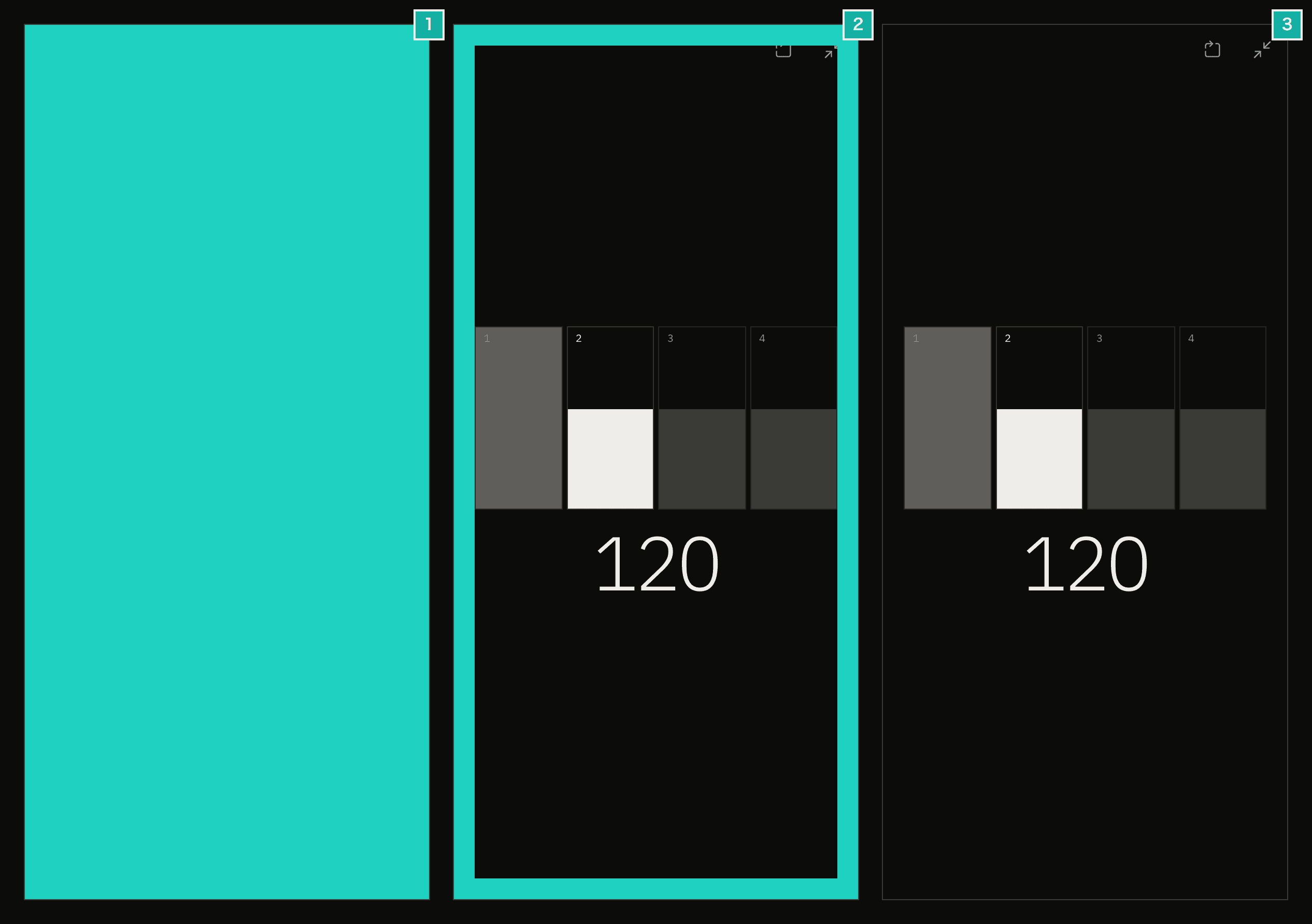
- Accented beat. The whole screen lights up
- Normal beat. Only the edges light up
- Between beats. No flash
If accented and normal beats differed only in color, they would look like the same flash to people who have trouble telling colors apart. So I changed how much of the screen lights up, and its shape. Whether the whole screen or just the edges light up is easy to tell even from a little way off. The flash color is the accent color the user picked for the app, and accented and normal beats both use it.
With a custom beat, a single beat can contain several clicks. Flashing on every click would blink too fast, so it flashes once at the start of each beat, using the accent flash if any sound in the beat is an accent.
No more than three flashes per second
Flashing the whole screen can trigger photosensitive seizures. WCAG 2.3.1 (Three Flashes or Below Threshold) requires that nothing flashes more than three times in any one-second period, or that the flashing stays below the thresholds. One threshold is the area. Take any part of the screen that fits within a 10-degree visual field: flashing exceeds the threshold when it covers more than 25% of that part. An accent flash that fills the whole screen is clearly beyond that, so I chose to meet the count condition.
On a metronome, the gap between beats shrinks as the BPM goes up. At 180 BPM there are three beats per second, at 240 BPM four. So I made sure there are at least 0.35 seconds between flashes.
I didn't use exactly 1/3 of a second because flashes at both ends of a window count as four. Flashes at 0, 1/3, 2/3 and 1 second put four flashes in the window from 0 to 1 second. Widening the gap a little to 0.35 seconds avoids that. In BPM terms, the gap becomes too short above roughly 171 BPM.
When the gap is too short, normal beats stop flashing first and only accented beats flash. The start of each bar is enough to keep your place. If even the accented beats come too close together, any flash less than 0.35 seconds after the previous one is skipped. That happens, for example, at 300 BPM in 1/4, where each bar has only one beat, so every beat is the accented first beat of a bar.
export const MIN_FLASH_GAP_SECONDS = 0.35;

export const planBeatFlash = ({ time, interval, pulses, lastFlashTime }) => {
  // Muted beats (no click) don't flash
  if (pulses.length === 0) return null;
  const accent = pulses.some((pulse) => pulse.accent);
  // When beats are short, only accented beats flash
  if (interval < MIN_FLASH_GAP_SECONDS && !accent) return null;
  // Skip even an accent if it comes too soon after the previous flash
  if (lastFlashTime !== null && time - lastFlashTime < MIN_FLASH_GAP_SECONDS) {
    return null;
  }
  return {
    time,
    level: accent ? 2 : 1,
    durationMs: Math.min(100, (interval * 1000) / 2),
  };
};A unit test feeds in 15 beats at 300 BPM in 1/4 and checks that flashes come every 0.4 seconds (the beats are 0.2 seconds apart, so every other one flashes) and that no one-second window holds more than three.
Each flash usually lasts 100ms (half the beat interval when the beats are closer together than that). This app's visual rules (its design system) say the beat display switches its fill instantly, without fading. The beat flash follows that rule: it just turns on and off, without a soft fade-out.
When Reduce Motion is on
When a device's reduce-motion setting is on (Reduce Motion on iPhone and similar; prefers-reduced-motion: reduce in CSS), the whole screen isn't filled. Accented beats show a 44px frame and normal beats a 20px frame, so the thickness of the frame tells them apart.
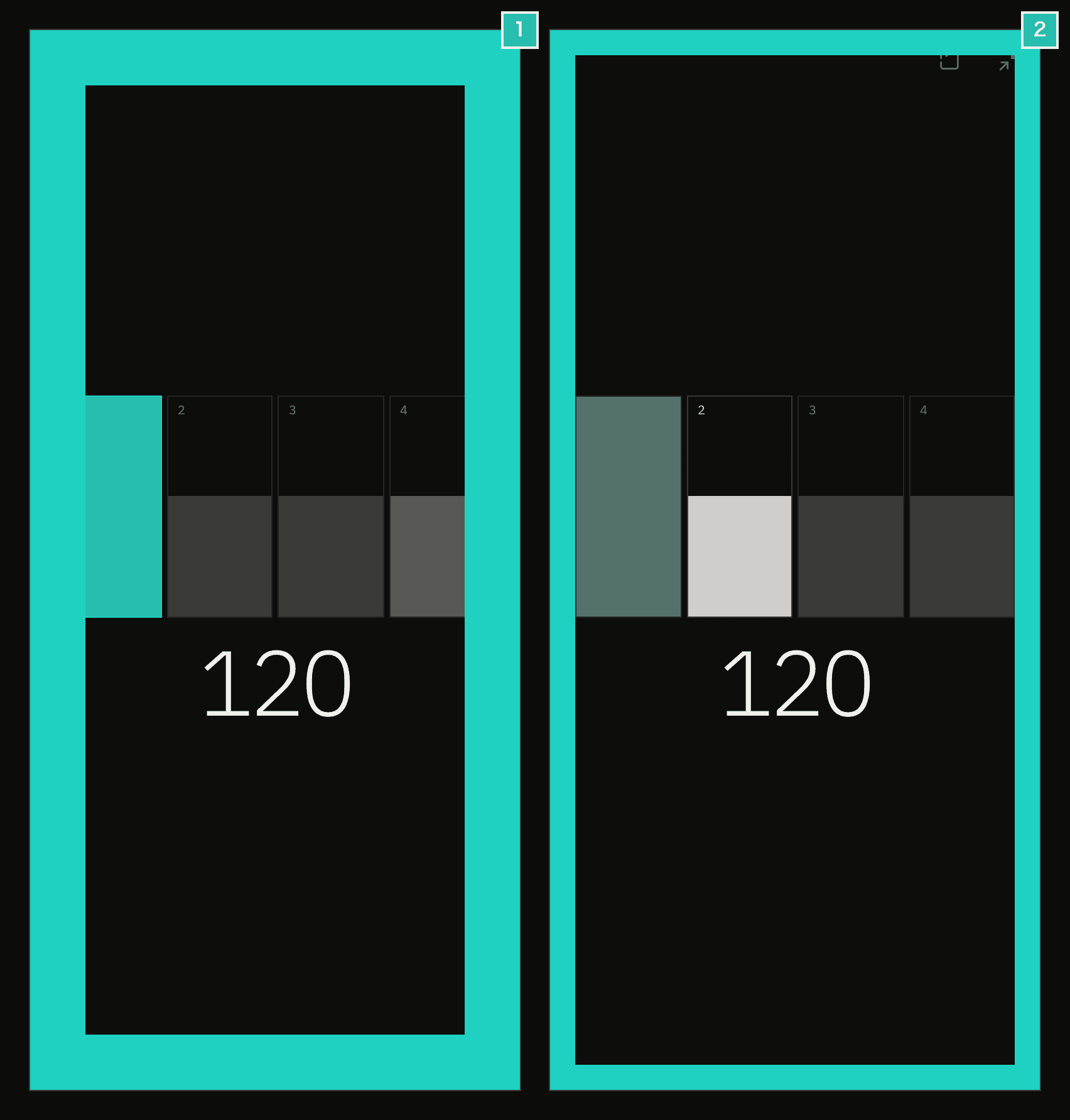
- Accented beat. A thick frame
- Normal beat. A thin frame
As the name says, the reduce-motion setting is about animation, and it doesn't say how flashing should be handled. Still, I figured some people who turn it on find large changes on screen hard to take. So the beat stays visible, but the area that changes is smaller.
Flashing in sync with the sound
This app's sound is generated by an AudioWorklet, which runs on a separate thread from the screen, and it sends a message for each beat (when the clicks in the beat sound, and whether each is an accent). Sound reaches the speaker a little late (outputLatency), so the app works out the time you are hearing right now and waits from there until the beat sounds before flashing. The feature that vibrates the phone on the beat uses the same calculation.
const now = context.currentTime - (context.outputLatency || 0);
const flash = planBeatFlash({
  time: event.time,
  interval: event.interval,
  pulses: event.pulses,
  lastFlashTime: current.lastFlashTime,
});
if (flash) {
  const delayMs = (flash.time - now) * 1000;
  current.lastFlashTime = flash.time;
  setTimeout(() => setLevel(flash.level), delayMs);
  setTimeout(() => setLevel(0), delayMs + flash.durationMs);
}The flash is an element laid over the whole screen that can't be pressed (pointer-events: none), so the buttons underneath still work while it's lit. The flash appears over the metronome screen and full screen, and when a modal such as settings is open, it flashes behind the modal.
The first accent was sometimes missing
The E2E test records every change of the flash element's data-level (0 for off, 1 for normal, 2 for accent) with a MutationObserver. It plays at 120 BPM in 4/4 and checks that the first four flashes are 2, 1, 1, 1 (accent, normal, normal, normal).
await page.addInitScript(() => {
  window.__flashLevels = [];
  const record = () => {
    const level = document
      .querySelector('[data-testid="beat-flash"]')
      ?.getAttribute("data-level");
    if (level && window.__flashLevels.at(-1) !== level) {
      window.__flashLevels.push(level);
    }
  };
  new MutationObserver(record).observe(document, {
    subtree: true,
    childList: true,
    attributes: true,
    attributeFilter: ["data-level"],
  });
});In the first version, to make sure no flash stayed on after stopping, the code that returns the flash level (a React hook) returned 0 (off) whenever the metronome wasn't playing.
return isEnabled && isPlaying ? level : 0;In this E2E test, the first accent flash was missing about one time in three. Right after playback starts, the time of the first beat can arrive before the "playing" state turns true. A flash during that gap never showed, because 0 was returned.
I stopped turning the light off based on whether it was playing, and instead cancel the scheduled flashes and turn the light off when playback stops. After the fix, I ran the same test five times and it passed every time.